4.0 Building and Managing Profiles with YaST
YaST provides an easy way to build profiles and manage Novell® AppArmor. It provides two interfaces: a fully graphical one and a text-based one. The text-based interface consumes less resources and bandwidth, making it a better choice for remote administration or for times when a local graphical environment is inconvenient. Although the interfaces have differing appearances, they offer the same functionality in similar ways. Another alternative is to use AppArmor commands, which can control AppArmor from a terminal window or through remote connections. The command line tools are described in Abschnitt 5.0, Building Profiles from the Command Line.
Start YaST from the main menu and enter your root password when prompted for it. Alternatively, start YaST by opening a terminal window, logging in as root, and entering yast2 for the graphical mode or yast for the text-based mode.
Abbildung 4-1 YaST Controls for AppArmor
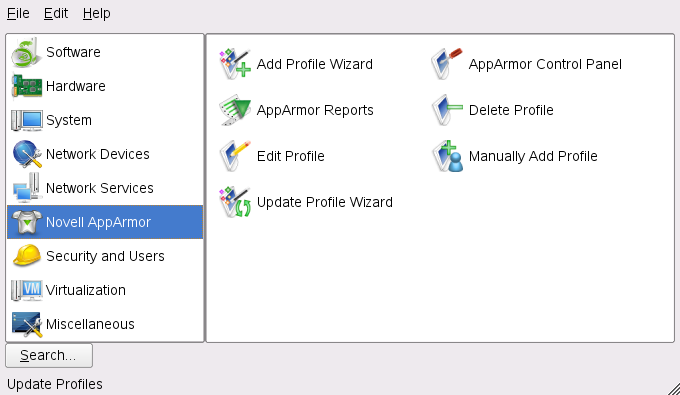
The right frame shows the AppArmor options:
- Add Profile Wizard
-
For detailed steps, refer to Abschnitt 4.1, Adding a Profile Using the Wizard.
- Manually Add Profile
-
Add a Novell AppArmor profile for an application on your system without the help of the wizard. For detailed steps, refer to Abschnitt 4.2, Manually Adding a Profile.
- Edit Profile
-
Edits an existing Novell AppArmor profile on your system. For detailed steps, refer to Abschnitt 4.3, Editing Profiles.
- Delete Profile
-
Deletes an existing Novell AppArmor profile from your system. For detailed steps, refer to Abschnitt 4.4, Deleting a Profile.
- Update Profile Wizard
-
For detailed steps, refer to Abschnitt 4.5, Updating Profiles from Log Entries.
- AppArmor Reports
-
For detailed steps, refer to Abschnitt 7.3, Configuring Reports.
- AppArmor Control Panel
-
For detailed steps, refer to Abschnitt 4.6, Managing Novell AppArmor and Security Event Status.