ReadPropertyValue
Returns the value of a bindery object’s property (For cross-platform functionality, see Developing NLMs with Cross-Platform Functions ( NDK: NLM Development Concepts, Tools, and Functions) and call NWReadPropertyValue )
- Local Servers:blocking
- Remote Servers:blocking
- Classification:3.x, 4.x, 5.x, 6.x
- Service:Server-Based Bindery
Syntax
   #include <\nlm\nit\nwbindry.h>

   int ReadPropertyValue (
      char   *objectName,
      WORD   objectType,
      char   *propertyName,
      int    segmentNumber,
      BYTE   *propertyValue,
      BYTE   *moreSegments,
      BYTE   *propertyFlags);
Parameters
- objectName
- (IN) Specifies the string containing the name of the bindery object (maximum 48 characters, including the NULL terminator).
- objectType
- (IN) Specifies the type of the bindery object (OT_USER, OT_GROUP, OT_PRINT_SERVER, and so on).
- propertyName
- (IN) Specifies the string containing the name of the property (maximum 16 characters, including the NULL terminator).
- segmentNumber
- (IN) Specifies the number of the data to be read: 1 = First segment of the property’s value.
- propertyValue
- (OUT) Receives a buffer containing a segment of the property’s value (128 bytes).
- moreSegments
- (OUT) Receives a flag that indicates if the property value has more data segments after the current segment (0 = no more segments, 255 = more segments follow).
- propertyFlags
- (OUT) Receives the property flags of the property: BF_DYNAMIC or BF_STATIC is logically ORed with BF_ITEM or BF_SET (BF_STATIC | BF_ITEM, and so on).
Return Values
Remarks
This function passes the objectName, objectType, propertyName, and segmentNumber parameters. It returns the value of a bindery object’s property through the propertyValue parameter. The moreSegments parameter returns a flag indicating whether more segments exist, and the propertyFlags parameter returns the property flags of the property.
The objectName, objectType, and propertyName parameters must uniquely identify a bindery object’s property and must not contain wildcard characters. The objectName can be from 1 to 48 characters long, including the NULL terminator. The propertyName can be from 1 to 16 characters long, including the NULL terminator. Only printable characters can be used. Slashes, backslashes, colons, semicolons, commas, asterisks, and question marks are prohibited.
The propertyFlags parameter indicates whether the property is Dynamic or Static and whether the property is of type Set or Item. A Dynamic property is a property that is created and deleted frequently. Dynamic properties are deleted from the bindery when the server is initialized. Static properties remain in the bindery until deleted with DeleteProperty.
The property type indicates the type of data stored in the value of a property. The value of a Set property contains a series of bindery object IDs. Each object ID is 4 bytes long. The value of an Item property contains segments of 128-byte strings.
Bit 1 of the propertyFlags parameter are set as follows:
Figure 6-1 The propertyFlags Parameter
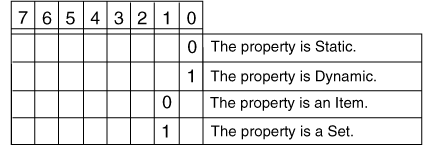
For example, 0x2 indicates that a property is Static and of type Set.
This function is used iteratively to read property values with more than 128 bytes of data. The segment number should be set to 1 to read the first data segment of a property and then incremented for each subsequent call until the moreSegments flag is set to 0 or NO_SUCH_SEGMENT is returned.
The data returned in the propertyValue parameter is an array of bindery object IDs, if the property is of type Set. When reading the value of a property of type Set, a member’s bindery object ID of 0 indicates the end of a segment. When a member is deleted from a set, compaction occurs only within its segment. Therefore, to ensure that all members of a set are read, continue reading segments until the bindery sets the moreSegments flag to 0 or returns a NO_SUCH_SEGMENT error.
The bindery makes no attempt to coordinate activities between multiple entities that might be reading or writing data to a single property. This means that one entity might read a partially updated property and get inconsistent data if the property’s data extends across multiple segments. If this presents a problem, coordination on reads and writes must be handled by application programs. Logical record locks can be used to coordinate activities among applications.
See Also
ReadPropertyValue Example
   #include <stdio.h>
   #include <\nlm\nit\nwbindry.h>

   /*
    *  This example gets the network and node address of a file
    *  server from the NET_ADDRESS property.
    */

   main()
   {
   BYTE netaddr[128], more, flags;

      printf( "return code = %d\r\n",
         ReadPropertyValue( "ROSS", 4, "NET_ADDRESS", 1, netaddr,
         &more, &flags));
      printf(
         "%02X%02X%02X%02X%02X%02X%02X%02X%02X%02Xmore=%x,flags=%x\r\n,
         netaddr[0], netaddr[1], netaddr[2], netaddr[3],
         netaddr[4], netaddr[5], netaddr[6], netaddr[7], netaddr[8],
         netaddr[9], more, flags );
   }