2.2 Types of Information Stored in eDirectory
The information stored in eDirectory can be read as well as modified by users who have been granted the applicable access rights.
The information stored in eDirectory is a collection of objects with associated attributes (also called properties) which can have values assigned them. The following figure shows an object called Computer with some associated attributes (such as Operator, Status).
Figure 2-3 An Object as a Set of Attributes
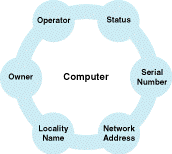
The objects in eDirectory and their names correspond to things that humans relate to when dealing with computers, networks and information. Objects such as countries, organizations, people, computers, and so on are types of objects you might find in eDirectory. Specific objects might be such objects as US, Novell, Fred, FS1, or Print Server. The objects are intended to fit into a human being’s conception of things, not necessarily a computer’s.
Informally, much of the attribute information found in eDirectory falls into one of four categories: Names, Addresses, Membership Lists, and Descriptions. Although these categories are not formally denoted in eDirectory, they are helpful in understanding typical kinds of information that users and developers can find in eDirectory.
Lists Stored in eDirectory. eDirectory can be used to store and manage lists of objects. A list is associated directly with a specific object. Typically these lists contain names of other objects in eDirectory. These lists might be used for distribution or authorization purposes. For example, a distribution list can be used to determine who should receive electronic mail messages or who is qualified to perform a specific function. A list name identifies it as a property of an object. The list itself is the value of the property.
If desired, members in the list can be granted the privilege of adding or deleting themselves from the list. This privilege can be used to make a list self-moderating. Members of the list can decide for themselves whether or not they want to be on the list and receive the related information.
For authorization purposes, a membership list might be used to define the objects that have access to a resource. For example, a server can have a list of operators who are authorized to maintain it. Or, a queue object can have a list of users authorized to place entries in the queue. eDirectory provides several standard lists for specific objects, such as users and servers. Applications can also define lists for their own special needs.
Descriptions Stored in eDirectory. eDirectory can be used to store object descriptions. A Description property can be used to associate a descriptive string with an eDirectory object. The string can contain any information that describes the object. There are various properties that provide specific kinds of descriptive information, such as the serial number of a device or the fonts supported by a printer.
Addresses Stored in eDirectory. Like a published directory, eDirectory provides additional identifying or qualifying information about an object. Some examples are postal addresses, electronic mail addresses, telephone numbers, physical locations, and network addresses.
You might need to change the location information from time to time. Such changes to an object are synchronized throughout eDirectory. By specifying an object by name, a user can reliably locate the object despite alterations in the object’s physical location or changes to the physical layout of the network.
Names Stored in eDirectory. The most significant piece of information associated with an object is its name, which identifies the object within the context of eDirectory. Names are intended for humans; that is, they are character strings that humans can read and remember. The name of an object is a property of the object.
Names are used as keys to the information stored in eDirectory. A person using eDirectory can supply the name of an object and receive information that describes the object. Or, a user can supply a description and receive a list of names of objects that fit that description. By employing natural naming conventions, eDirectory makes it easy for people using eDirectory to obtain less intuitive kinds of information.