4.6 NWFieldDescription Object
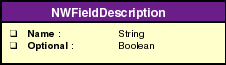
Represents a field in a layout. Every field attached to a layout is abstracted as an NWFieldDescription object. The object defines if a field is mandatory or optional in a layout, its VB data type, and other attributes.
Use this object to
-
Return the name of the layout field.
-
Identify if the field is optional.
4.6.1 Object Diagram
4.6.2 Name property
Gives the field name.
Syntax
object.Name
Type
String.
Attributes
Read-only.
Example
This example lists the details of all the fields of a Layout.
Set nwdir=CreateObject("UCX:NWDIR")
nwdir.Login ("username", "password")
Set Layouts = nwdir.Layouts()
’Display all the fields of user layout
Set userLayout = Layouts.Item ("User")
Set userFields = userlayout.Fields
Print "Total number of Fields in the User Layout:
"&UserFields.Count
UserFields.Reset()
While UserFields.HasMoreElements()
    Set UserField = UserFields.Next()
    Print UserField.Name
    Print UserField.Optional
Wend
4.6.3 Optional property
Returns or sets (for a new field) whether this field is optional within an entry of the corresponding layout.
Syntax
object.Optional
Type
Boolean.
Attributes
Read-only.
Remarks
TRUE, if the field is an optional field. Otherwise it is a mandatory field. The values of the mandatory fields should be set while creating the object. Otherwise object creation fails.
Example
This example lists the details of all the fields of a Layout.
Set nwdir=CreateObject("UCX:NWDIR")
nwdir.Login ("user", "password")
Set Layouts = nwdir.Layouts()
’Display all the fields of user layout
Set userLayout = Layouts.Item ("User")
Set userFields = userlayout.Fields()
Print "Total number of Fields in the User Layout:
"&UserFields.Count
UserFields.Reset()
While UserFields.HasMoreElements()
    Set UserField = UserFields.Next()
    Print UserField.Name
    If (UserField.Optional) Then
       print "The field is optional"
    Else
       Print "The field is mandatory"
    End if
Wend