6.2 Upgrade Process in 8.8 SP8
The ndsconfig upgrade command is used to upgrade the necessary configuration of the individual components such as HTTP, LDAP, SNMP, SAS, and NMAS. eDirectory database is upgraded to a new format if eDirectory versions prior to eDirectory 8.8 SP1 are upgraded to eDirectory 8.8 SP8.
The appropriate upgrade utility is called after the packages are upgraded to eDirectory 8.8 SP8.
A new offline database upgrade utility is available with eDirectory 8.8 SP1 onwards.
NOTE:In case the administrator wants to run the utility and find out the status of the upgrade, this database upgrade tool can be used with a copy of the database or with -d option
|
Linux |
Windows |
|---|---|
|
ndsupg |
ndsupg.exe |
Figure 6-1 ndsupg Help Screen
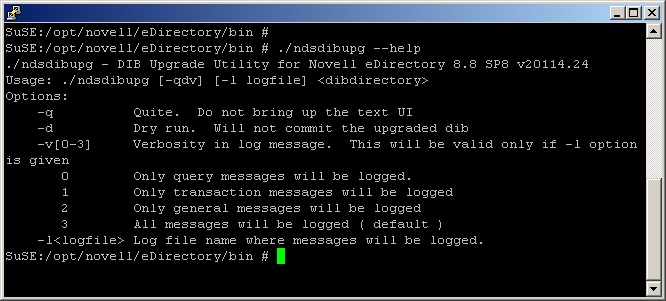
The following table discusses the ndsupg options.
Table 6-1 ndsupg Options
|
Option |
Description |
|---|---|
|
-q |
Quiet mode. There will not be any messages in quiet mode. Messages will be logged to log file (if provided) even in -q mode. It is recommended that you always provide a log file name for troubleshooting purpose. |
|
-d |
Dry run. Upgrade will be performed on a copy of the actual database. IMPORTANT:ds.nlm should be unloaded before loading dsup.nlm. This option can be used if the administrator wants to know if the upgrade is going to be successful and also to estimate the time required to upgrade the database. It is recommended to take a copy of the DIB. NOTE:eDirectory service should be unloaded or stopped before taking a copy of the database. ndsupg utility can be run on the copied database to estimate the downtime required for the actual upgrade. During this time, eDirectory service can be loaded or restarted. |
|
-v |
Verbosity of the messages. The default value is 3 where all messages are logged. It is recommended to always leave the verbosity level to its default value. |
|
-l |
Provide a log file name where messages are logged during upgrade. The log file will indicate the time the upgrade started and the end time. Given below is a snapshot of log file. 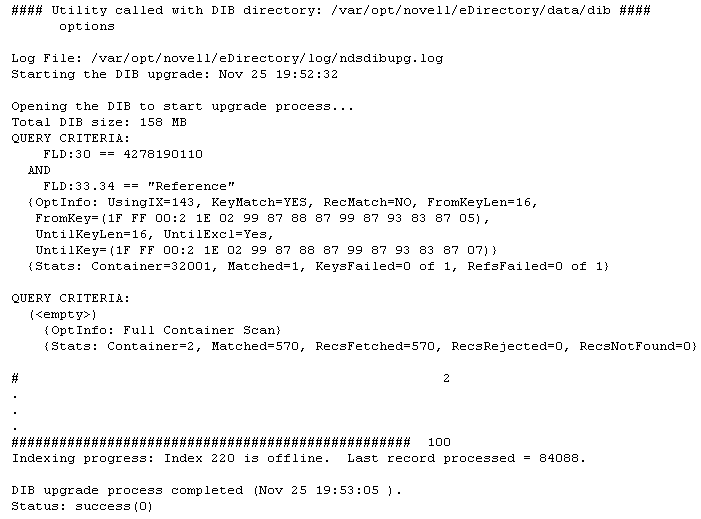
|
Using the Force Option to Upgrade eDirectory From Older Versions on Linux
eDirectory 8.8 SP8 only supports upgrades from version 8.8.2 or later on Linux.
To upgrade from eDirectory versions 8.7.3 through 8.8.1, perform any one of the following steps:
-
First, upgrade to eDirectory 8.8.7 and then upgrade to eDirectory 8.8.8.
or
-
Upgrade directly by using the force switch -f command.
With this option, some of the checks such as the health check and disk space check for DIB upgrade will not occur. Additionally, older RPMs are removed and new RPMs are installed.