Designating a Service Account Administrator on Exchange 5.5
The Migration Utility needs full access to your Exchange system. Therefore, the user who runs the Migration Utility must be set up as a Service Account Administrator in your Exchange system.
-
In Exchange Administrator, select an Exchange Domain object, then click File > Properties.
-
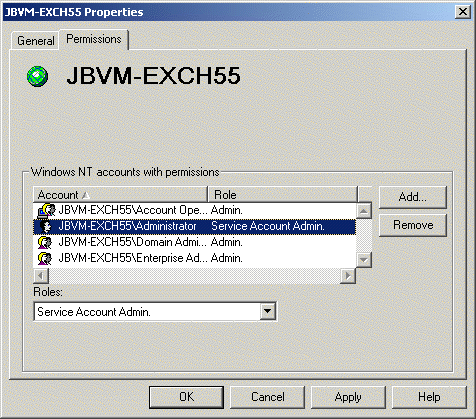
On the Permissions tab, select the user account that you plan to log in as when you run the Migration Utility.
IMPORTANT: If you plan to run the Migration Utility from a server or workstation other than the server where Exchange is installed, that server or workstation must have a username and password identical to the one you select on the Permissions tab. Otherwise, you cannot access the Exchange server with the necessary rights.
-
In the Roles field, select Service Account Administrator.
-
Click OK to grant the rights to the selected user.
-
Restart the Information Store service.