Checking for the Outlook Collaboration Data Objects Module
Some versions of Outlook install the Collaboration Data Objects (CDO) module by default and some do not. The Migration Utility requires that the CDO be installed on the computer where it runs.
-
In the Windows Control Panel, double-click Add/Remove Programs.
-
Select the Microsoft Office entry, then click Change.
-
Click Next, then expand the Microsoft Outlook for Windows entry.
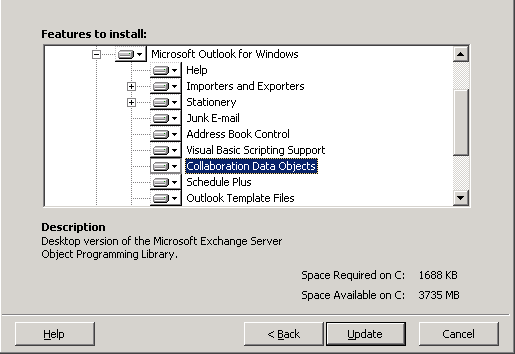
If a red X appears beside the Collaboration Data Objects item in the list, then the CDO has not been installed.
-
If necessary, select Run from My Computer in the drop-down list for Select Collaboration Data Objects, then click Update to install the CDO component.