

| |
This section assumes you are using a Windows 95/98 or NT 4 workstation. If you are using another type of workstation, use the following steps as general guidelines to configure your terminal emulation software to work with the appliance.
IMPORTANT: The appliance null-modem connection supports only the ANSI terminal type.
To establish a null-modem connection with the appliance:
Connect a null-modem cable to the serial port on the workstation and the appliance.
Click Start > run hypertrm.exe.
Figure 101
Connection Description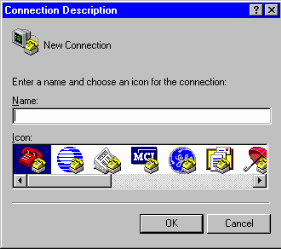
Enter a name for the connection > select an icon as instructed > click OK.
Figure 102
Direct to Com Option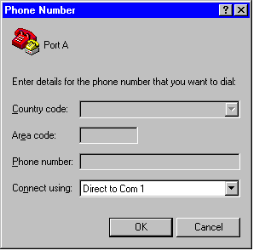
Click the Connect Using drop-down list > select a Direct to Com option corresponding to the serial port connection on your workstation > click OK.
Figure 103
Com Properties Dialog Box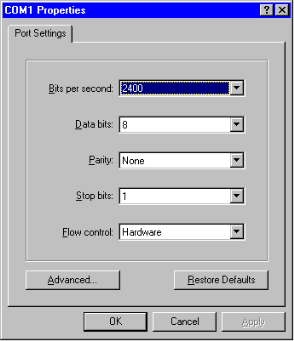
Set the properties according to the following table > click OK.
| Property | Value |
|---|---|
Bits per second |
9600 |
Data bits |
8 |
Parity |
None |
Stop bits |
1 |
Flow control |
None |
Click File > Properties > Settings.
A dialog box similar to the following appears:
Figure 104
Properties Dialog Box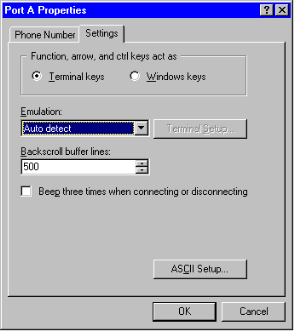
Click Terminal Keys.
Click the Emulation drop-down list > select ANSI.
(Optional) Specify cursor behavior by clicking Terminal Setup.
Click ASCII Setup > ensure that only Wrap Lines That Exceed Terminal Width is checked.
Click OK > OK.
Press Enter.
A command line prompt appears in Hyper Terminal.
You can now use all console commands to manage the appliance.
If the appliance has a monitor attached, you will notice that commands issued through a null-modem connection are not echoed on the appliance monitor.
The following commands are available when using a null-modem connection:
When accessing the appliance through a null-modem connection, arrow keys function in the following ways:
| |