10.7 Using Status Logs
In addition to the functionality provided by Novell Audit, Identity Manager logs a specified number of events on the Driver Set object and Driver object. These status logs provide a view of recent Identity Manager activity. After the log reaches the set size, the oldest half of the log is permanently removed to clear room for more recent events. Therefore, any events you want to track over time should be logged to Novell Audit or the Report and Notification Service.
10.7.1 Setting the Maximum Log Size
Status logs can be configured to hold between 50 and 500 events. This setting can be configured on the Driver Set object to be inherited by all drivers in the set, or configured for each driver in the set. The maximum log size operates independently of the events you have selected to log, so you can configure the events you want to log on the Driver Set, then specify a different log size for each driver in the set.
Setting the Log Size on the Driver Set
-
In iManager, select , then click .
-
Browse to and select the Driver Set object, then click .
-
Click the Driver Set name. The Modify Object window appears.
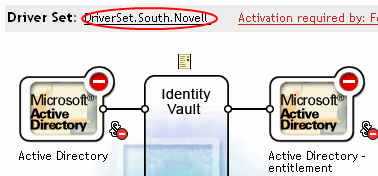
-
Select on the tab.
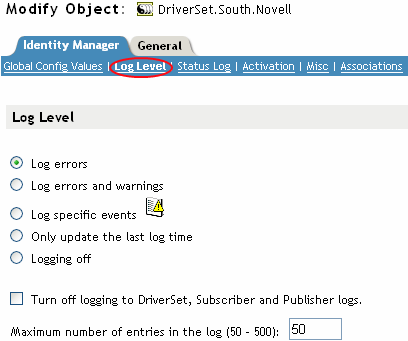
-
Specify the maximum log size in the field:

-
After you have specified the maximum number, click .
Setting the Log Size on the Driver
-
In iManager select , then click .
-
Browse to and select the Driver Set object, then click .
-
Click the upper right corner of the driver icon, then select .
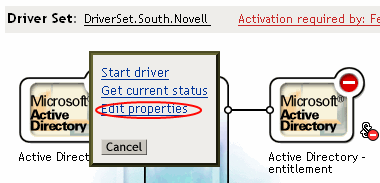
-
Select on the tab.
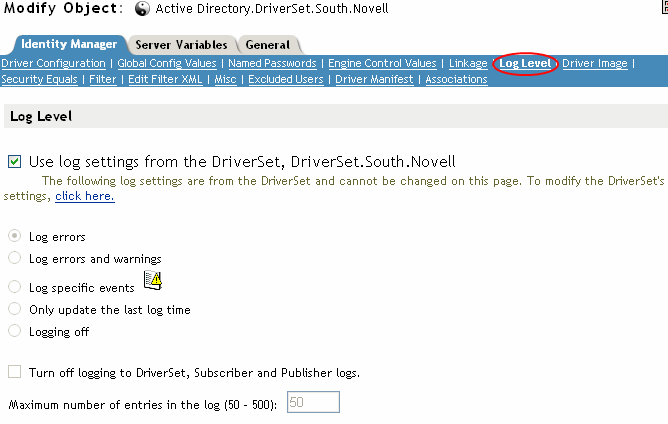
-
Specify the maximum log size in the field:
-
After you have specified the maximum number, click .
10.7.2 Viewing Status Logs
Status log entries are represented in iManager with a status log icon
 . Anywhere you see this icon in iManager, you can view a short-term log. The following status logs are available:
-
On the driver set.
-
On the Publisher channel for each driver in the set.
-
On the Subscriber channel for each driver in the set.
The status logs for the Publisher and Subscriber channels report channel-specific messages generated by the driver, such as an operation veto for an unassociated object.
The status log for the driver set contains only messages generated by the engine, such as state changes for any drivers in the driver set. All engine messages are logged.