1.1 Types of Roles Supported
The Identity Manager user application encompasses a broad set of identity-management capabilities. Not every user will need to use (nor be able to see) every type of capability; the capability will depend on the person’s role.
Users are assumed to fall into one or more of the following categories, each served by different tools and features. (The following vocabulary will be used throughout this documentation.)
1.1.1 LDAP administrator
The LDAP administrator is the person who has maximum configuration and system-administration rights with respect to the identity vault (eDirectory 8.7.x or 8.8). This is a logical role that may be shared also by the User Application Administrator (below), which is the person or entity with system rights to the application server (JBoss), the database (for example, MySQL), and/or the portal-based Web UI itself.
The LDAP administrator can choose from two kinds of tools to accomplish his job: The Eclipse-based Designer for Identity Manager infrequent (possibly one-time) tasks, and iManager tools for daily administration tasks.
Infrequent tasks that you would typically do in Designer Designer for Identity Manager include:
-
Configuring the abstraction layer definitions, attributes, and relationships that can be used in the Identity Manager user application. (See the chapter on Section 4.0, Configuring the Directory Abstraction Layer for more information.)
-
Validating directory abstraction layer definitions. (See the chapter on Section 4.0, Configuring the Directory Abstraction Layer.)
-
Making changes to User Application Driver settings. (See the chapter on Section 3.0, Configuring the User Application Driver.)
-
Localizing the display text for entity and attribute display labels; org chart relationship names; and global and local list items. (See the chapter on Section 4.0, Configuring the Directory Abstraction Layer.)
-
Import or export the User Application Driver and its settings.
-
Other kinds of offline tasks.
Everyday tasks in which the administrator (whether it’s the LDAP administrator or the User Application Administrator, described below) is typically operating on a live system are done in iManager. Such tasks might include:
-
Managing e-mail templates.
-
Defining or designating provisioned resources and provisioning request definitions.
-
Enabling or disabling a workflow definition, thereby making it active or not.
-
Terminating an in-process workflow.
-
Running reports on Novell Audit logging data.
Some of these tasks (the workflow-related ones) apply only when the Provisioning Module has been installed. Also, many of them might be done by the User Application Administrator (below) rather than the LDAP administrator.
1.1.2 User Application Administrator
The User Application Administrator performs tasks associated with administering the Web application (the browsing-based application running on JBoss). Access to the administration tools for this role occurs via the Administration tab of the Identity Manager user interface.
Actions that you might carry out in the user application include:
-
Configuring various application settings, such as those that tell the user application how to connect to the identity vault (LDAP provider). For details, see Section 10.0, Portal Configuration.
-
Determining the pages displayed in the Identity Manager user interface and who has permission to access them. (See Section 7.0, Page Administration.)
-
Determining the portlets available in the Identity Manager user interface and who has permission to access them. (See Section 9.0, Portlet Administration.)
-
Determining the look and feel of the Identity Manager user interface. (See Section 8.0, Theme Configuration.)
-
Controlling the levels of logging messages you want the Identity Manager user application to generate and which of those messages (if any) are sent to Novell Audit. (See Section 12.0, Logging Configuration.)
-
Managing various caches maintained by the Identity Manager user application. (See Section 13.0, Caching Configuration.)
-
Exporting or importing Web content (pages and portlets) used in the Identity Manager user application. (See Section 14.0, Tools for Exporting and Importing Portal Data.)
-
Setting up proxy rights for particular individuals.
-
Many other tasks related to the user interface that the end user sees.
Tasks that you would perform in iManager include:
-
Managing e-mail templates.
-
Defining or designating provisioned resources and provisioning request definitions.
-
Enabling or disabling a workflow definition, thereby making it active or not.
-
Terminating an in-process workflow.
-
Running reports on Novell Audit logging data.
Some of these tasks (the workflow-related ones) apply only when the Provisioning Module has been installed.
1.1.3 End User
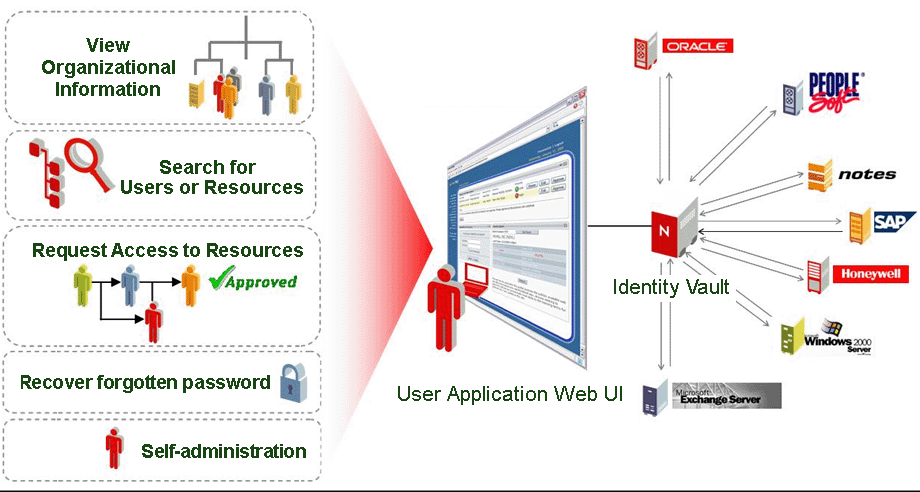
The end user is the person who views and interacts with the various portlets and Web pages that together comprise the user application’s user interface. In this context, end user is intended to mean an employee, a manager, or a proxy or delegate for an employee or manager.
The end user has a potentially vast array of capabilities, depending on how many features are enabled by the administrator. At a minimum, end users will be able to use the Identity Manager user application to:
-
View hierarchical relationships between User objects using the Org Chart portlet.
-
View and edit user information (with appropriate rights).
-
Search for users or resources using advanced search criteria (which can be saved for later reuse).
-
Recover forgotten passwords.
-
Send e-mail to team members (individually or en masse).
In addition, with the Provisioning Module installed, the user application’s Web interface allows users to:
-
Request a resource (start one of potentially many predefined workflows).
-
View the status of previous requests.
-
Claim tasks and view tasklists (by resource, recipient, or other characteristics).
-
View proxy assignments.
-
View delegate assignments.
-
Specify one’s (un)availability.
-
Enter proxy mode in order to claim tasks on behalf of another.
-
View team tasks, request team resources, and so forth (managers only).
1.1.4 Delegate user
A delegate user or delegate is an end user to whom one or more specific tasks (appropriate to that user’s rights) can be delegated, so that the delegates can work on those specific tasks on behalf of another. For example, John is going on vacation and wants Mary to handle his tasks while he is away. Assuming Mary has rights appropriate to the task (or tasks) John is delegating, Mary can become John’s delegates. When John marks himself unavailable in the user application, any tasks that would normally show up in John’s task list will show up in Mary’s task list instead. Mary thus acts in the role of delegate user. She can claim a task of John’s as fully hers (it is no longer John’s). Contrast this with the definition of a proxy user, below.
Notice that delegation occurs on a task-by-task basis. It is not necessarily an all-or-nothing transfer of responsibility (although in actual fact, the user interface does allow for a global delegation of all of a user’s tasks to a particular delegate, if that’s what’s called for). A given user may designate more than one delegate. Each delegate can take responsibility only for the task(s) he or she has been given. (For example, John may want Mary to handle any incoming new business card request tasks, but he may want Bill to handle new Siebel account requests.) The transfer of responsibility—the reassignment of new tasks—happens automatically when the original owner of the task declares himself (or herself) unavailable for a particular kind of task. (The declarer can optionally specify an expiration period for the delegation, again on a per-task basis.) This transfer is logged for compliance reasons.
A detailed description of the user interface features for delegate users can be found in Chapter 1 of the Identity Manager User Application: User’s Guide. See also Section 21.3, Provisioning security in this guide.
1.1.5 Proxy user
A proxy user is an end user who acts in the role of another user by temporarily assuming that user’s identity. All of the rights of the original user apply to the proxy. Work owned by the original user continues to be owned by that user. For example, while John is on a trip to China he wants his administrative assistant, Clive, to be able to access and act on all of his (John’s) tasks. John, if he has appropriate rights, can designate Clive as his proxy. (If he does not have appropriate rights, the User Application Administrator will set this up.) Once the proxy relationship is established, Clive can act in two roles: the role of Clive, or the role of John. In the John role, he can do anything John can do. When work items are accomplished by Clive, it is as if John did them himself.
Notice that, in contrast to the delegation mechanism described in the previous section, a proxy relationship gives the proxy user total visibility into (and the power to act on) the original user’s tasks and settings. Also, any attributes or relationships or system settings that John has access to will be accessible by his proxy, for the duration of the proxy’s role.
Another distinction between a delegate and a proxy is that whereas a user might delegate some tasks to one delegate and another category of task to another delegate, a proxy always gets all of the tasks of the original user. In other words, when you name someone as your proxy, you can be assured that all of your tasks can be seen and worked by that one individual. It is as if that individual becomes you.
Note that proxy actions undertaken on behalf of another user are logged to Novell Audit as such (for demonstrating compliance).
Additional information on proxy scenarios can be found in Configuring
Your Provisioning Settings
of the Identity
Manager User Application: User’s Guide.