4.4 Re-Branding the Login Dialog

You can change the image that is used in the login dialog that users see before they log in to the Teaming site.

Following is the default login dialog:
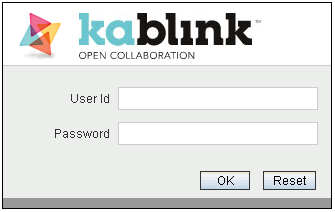
To re-brand the login dialog to contain a custom image:

  1. Navigate to each of the following three directories for your operating system:

    Linux:

    /opt/novell/teaming/apache-tomcat/
                               webapps/ssf/i/iccg/pics/Login
    
    /opt/novell/teaming/apache-tomcat/
                               webapps/ssf/i/icib/pics/Login
    
    /opt/novell/teaming/apache-tomcat/
                               webapps/ssf/i/icwg/pics/Login
    

    Windows:

    c:\Program Files\Novell\Teaming\apache-tomcat\
                               webapps\ssf\i\iccg\pics\Login
    
    c:\Program Files\Novell\Teaming\apache-tomcat\
                               webapps\ssf\i\icib\pics\Login
    
    c:\Program Files\Novell\Teaming\apache-tomcat\
                               webapps\ssf\i\icwg\pics\Login
    
  2. Replace the kablink_graphic.png file in each of the directories with the file that contains the image that you want to display in the login dialog.

  3. Stop and restart the Teaming server.