Each time a user attempts to access a network resource, the system calculates that user's effective rights to the target resource.
To calculate a user's effective rights, the system uses the following process:
NOTE: This is the logical process, not the exact implementation.
Check the Object Trustees (ACL) property of the [Root] object for entries that list the trustee. If any are found and they are inheritable, use the rights specified in those entries as the initial set of effective rights for the trustee.
Check the ACL at this level for Inherited Rights Filters (IRFs) that match with the right types (object, all properties, or a specific property) of the trustee's effective rights. If any are found, remove from the trustee's effective rights any rights that are blocked by those IRFs.
For example, if the trustee's effective rights so far include an assignment of Write all properties but an IRF at this level blocks Write all properties, the system removes Write all properties from the trustee's effective rights.
Check the ACL at this level for entries that list the trustee. If any are found and they are inheritable, copy the rights from those entries to the trustee's effective rights, overriding as needed.
For example, if the trustee's effective rights so far include the Create and Delete object rights but no property rights, and if the ACL at this level contains both an assignment of zero object rights and an assignment of Write all properties for this trustee, then the system replaces the trustee's existing object rights (Create and Delete) with zero rights and adds the new all property rights.
Use the same process as in Step d above. The resulting set of rights constitutes the effective rights for this trustee.
The resulting set of rights constitutes the user's effective rights to the target resource.
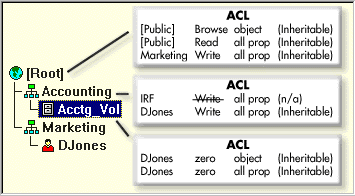
In the tree shown below, user DJones is attempting to access volume Acctg_Vol.
Here's how NDS calculates DJones' effective rights to Acctg_Vol:
This assumes that DJones doesn't belong to any groups or roles and has not been explicitly assigned any security equivalences.
The assignment of zero all property rights at Acctg_Vol overrides the assignment of Write all properties at Accounting.
The assignment of Write all properties at the root of the tree is filtered out by the IRF at Accounting.
No rights are assigned for [Root] anywhere in the pertinent branch of the tree.
These rights are assigned at the root and aren't filtered or overridden anywhere in the pertinent branch of the tree.
DJones: Browse object, Read all properties
DJones: Browse object, Read and Compare all properties
Because of the way that effective rights are calculated, it is not always obvious how to block particular rights from being effective for specific users without resorting to an IRF. (An IRF blocks rights for all users.)
To block particular rights from being effective for a user without using an IRF, do either of the following: