A.2 Configuring the Linux Access Gateway to Load the Red Hat Boot Loader
-
Start the machine in RHEL.
-
Enter the following command:
/sbin/grub-install /dev/<hardisk>
For example, /sbin/grub-install /dev/sda
-
Edit /boot/grub/menu.lst and comment out the following line to display the boot options for Red Hat as well as the Linux Access Gateway in the Red Hat boot loader:
#hiddenmenu
-
To copy boot entries for Linux Access Gateway to the Red Hat machine, create a directory as follows:
mkdir <Directory Name>
For example, mkdir lagboot
-
Enter the following command to mount the / partition or the boot partition of RHEL:
mount /dev/<partition> <directory>
Replace <partition> with the / or boot partition of Linux Access Gateway that you want to mount and <directory> with the newly created directory. For example, mount /dev/sda5 lagboot
-
To get multiple boot options in the Linux Access Gateway, use a file editor such as vi to copy the lines similar to the line shown below from the Linux Access Gateway boot loader lagboot/boot/grub/menu.lst to the end of the Red Hat boot loader /boot/grub/grub.conf file.
title Linux
    kernel (hd0,4)/boot/vmlinuz root=/dev/sda5 vga=0x32b selinux=0 splash=silent resume=/dev/sda2 elevator=cfq showopts
    initrd (hd0,4)/boot/initrd
This ensures that the system provides options to boot in the Linux Access Gateway as well as RHEL. If none of the options are selected, the system boots in RHEL by default.
-
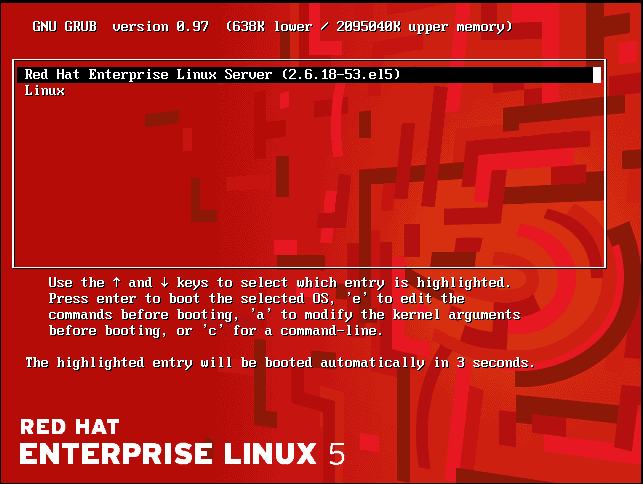
Restart the machine. The Red Hat boot loader image displays options to boot in Red Hat as well as Linux Access Gateway.