21.2 Adding An SSL VPN Server to a Cluster
After you create a cluster and identify the primary member, you can add other SSL VPN servers to the cluster. You can add more than one SSL VPN server to the SSL VPN cluster.
-
In the Administration Console, click > .
-
On the Servers page, select the server, then click .
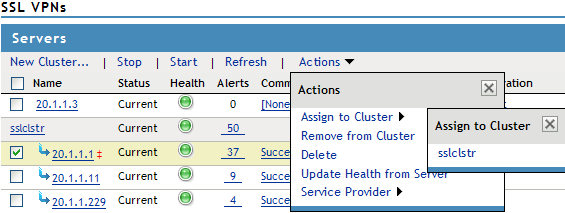
To select all the servers in the list, select the top-level Server check box.
-
Select the name of the cluster that you want to add the SSL VPN server to.
The health status of the SSL VPN server turns green, if the server is already configured and the trust relationship is established with the Identity Servers. Otherwise, the health status is displayed as yellow. It might take several seconds for the SSL VPN server to start and for the system to display the health icon.