6.9 Mailbox Mapping Options
Mailbox mapping automates the merging of users’ login names that have both GroupWise and Exchange accounts, combining the GroupWise and Exchange archives under the same user in Retain. Retain connects the internal GUID’s of accounts to reflect the same user. After mailbox mapping has been activated, an immediate caching of the address books of both systems is required. Mailbox mapping is not permanent; however, splitting must be performed manually via the Mailbox Merger / Splitter tool found on the ‘About’ screen. If a refresh of the mailboxes is not performed before users attempt to login or other activity is present on the server, the merge may fail, leaving extra entities created in the Retain archive which must be removed manually. Furthermore, the merge option is a once-off option. Please contact support for further options.
To map one mail system to another, both message systems, Exchange and GroupWise, must be functioning and have the desired accounts created on the system which allows for identification of the different users.
Go to Module Configuration and click the Mailbox Mapping Options button to reveal the tool.
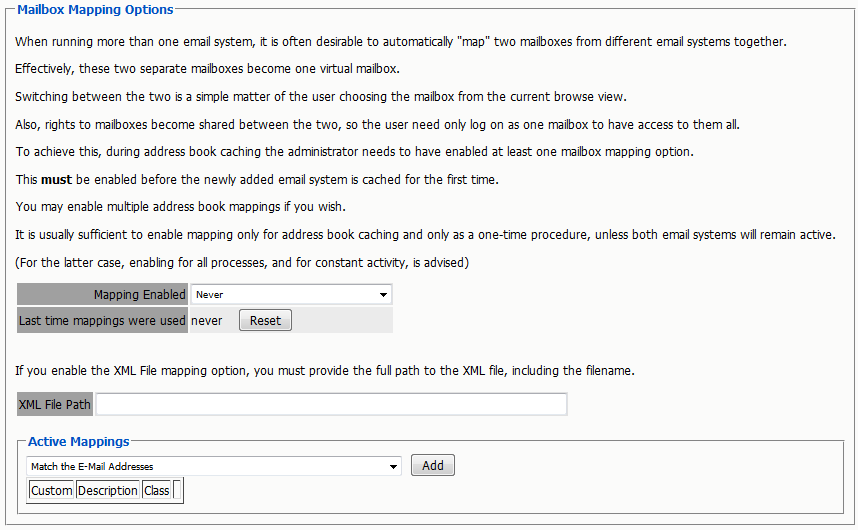
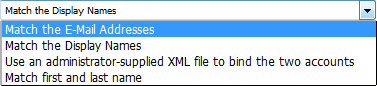
Accounts may be matched via email address, display names, or specified by an administrator supplied XML file.

Most organizations maintain a naming scheme from one system to the next which results in the email address being the same in both systems. For this situation, the email address match is the easiest and quickest way to map the users. For systems, which have listed the first and last name of each user, but have different email addresses, the name matching is the best option. The final option is for an administrator provided xml file to bind the accounts together is time consuming and requires the administrator to build a list of matching addresses with UUID’s in both systems.
Any mis-mapped addresses may be corrected by using the Mailbox Merger/splitter utility found on the ‘About’ page. see the ‘About and Diagnostics Page’ section for more information. A sample XML file is provided and can be download from the ‘Mailbox Merger/Splitter’ utility page, it is also shown below.
The Address book MUST be refreshed immediately in order to merge the users. The merge will not complete unless the Address Book is cached afterwards, and the merge cannot be re-run.
How the merge runs depends on the different users in the local system. If both message systems are to remain active, with users being added and removed from the system, it will be necessary to have mailbox mapping on all the time. Merged addresses are also required for the GroupWise to Exchange migration to function.