6.16 Reload Integration

Micro Focus Reload and Micro Focus Retain perform very different functions. Retain is an archiving product whose main feature is the storage of data in one place for later search and retrieval. Reload is a Hot Backup, Quick Restore and Push-Button Disaster Recovery product whose main feature is the storage of instances of GroupWise post offices for the purposes of restoring items to their original location in their original form or providing disaster recovery of domains or post offices.

So, why would you want to integrate Reload and Retain?

  • Reload is very good at moving data efficiently from point A to point B.

    • It copies your post office data in its original form.

    • It can make what is effectively a full backup by moving and storing as little as 12% of the total amount of data in the post office.

    • By having the backed up data available in its original form, it can serve as a data source for Retain.

    • Reload’s backups are available the moment the backup job is complete.

  • Retain moves a lot of data and needs strong network links to do so rapidly.

    • An archiving job moving “everything” will move all of the data. This may seem self evident but when you combine Reload with Retain, you can achieve the same thing by moving only 12% of the data.

    • If you don’t integrate them, you will pull data twice over the link – once for Reload, and once for Retain. On top of that, if you don’t have Reload and you only have Retain, you will definitely have to move your data twice.

    • By integrating Reload and Retain, you can centralize your archives and ensure good backups and achieve a single data pull.

6.16.1 A Brief Review on How Reload Works

No Helper Software Needed.

Reload runs on a Linux server. It does not use agents or helper software on the source post offices to work. In other words, no agents or TSA’s are required. Reload simply connects to the server where a post office or domain is stored and then copies the data to its backup storage location.

Backups are instantly available.

Because the data is copied in its original format, the data becomes available as soon as a backup job is complete by simply running a post office agent (POA) against it (for post office backups) or a message transfer agent (MTA) (for domain backups).

Backups Have Little or no Impact on Users.

Because Reload does not use the Post Office Agent to make backups, there is very little impact on users. The POA will continue to run and service users as normal. Reload also does not use TSA software or helper agents on the live post office server. Backups can be made while the users are logged in and working.

Reload Leverages GroupWise’s Architecture to Save Bandwidth.

A GroupWise post office is composed of databases and overflow files. Databases contain users’ mailbox layouts and indexes and other databases contain users’ authentication information. For any GroupWise item exceeding 2KB in size, such as e-mail with attachments, overflow files are stored, commonly called BLOBs (Binary Large Object).

While the contents of the databases changes almost constantly, the BLOBS are static. Therefore, in a Standard Backup, Reload grabs the databases in their entirety but only those BLOBS that have been newly created since the last backup.

Generally, the BLOBs take up almost 90% of the space occupied by the whole post office. Therefore, with a standard backup, Reload can get away with copying only 12% of the data – the databases and only those BLOBs which have recently been added. For those BLOBs that have been backed up in prior backup instances, Reload links to a master backup directory, taken the first time a backup was run, using a Linux feature called symbolic links. A symbolic link is like a Windows shortcut except that it looks, feels, and acts like the real thing.

This is how Reload can achieve VERY fast backups. In addition, using Reload to move data will save tremendously on network bandwidth compared to traditional backup systems which grab all of the data.

Backups Can be Made of Backups Allowing Centralization and Redundancy

Reload was made to backup live post offices and domains and it can also make backups of other Reload backups. The following two cases can help illustrate how useful this can be:

  • Consider client “A” who has two physical locations, one post office in each. This client wants redundant backups – a primary backup plus a secondary in case the primary fails.

  • This client installed a Reload server in each location. The servers backed up the local post office in addition to making a backup of the Reload server in the other location. Thus, each Reload box effectively had backups of both servers.

  • Consider client “B” who has one central data center and four branch offices. This client wants the head office to have backups of all post offices in all locations.

  • Branch offices 1, 2, and 3 have fast WAN links to head office but branch office 4 has a very weak connection to head office. However, branch office 4 has a strong WAN link to branch office 2.

    So the client installed a Reload server in each office and one in the head office. The Reload server in the head office was set to back up the Reload servers in branch offices 1, 2, and 3. For Branch office 4, the Reload server in Branch office 2 was set up to back up the data from the Reload server in branch office 4 and then the head office was set to back this data up from the Reload server in branch office 2.

Thus, backups can make as many hops and can be backed up in as many places as you need.

Using the ability to backup one Reload server with another, you can achieve data centralization and redundancy. The redundancy also gives you the ability to use Reload for off-site disaster recovery.

Additionally, for client “B”, their old backup system moved all of the data every day. Using Reload, they managed to cut their network traffic by 88%.

6.16.2 How Retain Takes Advantage of Reload’s features

Consider client “B” from the earlier example who has four branch offices and a head office. They want their Retain Server to be located at head office. So they need to centralize their data.

Without Reload, they would have Retain Workers on the branch office POA servers and the data would be sent over the WAN links. For a data collection involving “everything”, all data would surely saturate the WAN links.

Plus, their backup/restore software would use the WAN links too, if they were centralizing their backups.

Adding Reload to the mix, they are able to achieve huge bandwidth savings and performance gains.

Reload would be set up to centralize the data to one Reload server in head office, saving immediately 88% of their bandwidth compared to their existing backup/restore system.

Next, A Retain Worker would be set up on the central Reload box to draw data from all backed up post offices.

One Retain Worker can only run one job at a time, so the post offices would be archived one at a time.

6.16.3 Multiple Workers on One Server

It is possible to install more than one Retain Worker on one server but this would double the hardware requirements, Tomcat memory tuning, and is limited to Linux as the platform OS. This option is built into the Linux installer and is activated by using the ‘addworker’ switch to the install command. (For example: ./RetainInstall.sh addworker)

You would normally only add additional workers if you wanted to dredge more than one post office at a time.

On a Reload server, it might not be so time critical to dredge the post offices on it since there is no impact on the end users. On top of that, Reload has a special feature made especially for Retain, a special post office agent that stays up all the time, except to move to the latest backup. This way, it is always available to Retain.

So you will have to decide if it is acceptable to have the post offices dredged one at a time or if you would prefer to dredge many at a time. To do many at a time requires multiple workers.

6.16.4 Timing

It’s important to time the data collection on Retain so that the Reload backup will be complete long before the Retain job is scheduled to start. This is set in the schedule section under the Data Collection menu in Retain.

6.16.5 Retain Settings

The three tasks to configure Retain to work with reload are to assign the reload password for the worker, assign the running jobs to use the Reload integration, (this setting is found in the Jobs configuration page in the Retain management console), and configure the Profile to use the Item store flag for duplicate checking.

Enter the management console, and select Jobs from the Data Collection menu.
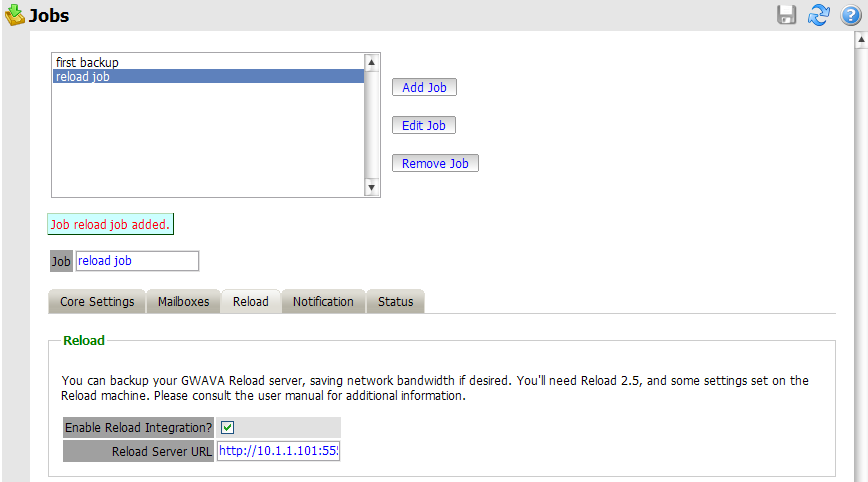
Create or select a job which you desire to use against the Reload system, and select the Reload Tab. You must select the Enable Reload Integration option, as well as supply the correct connection address for the Reload Server URL. (Both IP address and DNS name will work, but DNS is recommended wherever possible.)

Set the rest of the Core Settings, Notification, and Status as you would normally for your Retain system, but note that in the Mailboxes section you MUST assign the mailbox that Reload is backing-up.

Save the changes.

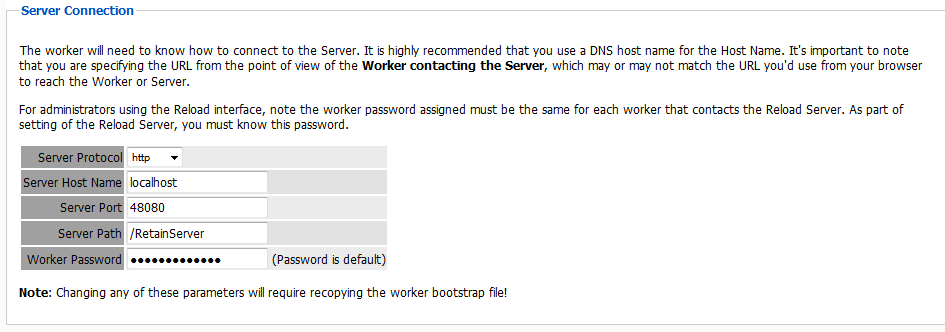
To specify the Reload –Retain password to the worker, open the specified worker in the worker settings page, and click on the Connection tab. Specify the new Worker Password by entering it into the provided field and then click ‘Save changes’ in the top corner of the page. You must re-upload the bootstrap file to the worker after creating a new password. (See the worker section to get instructions on correcting the bootstrap file.)