13.3 Net Folder Synchronization Detail Overview
IMPORTANT:My Files > Personal Storage doesn’t require a synchronization of metadata because the files are stored and managed on the ESN appliance itself. There is no synchronization with a back-end file server.
My Files > Home Folders function exactly like all other Net Folders from a synchronization standpoint.
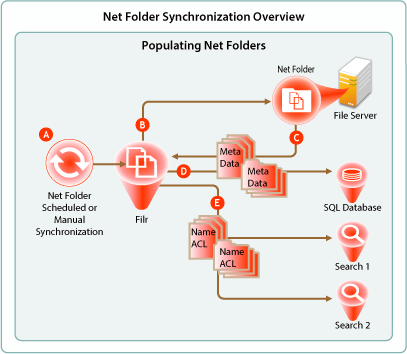
Figure 13-3 Net Folder Synchronization
|
Letter |
Details |
|---|---|

|
Full Net Folder synchronizations occur according to individual Net Folder schedules, or if no schedule is defined for the Net Folder, then they occur according to the associated Net Folder Server’s synchronization schedule. If no schedule is set, then it falls to ESN administrators to manually synchronize them. |

|
When a Net Folder Synchronization is triggered, the ESN appliance connects to the specified Net Folder location on the target file server. |

|
ESN then walks the directory structure, collecting meta data (name, size, dates, ACL information, etc.) about each folder and file as it goes. |

|
ESN stores the collected meta data in the SQL database. |

|
Then ESN sends the folder and file names and ACL information to each ESN Search appliance to be indexed. This makes it possible for users to search for folder and file names, provided that they have sufficient rights on the file system to see them. The majority of Net Folder synchronization work occurs on the File appliance. If content indexing is enabled for the Net Folder, the process continues as illustrated in Net Folder File Content Indexing Overview. |