6.0 ESN Email Notifications
ESN’s Postfix Mail Server
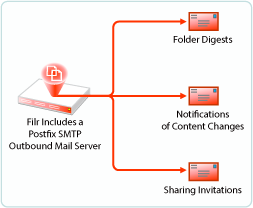
ESN includes a Postfix mail server for outbound email notifications, as illustrated in Figure 6-1.
Figure 6-1 ESN Outbound Email Functionality
Although the default mail server should work well for most ESN installations, you can configure ESN to use your outbound SMTP mail server. For more information, see Configuring an Email Service for ESN to Use
in the ESN 1.0: Administrative UI Reference.
Beginning with ESN 2.0, you can also customize parts of the email notifications that are generated by ESN. For more information, see Email Notification Template Customization
in the ESN 1.0: Administrative UI Reference.
What ESN’s Notification Services Provide
-
ESN-generated Notifications: ESN can notify users through email when items are shared with them and when changes occur on the ESN system to files and folders that they are interested in.
-
Sharing Invitations: ESN users can have ESN notify other users when they share a folder or file with them, as described in
Sharing Files and Folders
in the ESN 1.0: User Access Guide.NOTE:To receive notifications, users must have a valid email address in their ESN accounts.
ESN doesn’t verify that valid email addresses exist in target user accounts as a prerequisite for their being included in a notification list.
-
Content Change Digests: ESN users can subscribe to email notifications, so that they automatically receive a message whenever content of interest changes. For more information, see
Subscribing to a Folder or File
inGetting Informed
in the ESN 1.0: User Access Guide.ESN users can subscribe others to receive notifications by configuring their folders to send email notifications to folder contributors. For more information, see
Configuring Folders to Send Email Notifications to Other Users
in the ESN 1.0: User Access Guide.NOTE:To receive notifications, users must have a valid email address in their ESN accounts.
ESN doesn’t verify that valid email addresses exist in target user accounts as a prerequisite for their being included in a notification list.
-
-
Emailing Folder Contributors: ESN users can send email messages to folder contributors, as described in
Sending an Email to Folder Contributors
in the ESN 1.0: User Access Guide.