1.3 ESN Features and Functionality
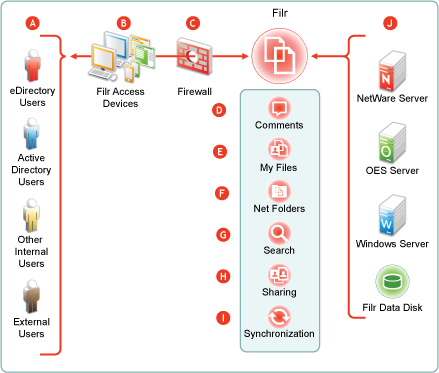
Figure 1-3 shows ESN’s main features in the context of your existing network infrastructure. The table that follows the figure briefly describes each feature and how all of the components shown fit together to provide ESN services.
Figure 1-3 What ESN Provides
|
Letter |
Details |
|---|---|

|
|

|
ESN lets users access files and folders through the following:
|

|
ESN is designed to work with your security infrastructure. Your firewalls continue to protect your data while ESN provides access to it from practically anywhere. For more information, see |

|
ESN lets users collaborate by supporting user comments on files and folders. For more information, see ESN Comments. |

|
ESN lets users access their personal files and folders on either or both traditional home directories and local ESN storage. For more information, see My Files (Personal Storage). |

|
ESN lets users access your organization’s files and folders that were previously available only through mapped drives. For more information, see Net Folders. |

|
ESN lets users search for files and folders that they have rights to access. If indexing is enabled on a folder, they can search within the content of the folder’s files as well. For more information, see ESN Search Appliance—Accessibility, and Searchability. |

|
ESN lets users share files in Net Folders, and files and folders in My Files, with internal and external users. For more information, see Sharing through ESN. |

|
ESN lets you synchronize eDirectory and Active Directory users as well as files and folders according to your organization’s needs. For more information, see ESN Synchronization. |

|
ESN provides access to storage on Micro Focus file servers, Windows file servers, and personal storage on the ESN appliance. |