Bundle Quick Tasks
ZENworks Service Desk allows you to quickly perform certain actions on one or more devices:
-
Log in to the ZENworks Service Desk user interface through ZENworks.
For more information, see Logging in to the ZENworks Service Desk User Interface through ZENworks.
-
In the Tasks panel, click the service request you want to resolve.
-
In the ZENworks Tools panel, click Bundles.
-
In the Bundles panel, ensure that the Filter option is set to Device Bundles.
-
Select the bundles on which you want to perform the quick tasks and then click Quick Tasks.
-
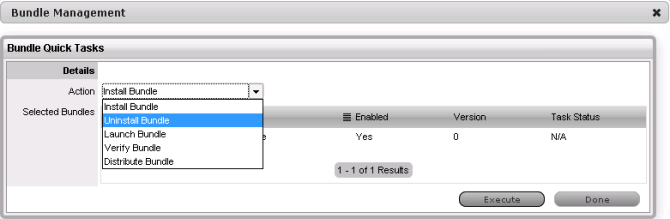
In the Bundle Quick Tasks panel, select the quick task action you want to perform.
-
Install Bundle: Lets you immediately install a bundle to one or more devices.
-
Uninstall Bundle: Lets you uninstall a bundle from one or more devices. Uninstalling a bundle does not remove its assignments or prevent the bundle from being reinstalled.
-
Launch Bundle: Lets you immediately launch a bundle for one or more devices. If the bundle is not already installed, it is installed and then launched
-
Verify Bundle: Lets you verify if the specified bundle is properly installed on the device.
-
Distribute Bundle: Lets you distribute (download and install) the specified bundle on the device.
-
-
Click Execute.
The status of the quick task action is displayed in the Bundle Management window.