Registering NetWare Btrieve with the Novell Directory Services

Novell Directory ServicesTM (NDSTM), a NetWare component, implements a system database called the Directory that can be distributed over a network. The Directory replaces the bindery used in previous NetWare releases. To provide compatibility with bindery-based NetWare versions, however, the Directory offers you the option of using bindery emulation.

With NDS you can organize network resources (such as users, network servers, and printers) as objects within the Directory. The Directory implements a hierarchical tree structure to store objects and their associated attributes. All objects must belong to an object class, which is constructed from the attribute types. The attribute types define the categories of information that can be associated with objects.

You must have appropriate access rights to read or modify the information stored in the Directory. For more information about NDS features (objects, naming conventions, access control, and bindery emulation) and how to manage the Directory database, refer to Cobra Installation Guide.

Btrieve 6.x provides the NDS Support utility (BDIRECT.NLM), a utility that allows you to register Btrieve with NDS as an object of the class Btrieve Server. The Btrieve Server class identifies the host server name, the type of communications protocol supported, and the object's internet address.

You can run the NDS Support utility interactively, through the Btrieve Setup utility, or from the command line. The following sections describe how to use these two methods.

IMPORTANT:  Before running the NDS Support utility, you must set the bindery context in the STARTUP.NCF file or at the server console. The name path for the bindery context must begin with Organization or Organizational Unit. The following example illustrates using a name path for the bindery context that begins with the Organizational Unit.

set bindery context = OU=Testing.O=Novell.C=US


Installing or Removing the NDS Support Utility Interactively

You can use the Setup utility to either install NetWare Btrieve as an object in the Directory or to remove an existing Btrieve Server object from the Directory.


Installing NetWare Btrieve as a Server Object in the Directory

Follow these steps to install NetWare Btrieve as an object in the Directory using the Setup utility:

  1. If you are not already in the Setup utility, start it by entering the following command: load bsetup

    As indicated previously, the Available Options menu is the first screen you see after starting the Btrieve Setup utility.

  2. From the Available Options menu, select the Set Directory Services option to install Btrieve as an object in the Directory
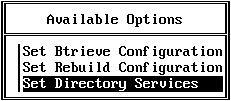

    The NDS Support utility determines whether a Btrieve Server object exists for the server on which the utility is loaded. If no Btrieve Server object is found, the utility asks if you want to install one.

  3. Select Yes to install the Btrieve Server object.

    The utility prompts you for the Directory object name (like a username, but called an object name under NDS) and password to be used to log in to the network. The login object name must have the appropriate rights to create or delete objects in the Directory.

  4. Enter the Directory object name and password to be used to log in to the network.

    If you are successful in installing the Btrieve Server object, the utility modifies the BSTART.NCF file (which implements the LOAD BDIRECT -A command for activation) and notifies you that the installation succeeded.

    NOTE:  The BSTART.NCF file must reside in the SYS:SYSTEM directory. Installing a Btrieve Server object does not activate it. You must use BSTART (described in Starting NetWare Btrieve 6.x) to load Btrieve and activate the Btrieve Server object.

    Activation causes the network address attribute of the Btrieve Server object to be filled in with the network address of the server.


Removing an Existing Btrieve Server Object from the Directory

In the case of an existing active Btrieve Server object, the utility notifies you that this object is active and asks if you want to remove it from the Directory. If you select Yes, the NDS utility removes the Btrieve Server object. If you select No, the utility returns you to the previous screen.

If you are successful in removing the Btrieve Server object, the utility modifies the BSTOP.NCF file (which implements the LOAD BDIRECT -D command for deactivation).

NOTE:  The BSTOP.NCF file must reside in the SYS:SYSTEM directory. Removing a Btrieve Server object does not deactivate it. You must use BSTOP (described in Stopping NetWare Btrieve 6.1x) to unload Btrieve and deactivate the Btrieve Server object.

Deactivation removes the network address from the attribute of the Btrieve Server object. (If the removal fails, the utility notifies you.)


Running the NDS Support Utility from the Command Line

You can install the NDS Support utility as a standalone NLM.

  1. To install Btrieve as an object in the Directory (or to remove an existing Btrieve Server object from the Directory), enter the following command at the server console prompt: load bdirect

    The NDS Support utility determines whether a Btrieve Server object exists for the server on which the utility is loaded. If no Btrieve Server object is found, the utility asks if you want to install one.

    In the case of an existing Btrieve Server object, the utility asks if you want to remove it from the Directory.

  2. Specify Yes to install (or remove) the Btrieve Server object.

    The utility prompts you for the Directory object name (like a username but called an object name under NDS) and password that will be used to log in to the network. The login object name must have the appropriate rights to create or delete objects in the Directory.

    If you specify No, the utility terminates.

  3. Enter the Directory object name and password to be used to log in to the network.

    If you are installing the Btrieve Server object, the utility modifies the BSTART.NCF file (which implements the LOAD BDIRECT -A command for activation). Activation causes the network address attribute of the Btrieve Server object to be filled in with the network address of the server.

    If you are removing the Btrieve Server object, the utility modifies the BSTOP.NCF file (which implements the LOAD BDIRECT -D command for deactivation). Deactivation removes the network address from the attribute of the Btrieve Server object. (If the removal fails, the utility notifies you.)

    NOTE:  The BSTART.NCF and BSTOP.NCF files must reside in the SYS:SYSTEM directory. Installing a Btrieve Server object does not activate it. You must use BSTART (described in Starting NetWare Btrieve 6.x) to load Btrieve and activate the Btrieve Server object or use BSTOP (described in Stopping NetWare Btrieve 6.1x) to unload Btrieve and deactivate the Btrieve Server object.