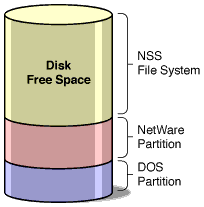
NetWare and DOS Partitions on One Disk
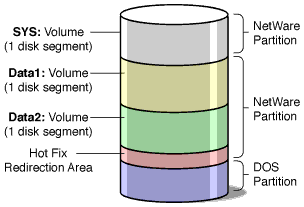
You can divide a NetWare server hard disk into units called disk partitions. You can also leave free (unassigned) space on a disk.
NOTE: A NetWare disk partition is not related to an NDS® partition.
The Novell traditional file system resides on NetWare partitions. The Novell Storage Services (NSS) file system resides on free space not assigned to NetWare partitions.
One of the server's hard disks must contain a DOS partition. This is the primary boot partition where server.exe is stored. You need only one boot partition per server.
One of the server's hard disks must also contain a NetWare partition. The DOS and NetWare partitions do not have to be on the same disk. If you are using the NSS file system, you must keep one NetWare partition on the server's hard disk to contain the Sys volume.
A hard disk can contain as many as four partitions, including a DOS partition, multiple NetWare partitions, or non-NetWare partitions (such as Windows NT or UNIX). The disk can also contain free space assigned to the NSS file system.
A NetWare partition consists of a data area and can also contain a Hot Fix Redirection Area, used for disk sector sparing (maintaining a spare sector per track in case another sector becomes defective). The logical sector 0 of a NetWare partition is the first sector of the data area available to applications, such as the traditional NetWare file system. This data area is referred to as a logical partition. See Logical Partitions.
The following figures illustrate some of the ways hard disks can be partitioned.
Figure 1
NetWare and DOS Partitions on One Disk
Figure 2
Figure 3
DOS Partition on First Disk, NetWare and Non-NetWare Partitions on Second Disk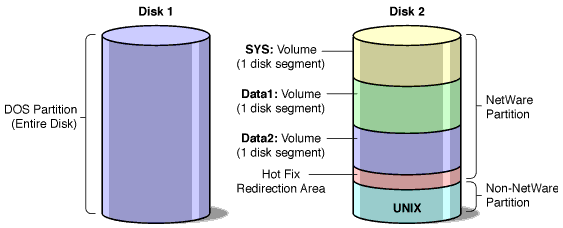
Disk with One NetWare Partition and Free Space Assigned to NSS