Hot Fix
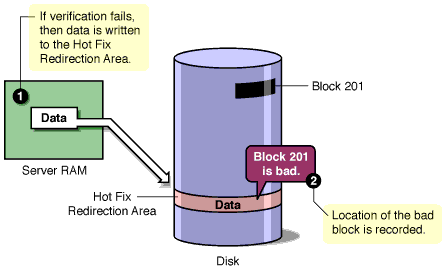
Due to the constant reading and writing of data to disk, some disk storage blocks lose their capacity to store data. NetWare prevents data from being written to unreliable blocks by employing a feature called Hot Fix.
The Hot Fix feature redirects the original block of data (still in memory) to the Hot Fix Redirection Area of the NetWare partition, where the data can be stored correctly. Once the operating system records the address of the defective block in a section of the partition area reserved for that purpose, the server won't attempt to store data in the defective block.
Hot Fix redirection can occur during a write request, a read request, or a read-after-write verification.
If the disk is mirrored, the system retrieves the data from the mirrored disk and redirects the data on the primary disk. If the disk isn't mirrored, the data is lost, but the block is marked as bad.
By default, 2% of a disk's space is set aside as the Hot Fix Redirection Area. You can increase or decrease the amount.
If Hot Fix is enabled, then it is always active unless the disk fails or the redirection area is full. You can view Hot Fix activity in MONITOR by selecting Storage Devices and then a Hot Fix partition.
Figure 5
Hot Fix
If desired, you can specify no Hot Fix Redirection Area when you create disk partitions. Having no Hot Fix Redirection Area saves partition space. Eliminating the Hot Fix Redirection Area might be recommended for large RAID systems that provide their own means of fault tolerance.
However, if Hot Fix is not enabled, then the partition will not have the fault tolerance provided by NetWare. Data on corrupted sectors of the disk won't be redirected to the Hot Fix Redirection Area. In addition, you cannot mirror partitions that do not have Hot Fix. It is easiest to enable Hot Fix when you create the partition. To add Hot Fix later, you must delete all the volumes on the partition.
Refer to Creating NetWare Partitions for instructions on how to specify no Hot Fix Redirection Area.