Example of disk cache allocation
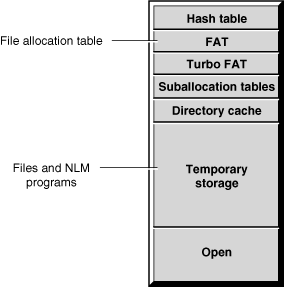
Recently used data is kept in cache buffers in case it is needed again. Caching data speeds processing because data can be written to cache or read from cache hundreds of times faster than it can be read from or written to disk.
Cache memory is used for all the server's processing needs, such as:
Figure 1
Example of disk cache allocation
Memory from cache is allocated to a process when requested. When a process is through using the memory, it frees the memory and returns it to cache. NetWare also provides a garbage collection process to recover unused memory. The garbage collector runs in the background, but you can manually initiate the process if needed. See Optimizing Garbage Collection.
There are two kinds of cache: directory cache and file cache.
Directory cache is used only with the traditional NetWare file system, not with the Novell Storage Services (NSS) file system. Directory cache stores disk directory entries. When the server is first installed, NetWare allocates 20 directory cache buffers of 4 KB each. If more buffers are needed, NetWare tunes the server by increasing the number of directory cache buffers. You can also tune the number of directory cache buffers yourself, using two server parameters that establish the minimum and maximum number of directory cache buffers the server can allocate. For information about tuning directory cache, see Tuning Server Memory.
File cache is used with both the traditional file system and the NSS file system. File cache is a pool of 4 KB memory pages. File cache stores recently used file data and also parts of the NDS® database.
File cache buffers are organized in a structure called a linked list. When the server receives a request for data that is on disk, it retrieves the data and stores it in a file cache buffer. The buffer is placed at the head of the linked list and is stamped with the current time. This buffer is called the most recently used (MRU) buffer. As new buffers are added to the head of the list, the older buffers move down the list. Whenever the server requires a buffer to store data, it retrieves the oldest buffer from the tail of the list, stores the new data in the buffer, and moves the buffer to the top of the list.
When the server receives a request for data that is already in a cache buffer, it retrieves the data from the buffer, stamps the buffer with the new time, and moves the buffer to the head of the list. This way, the most recently used buffers are found at or near the top of the list and the least recently used (LRU) buffers gather at the bottom.
In an ideal environment, there is enough memory so that all frequently used data can be retrieved from file cache rather than from disk. The MONITOR utility provides a disk cache utilization statistic, called the LRU Sitting Time, that helps you estimate whether your server has sufficient memory to service requests from cache. For information about using the LRU Sitting Time statistic, see Tuning File Cache.