Displaying Container Audit Status
Prerequisites
- See General Prerequisites.
- To display the container audit status, you must have Read or Write rights to the Audit File object Audit Policy property, or Read or Write rights to the Audit File object Audit Contents property, or have logged in with a level 1 password. See Controlling Access to Online Audit Data for information about password levels.
Procedures
-
Choose Display audit status in menu 1101.
AUDITCON displays menu 1200. This is a read-only display that presents the audit status for your current container audit trail. You can open this display from various places in the container audit menu tree.
-
Press the Esc key to return to the calling menu.
Figure 73
Menu 1200: Audit Status
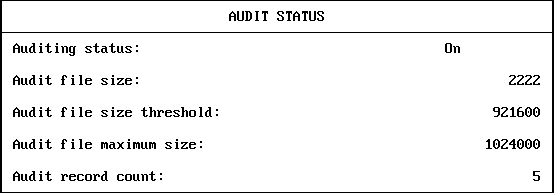
The Audit status menu displays the following status information for the current container audit trail:
Auditing status |
Shows as ON if auditing is enabled for the selected container audit trail, or OFF if auditing is not enabled. |
Audit file size |
Shows the size, in bytes, of the current container audit file. |
Audit file size threshold |
Shows the configured size at which the server sends warning messages to the server console and system log file. |
Audit file maximum size |
Defines the nominal maximum size for the audit file. |
Audit record count |
Defines the number of audit records in the current audit file. |
This display does not define the complete status of a container audit trail. See Configuring Auditing for more information on viewing and setting the audit configuration.
WARNING: The audit status shown in this menu applies only to the replica of the container that was selected. The audit file size and audit record counts might be different in other replicas of the audit file.
Previous | Next