For each NetWare® user accessing NFS files through the NetWare server, you need to know the user's user identification number (UID) and the group identification number (GID) of the user's primary UNIX* group.
This information is stored in the passwd file. This file is stored in the /etc directory. You can transfer the passwd file to the NetWare server using the UNICON utility's FTP function (see "Copying a File from a Remote Host"), or manually obtain the information for each user as described in the following sections.
You use the following procedure to display a list of the current users and their UID numbers.
Start the system administration utility from the shell tool by typing
admintool <Enter>
The utility displays the administration application icons.
Start the Database Manager application by double-clicking on the Database Manager icon.
The application displays the Main Menu.
From the Main Menu, make the following selection:
The utility displays a list of all the users and their assigned UIDs.
Use the grep command to display information about a user:
grep username /etc/passwd <Enter>
Replace username with the user's UNIX account name. The following illustrates how to find information about a user named joeuser:
grep joeuser /etc/passwd <Enter>
User information is displayed in seven fields. Each field is separated by a colon (:). The fields contain the following information:
If you do not know a user's account name, you can use the grep command and the user's full name to find information. The following command illustrates how to find the entry for the joeuser account using the name Joe User:
grep `Joe User' /etc/passwd <Enter>
This command displays the same information as the previous example.
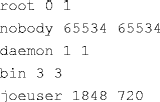
If your UNIX host has a large passwd file, you may want to create a file listing every user and the user's corresponding UID and GID. Create this list using the awk command.
The following example creates a file containing a three-column list of user names, UIDs, and GIDs. The list is stored in the host's /tmp directory.

The file created by the example contains a list that looks like this: