This section presents overviews of NetWare 5 server features. For an overview of Novell ClientTM software, see "Novell Clients."
NetWare 5 includes a new graphical, Java*-based installation utility.
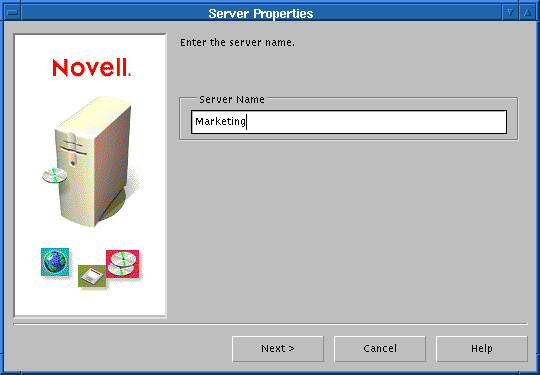
This utility guides you through installing a NetWare 5 server.
The NetWare 5 installation wizard autodetects the server's hardware and network environment and presents you with default options for each installation choice. If you accept these defaults, your network will be installed, up and running with very little effort on your part.
You can also customize many aspects of the installation to ensure that your NetWare 5 server---and the network it supports---match your business and operational requirements.
Instructions for planning your network are found in Chapter 3, "Server Basics." For NetWare 5 server hardware and software requirements, see "Meet System and Software Requirements."
If you are upgrading to NetWare 5, you will find everything you need to make your upgrade as smooth as possible.
Both upgrade options convert bindery data to NDS automatically.
To begin planning for an upgrade, see Chapter 3, "Server Basics."
Today's business climate demands optimal use of all resources. Independent researchers consistently conclude that, overall, NetWare delivers much more and costs much less to operate and maintain than other network platforms.
Other “network” platforms are actually general purpose operating systems that include networking as a feature. However, their primary focus is on the desktop. For this reason, they lack the robustness and power of NetWare.
Only NetWare is fully dedicated to running and managing your network.

The NetWare 5 server includes powerful and important new features as shown in the following illustration:

NetWare 5 has important new memory management features as shown in the following illustration.

NetWare 5 can address up to 4 GB of RAM.
Memory management is a critical aspect of ensuring optimal server performance. See Chapter 3, "Server Basics," for help in determining optimal memory amounts for your NetWare 5 servers. For further information and help with optimizing server memory and other memory management tasks, refer to Contents > NetWare Server Documentation > NetWare Server Memory in the NetWare 5 online documentation.
NetWare 5 security features help protect the server. See Contents > NetWare Server Documentation > NetWare Server Security in the NetWare 5 online documentation for help in planning for your server's safety and security.
Network communication protocols must accommodate four basic requirements:
NetWare became the network platform of choice in part because the IPXTM protocol handles the four communication requirements above with very little network administration overhead.
NetWare 5 now offers three communications protocol options: pure IP, IPX, or a combination of the two.
IP networks have traditionally been weak in two areas:
To provide the ease of administration and lower cost of ownership that network administrators expect from Novell, NetWare 5 includes a pure IP solution that extends native IP functionality and greatly increases the manageability of a pure IP network in the following ways:
NetWare 5 delivers directory-based management of IP addresses, allowing you to manage your DHCP servers and workstation objects through NDS.
NetWare 5 provides the ability to manage DNS servers through NDS.
SLP is the standard for publishing network service availability on an IP network. SLP registers services only in the local area. It assumes that the client will be able to locate global services.
NetWare 5 integrates the SLP Directory Agent (DA) with NDS and compiles a global listing of all available services.
Only NetWare 5 offers the SLP-DA feature.
In addition, the NetWare 5 pure IP solution is compatible with all IP networks. NetWare 5 integrates and extends the scope of the Internet Protocol (IP) suite to deliver the most manageable IP solution available.
For further information and help in determining which server communication options best meet your networking needs, see Contents > NetWare Server Documentation > NetWare Server Communications in the NetWare 5 online documentation.
NetWare 5 servers include multiple interface options:
After the server is installed and restarted, the main console screen displays the graphical user interface. You can launch Java-based applications using the Start menu, toggle between various console screens using Alt + Esc, or select a screen by using Ctrl + Esc and then entering a screen number from the list of current screens.
The following illustrates the interface options available in NetWare 5.

For further information regarding features and usage of NetWare 5 server interface options, see Contents > NetWare Server Documentation > “ConsoleOne” in the NetWare 5 online documentation.
You can manage your NetWare 5 network and perform most NetWare console tasks without direct physical access to the server. NetWare 5 includes two utilities for this purpose: DOS-based RCONSOLE, and Java-based RConsoleJ.
The following table summarizes the functional differences between the two remote server management utilities included in NetWare 5.
|
Function |
DOS-based RCONSOLE |
Java-based RConsoleJ |
|---|---|---|
|
Use console commands as you would at the server console |
Yes |
Yes |
|
Scan directories and edit text files in NetWare and DOS partitions on a server (using edit.nlm) |
Yes |
Yes |
|
Transfer files to, but not from, a server |
Yes |
No |
|
Control the server using an IP connection |
No |
Yes |
|
Control the server from another server |
No |
Yes |
|
Stop or start a server |
Yes |
Yes |
|
Install or upgrade NetWare |
Yes |
No |
See Contents > NetWare Server Documentation > Remote Server Management in the NetWare 5 online documentation for details on remote server management.
Novell's directory service---NDS---requires that all internal clocks on all servers in an NDS tree be synchronized so that updates to objects on the tree can be ordered correctly. Time synchronization also affects other system functions as illustrated in the following graphic.
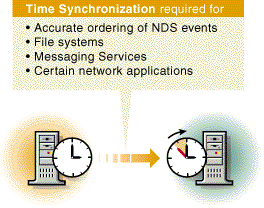
NetWare 5 provides the following time synchronization components:
If your network requires the use of an Internet time source, you can use NTP with TimeSync to query authoritative time servers using the Internet and to synchronize that time within the NetWare network.
For further information and help with optimizing time synchronization on your network, refer to Contents > Network Time Management in the NetWare 5 online documentation.
NetWare 5 includes support for computers with PCI Hot Plug capabilities.
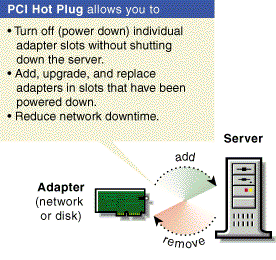
The NCMCON utility allows you to view status information on PCI slots and to turn Hot Plug compatible slots off and on.
For further information regarding PCI Hot Plug, refer to Contents > NetWare Server Documentation > HotPlug Hardware Management in the NetWare 5 online documentation.