
Novell* Public Key Infrastructure (PKI) Services enables the use of public key cryptography and public key certificates in an NDS-enabled network. PKI Services allows you to request, manage, and store public key certificates and their associated key pairs in the NDS* tree and to establish and manage an NDS tree certificate authority (CA) that is specific to your NDS tree and to your organization.
PKI Services also works with most commercial certificate authorities such as VeriSign** and with the major certificate authority software, such as Netscape** CA Server. PKI Services optionally generates PKCS #10 formatted certificate signing requests (CSRs) that can be used by commercial or external certificate authorities.
Novell PKI Services consists of a PKI NLM and a snap-in module to NetWare* Administrator. A network administrator uses NetWare Administrator as the administration point for PKI Services.
PKI Services uses the cryptography services provided by the Novell International Cryptography Infrastructure (NICI). NICI is a controlled infrastructure that offers modular cryptography engines. Cryptography engines can be added to a NetWare server to extend the cryptographic algorithm support. Because PKI Services derives all supported cryptography and signature algorithms, as well as supported key sizes from NICI, a single version of PKI Services can be used in NetWare installations throughout the entire world.
New NDS Objects
PKI Services defines several new NDS objects.
Certificate Authority Object
This object contains the public key, private key, public key certificate, certificate chain, and other configuration information for the NDS tree Certificate Authority object. The private key is stored in the Certificate Authority object in encrypted form. Once a server is configured to provide the certificate authority service, it performs that service for the entire NDS tree. The Certificate Authority object resides in the Security container. The certificate authority service can run on any server, but since the Certificate Authority object is the centerpiece of a public key infrastructure system, a compromised server containing the NDS tree CA can compromise your entire public key infrastructure system. You should therefore place the NDS tree CA on a server that is physically protected and that only runs software that you trust.
Key Material Object 
This object contains the public key, private key, public key certificate, and certificate chain. The private key is stored in the Key Material object in encrypted form. A server can have many Key Material objects. Any security applications running on a particular server that require keying material for their operation can be configured to use any one of the Key Material objects. You can create and place Key Material objects only in the container where the server resides. You cannot move or rename a Key Material object.
Note: The key pair stored in the Key Material object is referenced by the name you enter when the key pair is created. The key pair is created when the Key Material object is created. The key pair name is not the name of the Key Material object. When configuring security applications to use key pairs, you reference those keys by their key pair name, and not by the Key Material object name.
Security Container 
This container holds security-related objects for the NDS tree, which include the NDS tree CA object. The container physically resides at the top of the NDS tree. The Security container is created when Novell SAS is installed. Novell SAS can be installed when NetWare 5* is installed.
Configuring and Maintaining PKI Services
The first step in setting up PKI Services is to configure the NDS tree Certificate Authority object. The certificate authority service runs on one NetWare server. You should select a NetWare server within your NDS tree that will be available when needed to perform signing operations and that resides in a physically secure location. During the creation process, you are prompted to name the Certificate Authority object and to choose a server on which the certificate authority service will run.
After the NDS tree CA is configured, you can create Key Material objects. Key Material objects are created in the container that holds the server's NDS object. During the creation process, you are prompted to name the key pair and choose the server with which the key pair is to be associated. The Key Material object name is generated by Novell PKI Services and is based on the key pair name you choose. You must also specify whether to have the certificate for the Key Material object signed by your organization's NDS tree CA or by an external certificate authority.
If you decide to use an external certificate authority to sign the certificate, the server with which the Key Material object is associated will generate a CSR that you will need to submit to the external certificate authority. After the certificate is signed and returned to you, you will need to install it into the Key Material object, along with the trusted root for the external certificate authority. This process is depicted in the following diagram:
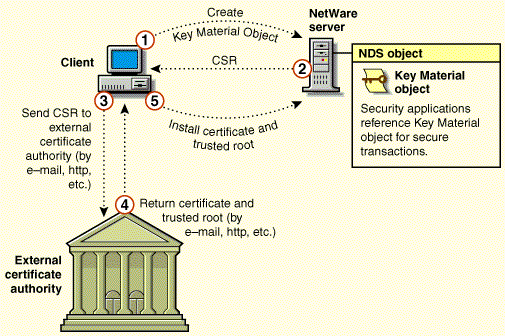
1. From the client, send a request to the server to generate a Key Material object using NetWare Administrator.
2. The server generates a key pair and stores it in a new Key Material object. The server creates a CSR and sends it back to the client.
3. The CSR is routed to the external CA by e-mail, http, or another similar mechanism.
4. The external CA validates the request, signs the certificate, and returns the certificate and trusted root to the user by e-mail, http, or another similar mechanism.
5. The trusted root and public key certificate are stored in the Key Material object using NetWare Administrator.
When creating a Key Material object with a public key certificate that is signed by the NDS tree CA, similar steps as described above occur, except the entire process is automated.
Once the desired Key Material objects are created, you can configure your applications to use them. Keys are referenced in the application's configuration by the key pair name you entered when the Key Material object was created.
For example, suppose you create a Key Material object for a server running LDAP Services for NDS and the server's name is "Payroll." If the name given to the key pair is "LDAP Keys," the Key Material object would be named "LDAP Keys - Payroll." To then configure LDAP Services for NDS to use "LDAP Keys," you launch NetWare Administrator, select the LDAP object, and then choose "LDAP Keys"from a list of key pair names.
Note that a key pair is restricted in its use to one server. You can have multiple applications running on a given server that reference the same Key Material object, but you cannot use a Key Material object on multiple servers.
You can use both types of CAs simultaneously within Novell PKI Services. The use of one type of CA does not preclude the use of the other.