NDS, Novell's directory technology, provides global access to all networking resources. NDS allows users with the proper access rights to log in to the network and view and access network resources.
During the server installation, you will set up a minimal NDS framework. The minimal framework consists of an NDS tree, one or more container objects, a NetWare server object, and an ADMIN user object.
After installation, you can create additional NDS objects using the NetWare Administrator utility.
The NDS tree represents the entire network. Network resources such as servers and printers are presented hierarchically in the NDS tree. Users log in to the NDS tree with a single login name and password instead of logging in to specific servers.
The NDS tree is given a name during the first NetWare server installation. The name of the tree should represent your entire organization. It can be up to 64 characters long and can contain underscores and dashes. Although other special characters are permitted, using special characters in the NDS tree name is not recommended.
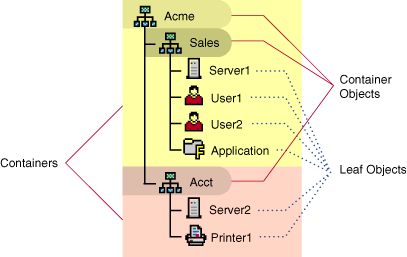
Objects are used to represent network divisions or network resources such as an organization or a NetWare server. Objects have properties that define their characteristics. You can create two types of objects: container objects and leaf objects.
Container objects are used to organize the structure of the NDS tree. A container object can contain another container object, a leaf object, or both. The two main kinds of container objects are Organization and Organizational Unit objects. However, all of the following container objects are available:
When you create a new NDS tree, you must create the container objects, such as an Organization or Organizational Unit object, that will contain the NetWare Server object.
Leaf objects represent information about network resources such as servers or printers. Unlike container objects, leaf objects cannot contain other NDS objects. Many types of leaf objects exist, such as Application, Computer, Printer, User, and NetWare Server object. At least two leaf objects are created during the server installation.
NOTE: For security reasons, you may rename user ADMIN during the installation program or after the installation using the NetWare Administrator utility.
Other users can be assigned Supervisor rights to other container objects and all their leaf objects. Having Supervisor rights to a container object allows the user to create and manage all objects in the container.
When installing a new server into an existing tree, you must have Supervisor rights in the container in which you are installing the new server.
Depending on which products you select to be installed, additional objects, such as an NDPS broker object, might be created and added to the NDS tree during the installation program.
NDS allows you to refer to objects according to their positions within a tree. The NDS context describes the full path (including container objects) of an object in the NDS tree structure.
The notation to describe the NDS context is the list of container objects, separated by periods, between the leaf object and [Root]. For example, the context of the NetWare Server object SERVER1 to be placed in the Organizational Unit (OU) container SALES in the Organization (O) container ACME would be noted as: SALES.ACME. The full NDS context name for this server would be SERVER1.SALES.ACME.
NDS context can also be noted using typeful names. Typeful names include the object abbreviation types. For example, the NDS context described above written in typeful notation would be CN=SERVER1.OU=SALES.O=ACME.
NOTE: When referencing a leaf object, the leftmost object is assumed to be a leaf object. Leaf objects have common names (CN) which are described in typeful notation with a preceding CN=object name.
For more information on planning and implementing NDS, see Contents > Network Services Documentation > Directory Services > NDS Concepts and Planning in the NetWare 5 online documentation.