NDS, Novell's directory technology, provides global access to all networking resources. NDS allows users with the proper access rights to log in to the network and view and access network resources.
Network resources such as servers and printers are presented hierarchically in an NDS tree. Users log in to the NDS tree with a single login name and password instead of logging in to specific servers.
If you are upgrading a server that already has NDS installed, the server will remain in the same container after being upgraded. You will be prompted for the username and password of a user with Supervisor rights in the server's container object.
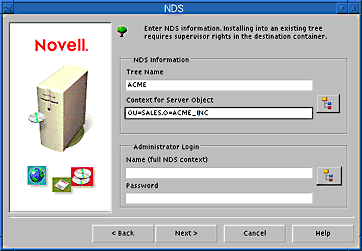
NOTE: If this is the first NetWare 5 server to be installed into an NDS tree with NetWare 4.1x servers, you will be prompted to modify the schema. When prompted, you must provide the administrator name and password for the entire NDS tree. Modifying the NDS schema requires Supervisor rights at the root of the existing NDS tree.
If you are upgrading a server that does not already have NDS installed, you will be prompted to set up NDS.

For more information, see "Set Up NDS, Novell's Directory Technology." After setting up NDS, proceed to "License the NetWare Server" below.
You have created a new NDS tree or upgraded the server in an existing NDS tree. The NetWare Server object and Volume objects will be updated in the original NDS container or created in the container you specified.

If you have created a new NDS tree, a user (default name ADMIN) with Supervisor rights to the NDS tree will be created in the same NDS container as the NetWare Server object.
IMPORTANT: Record the administrator password and other relevant information before proceeding.