NetWare 5.1 License Container Objects and License Certificates
NLS creates two License Container objects for NetWare 5.1: one for a server base license certificate and one for a connection license certificate. The server base license certificate is required to run the NetWare 5.1 operating system. Also, it allows the NetWare 5.1 operating system to provide authenticated connections for clients.
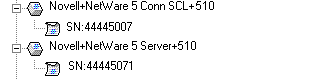
A License Container object for a server base license displays as follows:

Connection license certificates allow users to log in and use NetWare 5.1 services. A License Container object for a server connection license certificate displays as follows:

If licensing is not installed properly (for example, if you choose not to install NLS during NetWare 5.1 installation), you have two login connections (but not the 5, 50, or 500 that you purchased). That is, you have a two-user server. These connections allow you to log in, troubleshoot, and install certificates.
Each license container has one or more license certificates (unless you move or delete them). The following figure shows:
- A license container and certificate for a server connection license
- A license container and certificate for a server base license
Using NetWare Administrator, you can view License Container and License Certificate objects as they appear in the NDS® tree. Searching for a license unit The NLS client that requests the NetWare server and NetWare connection licenses is built into the NetWare server operating system. It is called the NetWare license Policy Manager. See Policy Manager in Key NLS Terms in NLS Administration. When an NLS client requests a license unit, an LSP searches the server's context for an available license unit. If the LSP doesn't find an available unit there, it searches up the NDS tree for a license certificate that has an available license unit. Communicating with license certificates NLS 5.02 can communicate with NLS 4.0 license certificates (installed with NetWare 5.0). However, NLS 4.0 cannot communicate with NLS 5.02 license certificates. (They might not have to.) Scenario---Six months ago, network administrator Sandy installed NetWare 5.0 on server PUFFIN. The server base license and server connection license certificates were installed during server installation. NLS 4.0 on PUFFIN has communicated reliably with the NLS 4.0 license certificates. Sandy, the network administrator, installs NetWare 5.1 on DYR, a new server. Sandy does not upgrade NLS 4.0 on PUFFIN to NLS 5.02. The server connection license certificate assigned to PUFFIN gets deleted. Using NetWare Administrator that ships with NetWare 5.1, Sandy reinstalls the server connection license certificate. The connection certificate on PUFFIN is now an NLS 5.02 certificate. NLS 4.0 on PUFFIN can no longer communicate with the newly installed NLS 5.02 certificate. Users are unable to log in to PUFFIN until Sandy upgrades PUFFIN to NLS 5.02. Also, to access NLS-enabled software on a server running NLS 5.02, users must have