1.2 How NJCL and JNDI Work Together
In any distributed computing environment, naming and directory services largely determine how other sevices and applications coordinate. This is true of NJCL and JNDI. JNDI is the API and framework through which an application can access one or more naming systems through a single interface.
One of the more difficult concepts to understand in NJCL is how NJCL and JNDI are related. The following graphic may help to describe how NJCL and JNDI are integrated.
Figure 1-4 NJCL and JNDI Integration
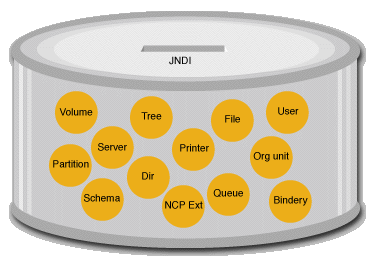
When you want your application to access the objects in the can, such objects Server, Printer, or File JNDI provides a single point of access. JNDI acts as the lid or opening to the can containing the objects. Thus, to find an NCP Extension, you access it through the same opening as if you were trying to find a User.
Some of the important services of JNDI are naming, attributes, search, schema capabilities, and so forth. In addition to the JNDI methods for naming and accessing objects, the objects themselves may include additional, non-naming methods. If you want to access methods for file read and write, or print a file to a printer, you use the interface for the real object, not the JNDI interface. Thus, JNDI provides the consistent access methods to get to objects, but does not define the actual objects.
The key to getting this all to work is the concept of duality in the objects. The ability of Java to mix two interfaces into a single object is used heavily in NJCL to provide objects that have a consistent naming interface but unique functionality. This makes it possible for an object to implement multiple interfaces. The example shown in the following graphic refers to a FileDirContext, which is a directory entry in the file system.
Figure 1-5 JNDI Context Duality
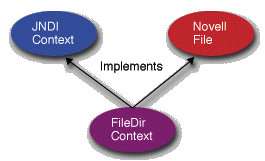
The FileDirContext entry may have additional subordinates (either files or directories) that will be accessible through the JNDI naming methods. At the same time, it provides access to file streams for its actual data. If an application is interested in one or the other interface for FileDirContext, it need only narrow the object to the desired type and use the appropriate methods. For further information on narrowing, see the Narrowing.