3.5 Selecting Test Stations
Before you begin testing, some tests may require that you designate the station where the tests will be performed. Test stations are identified by their IP addresses.
Figure 3-6 Shows the Project Contents panel.
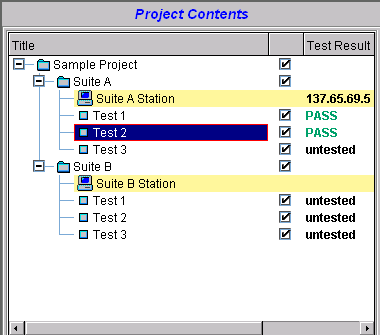
When you open a test project, a Station Address icon will appear in the Project Contents panel. When you double-click on the Station Address icon, the Station dialog window appears.
Figure 3-7 Shows the Station Dialog.

TestConsole attempts to auto detect all IP addresses of any clients on the subnetwork with TCLink loaded. You can select the test station from the list provided. If the IP address is not visible (e.g., on a different subnet), you can type it in the Selection box.
HINT:If the loopback IP address 127.0.0.1 appears in the Select Test Station window, it is an indication that the IP address on the TestConsole client is not set up properly.