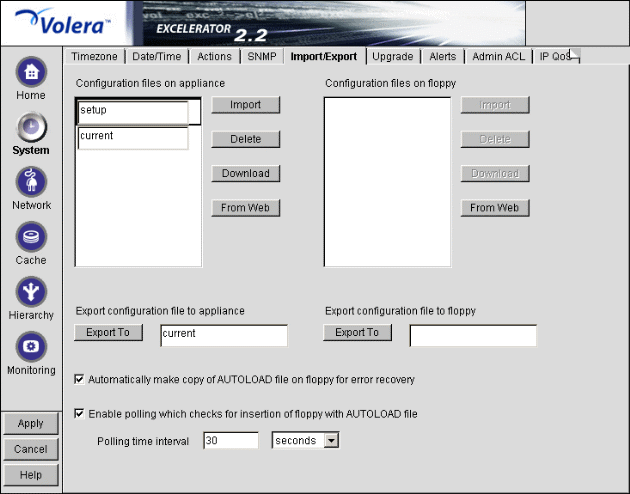
Figure 80
The Import/Export tab lets you manage appliance configuration files on the appliance and on floppy diskettes.
IMPORTANT: You should have a backup configuration file named something other than AUTOLOAD.NAS. For further details, see Backing Up the Appliance Configuration.
Configuration Files on Appliance: Displays a list of all the configuration files stored on the appliance. You can use these files to configure the appliance instantly, rather than using the GUI, command line, or Telnet to make individual changes. The appliance automatically updates the configuration file, CURRENT, each time you apply a change to Excelerator. The .NAS extension of these files, which is not shown in this list, is supplied by the server.
You can download, import, and delete any file in this list. You can also copy a configuration file from any URL to the appliance. The Download option opens the file in a separate browser window. The Import option changes the appliance configuration from its current settings to those contained in the selected configuration file. The Delete option removes the selected configuration file from the appliance. The From Web option lets you specify the URL for the configuration file being copied to the appliance. If the file is in a secure area or is being downloaded using SSL (HTTPS:), you can also enter a username and password for authentication.
Configuration Files on Floppy: Displays a list of all the configuration files stored on the floppy disk located in the appliance's floppy disk drive. You can download, import, and delete any file in this list. You can also copy a configuration file from any URL to a diskette in the appliance's floppy disk drive. The previous section contains more detail regarding the Import, Delete, Download, and From Web options.
IMPORTANT: It is easy to confuse the diskette in the appliance's floppy disk drive with one located in your configuration workstation. Only the former is accessible through the browser-based management tool.
Export Configuration File to Appliance / Export Configuration File to Floppy: Creates a configuration file on the appliance or on the diskette in the appliance's floppy disk drive.
Files saved using the Export feature contain the complete configuration of the appliance at the time of export. The default filename is CURRENT. You can specify any DOS-style eight-character name. Names are not case-sensitive. Each file has a .NAS extension that is not displayed in the list or specified when the file is created, but is automatically appended by the system.
Automatically Make Copy of AUTOLOAD File on Floppy for Error Recovery: Creates an AUTOLOAD file on a floppy diskette in the appliance when the configuration is changed. The appliance uses the AUTOLOAD file during error recovery to restore the system configuration after a successful restoration of the clone image. The AUTOLOAD file is also used when you invoke the import floppy command from a Telnet or command line session.
You can also export or import configuration files other than AUTOLOAD to a floppy diskette from the command line or Telnet interface.
Enable Polling Which Checks for Insertion of Floppy with AUTOLOAD File: Allows the floppy diskette to be polled during normal operation of the appliance. If a floppy diskette containing an AUTOLOAD.NAS is inserted when this option is on, Excelerator automatically applies the settings in the AUTOLOAD file.
While this feature is useful, proxy activity is suspended for a short period of time while Excelerator polls the floppy drive.