Composer User's Guide
CHAPTER 1
Web Services are fundamentally changing the way enterprises exchange information and perform business transactions. But to succeed in web services development, business analysts and developers must be able to work together on sophisticated, large, distributed applications that meet strict requirements for performance, security, scalability, and reliability, in the face of increasingly stringent time-to-market demands.
The most important factor in making a successful transition to a services-based architecture that leverages modern web technologies is the availability of powerful, easy-to-use development tools. Such tools should be:
Purpose-built, from the ground up, for Web Services development
Tightly integrated by design—not a grabbag of unrelated pieces
Easy to learn and use, so that a diverse team of users—from business analysts to system administrators to software engineers—can be productive immediately in a concurrent-development setting
100% standards-aware in terms of all important Web Services technologies: XML grammars (including SOAP), description and discovery technologies (WSDL, WSIL, UDDI), transport layers (HTTP and others), directory protocols (LDAP, DSML), and security-related standards, among others.
Compatible with diverse deployment and runtime environments: i.e., a variety of application servers on a variety of operating systems
If Java is the programming language, the development environment should be fully J2EE-aware—not just a 3GL IDE (integrated development environment), but a front-to-back development, testing, packaging, and deployment toolset with full awareness of JAR/WAR/EAR issues, portal/portlet architectures, etc.
Novell's exteNd product line meets all of these criteria.
Novell exteNd is a family of Web Service development products for rapid development of Web Service objects on J2EE (Java) application server platforms The major pieces are available independently or as an integrated suite. The suite, in turn, comes in two flavors: Professional Edition, and Enterprise Edition.

The Novell exteNd 5 Professional Edition Suite is the base configuration of tools that enable the application developer to develop and deploy enterprise-level Web applications. The Professional Suite contains the following tightly integrated components:
Novell exteNd Application Server (Sun-Certified J2EE application server)
Novell exteNd Composer with JDBC Connect and LDAP Connect.
NOTE: The Professional Edition suite does not support direct-to-app-server deployment from the Composer GUI. (Deployment must be done from within exteNd Director.) It also does not support transaction (JTA) awareness, EJB-based service triggers, nor XForms awareness.
Fully functional eval versions of the Composer Connects for 3270, 5250, CICS RPC, Data General, EDI, HP3000, HTML, JMS, SAP, Tandem, Telnet, and Unisys (UTS and T27).
Novell exteNd Director (excluding the Content Management and Workflow subsystems and the Autonomy-based search functionality). Director is a full J2EE development environment with sophisticated packaging and deployment capabilities, as well as robust subsystems for portal and portlet application development.
Web Services SDK (a JAX-RPC implementation that includes compilers and runtime environment for supporting SOAP-based Web Services)
The Novell exteNd Messaging Platform—support for standards such as JMS (Java Messaging Service), the Common Object Request Broker Architecture (CORBA), Java Transaction Service (JTS), and the Java Transaction API (JTA).
The Novell exteNd 5 Enterprise Edition Suite contains all of the same pieces as the Professional Suite, with a few additions:
Novell exteNd Composer Enterprise Edition, including the Business Process Modeler (BPM) subsystem, plus support for direct-to-app-server deployment, EJB trigger options, transaction control, and XForms integration.
Full versions of the following Composer connectivity add-ins:
Support for the SAP Service type (triggering of Composer services via RFC requests at an SAP gateway).
Novell exteNd Director Enterprise Edition, including the Content Management and Workflow subsystems as well as the Autonomy-based search functionality.
All of the other pieces mentioned in the previous section (MySQL, WSSDK, Messaging Platform, and so on).
Novell exteNd Composer is a development (and runtime) environment designed for rapid design and deployment of Web Services and XML integration applications—applications that can connect to diverse back-end systems and data sources.
The Composer product consists of the following pieces:
Novell exteNd Composer – A visual design-time tool for creating and debugging Web Services and XML-enabled back-end integration applications.
Novell exteNd Composer Enterprise Server – The runtime container layer (for use on any compatible J2EE app server) that executes and manages applications created in exteNd Composer.
Novell exteNd Connect Family – Individual add-in products that augment the capabilities of exteNd Composer and Server to permit the XML-enablement of systems that rely on specialized data sources, such as EDI, CICS RPC, 3270/5250 terminals data streams, Telnet, and JMS. (The exteNd Composer JDBC Connect, which allows communication with relational databases, is bundled into the core Composer installation suite, as is the LDAP Connect. Other Connect products are available separately.)
All exteNd Composer products are certified to run under the Novell exteNd Application Server, Apache Tomcat, IBM's WebSphere, and BEA WebLogic, with support for operating systems ranging from Windows NT and Windows 2000 to Linux, Solaris, AIX, and HP-UX.
NOTE: Novell exteNd Composer Enterprise Server and exteNd Composer Enterprise Connect products each have their own documentation. This Guide covers only the core development environment (which we refer to herein as Composer). See the separate JDBC Connect and LDAP Connect guides for information on those component editors.
Composer offers a powerful, intuitive, point-and-click GUI (graphical user interface) for rapid application development, giving the business analyst or application developer a powerful tool for creating robust XML integration applications in minimum time.
Composer offers, among other features:
An XML editor with code-completion features for WSDL, WSIL, and other "specialty grammars"
A drag-and-drop-enabled XML mapping engine, with support for schemas, DTDs, XSL, XPath, and DOM Level 2
An intuitive, visual editing environment for implementing standard control-flow constructs, error trapping, logging, etc., without the need for extensive Java programming expertise
Realtime step-into/step-over debugging and animation, so that applications can be tested in real time without leaving the development environment
A multi-document interface (MDI), allowing you to work in more than one document or component at one time
Realtime registry browsing, with support for WSDL publishing/retrieval using UDDI registries
Built-in ECMAScript support (including a custom script editor and live console) for users who need fine control over business logic or data manipulation
Back-end system connectivity via exteNd Composer Connect add-ins for 3270, 5250, Telnet, JMS, JDBC, CICS RPC, EDI, etc.
Deployment facilities for direct deployment of projects to the app server (with context-driven customizations for Novell, WebSphere, or WebLogic app servers)
Integration with exteNd Director (switch to the Director environment at any time and import Composer projects into any WAR file or EAR project)
Composer also has XForm and JSP code generation features, and many other capabilities that aren't listed here for space reasons. This is just a partial list of major features.
Composer is targeted at business analysts, IT managers, Java developers, and other stakeholders in the Web Services development process.
Composer is designed to be accessible to users of various skill levels. (It is not a Java-programming IDE.) Business analysts with little or no programming background can quickly master complex data transformations using Composer's drag-and-drop XML mapping features. Webmasters can use Composer's JSP, XForms, and UDDI browse/publish capabilities to assemble sophisticated web apps with no need for additional tools. Java developers can use Composer to develop sophisticated, reusable XML components that might rely heavily on ECMAScript, SQL, LDAP, custom Java classes, and/or specialized packagings (WAR/EAR/JAR files).
Because Composer's GUI is rich with wizards, picklists, and drag-and-drop-enabled features, users of all skill levels (regardless of domain expertise) can become productive quickly. Sophisticated web applications that might take months to develop using a "grabbag of tools" approach often can be rolled out in weeks or days using Composer.
Composer application design is based on an Action Model architecture that includes two main processing constructs: components and services.
Components are executable units of work that encapsulate business logic, usually in the context of connectivity requirements.
For example, a typical JDBC component validates an incoming XML request document, maps the document's key pieces of data to an SQL inquiry, and maps the SQL result set to an XML response document. All of the business logic and data retrieval functionality of this type of operation can (and should) be encapsulated at the component level.
Services, on the other hand, typically oversee the execution of components and coordinate the flow of data between them. A typical service might wrapper a series of components that receive an input XML document, perform sophisticated document mappings/transformations, collect information from back-end data sources, execute transactions on mainframes and AS/400s, process error conditions, send context-sensitive e-mail or JMS notifications, and/or return one or more XML response documents to the original requestor(s). By breaking up a service's tasks into discrete components, important benefits—in terms of testing, debugging, code maintenance, encapsulation, and code reuse—can be realized.
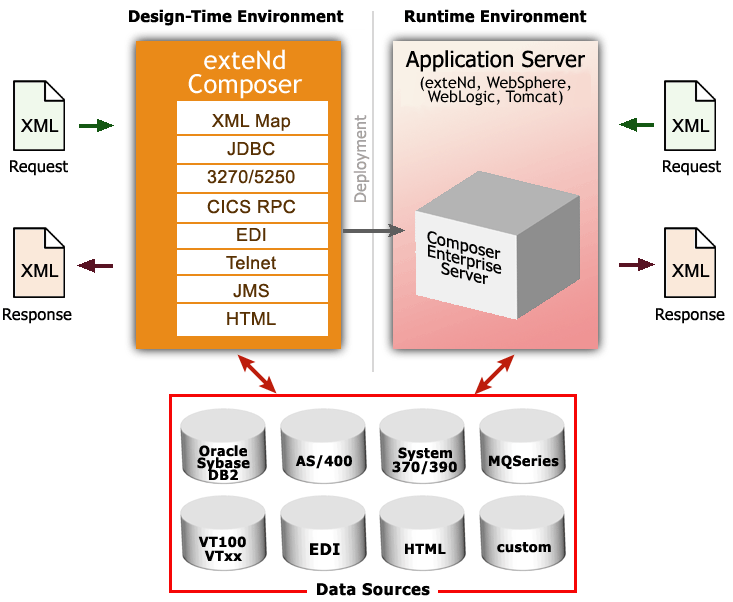
You will typically use Composer to create components and services that perform B2B integration tasks involving data retrieval and transformation through XML technologies, including (optionally) SOAP and Web Services technologies. You'll deploy these components and services into a J2EE application server environment, where their execution is mediated by exteNd Composer Enterprise Server (the runtime half of Composer).
You can build many types of applications with Composer, but typically you will create XML integration applications triggered by servlets, EJBs, custom Java objects, or incoming messages on a JMS message queue. Your applications might, in some cases, simply be used locally on the app server to provide services across local processes, with no exposure to the outside world. In other cases, your applications will be fully web-enabled. The interface(s) to your web-facing applications might or might not involve SOAP or WSDL.
In general, with Composer, you can implement any kind of application where data inputs and outputs involve XML.
If you are using the Enterprise Edition of Composer (which comes with the JMS Connect), you can also build services that use messages for inputs and outputs.
NOTE: Messaging (involving Message Oriented Middleware, such as IBM's MQSeries) is a powerful data-sharing metaphor in its own right, allowing the use of payloads other than XML. With Composer and JMS Connect, you can build applications that use messages for input and XML for output; XML on the input side and messages for output; or messaging within an XML-in/XML-out application; plus other variations.
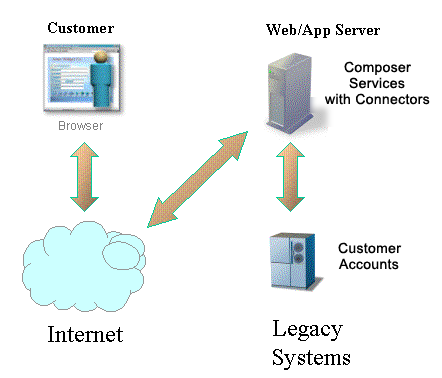
In the simple example depicted below, a buyer and a supplier connect their respective business systems across the Internet using XML and Composer.
Your organization might want to build one or more of the following types of applications using Composer:
Internal Application Integration Services. You may have many applications between which you want to exchange data from diverse sources. For example, you may want to connect an Oracle financial application, an SAP manufacturing application, and an in-house-developed order processing application together. Composer will help you achieve this.
External Web Service Applications. You may have a need to expose a service to trading partners (or other users) via the Web. SOAP services and WSDL-based Web Services can be constructed quickly and easily using Composer. Once you've designed a service in Composer, Composer will actually autogenerate WSDL for the service (and even publish it to a UDDI registry, if you want).
Data Warehousing Applications. Composer works well with data mining and warehousing technologies, since Composer's key function is to map data from disparate sources.
Packaging business applications as Web Services opens up new opportunities for automating workflows. The Web Services Flow Language (one of several emerging standards for workflow automation) provides a standard to which next-generation BPM software will build. The basis for this next-generation technology is workflow built on Web Services. SOAP and XML will be key technological underpinnings of future workflow systems.
Composer plays directly to emerging standards and technologies involving automated workflow. Next-generation workflow engines will "hook up" Web Services (external or internal) to allow sophisticated long-running applications to be built, relying on BPM concepts such as timeouts/retries, conditional links between services, control flow between individual services involving parallel execution, etc. Complex choreographies involving Web Services will be attainable. (Some of the possible choreographies are described in RosettaNet Partner Interface Processes.) Composer will be a valuable tool in creating WSFL-ready applications.
Composer is built upon a simple hub and spoke architecture. The hub is a robust XML transformation engine that accepts XML documents, processes the documents, and returns an XML document. The spokes, or Connect products, are plug-in modules that "XML enable" sources of data that are not natively XML-aware, bringing their data into the hub for processing as XML. These data sources can be anything from legacy COBOL / VSAM managed information to Message Queues to HTML pages.
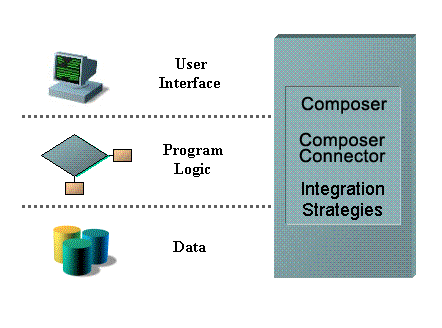
The various Connect products can be categorized by the integration strategy each one employs to XML enable an information source. The integration strategies are a reflection of the major divisions used in modern systems designs for Internet-based computing architectures. Depending on your B2Bi needs, exteNd can integrate your business systems at the User Interface, Program Logic, or Data levels.
In addition to JDBC and LDAP (which are core Connects, included with all versions of Composer), there are additional Connect products:
JMS—Java-based messaging using the Java Message Service standard. This Connect product provides connectivity between Composer applications and any JMS-aware messaging system.
3270 and 5250—Seamless connectivity with two of the most common terminal data stream types.
CICS RPC—Transparent ability to interact with COBOL systems via remote procedure calls through CICS.
Data General—Connect with Data General hosts using DG emulation.
HTML—Screen-scrape web pages and/or remap HTML data to XML data.
Telnet—Screen-scrape and interact with any Telnet data stream.
SAP—Launch Composer-built services when a BAPI-enabled SAP function launches.
NOTE: This guide describes the basic functionality of exteNd Composer. The addition of each Connect increases the features available to you in Composer. These additional features are described in separate user guides that accompany each Connect.
Once you install a Connect product, the Composer GUI will become updated with:
New xObject categories corresponding to the Connection Resource types and Component types specific to the product in question
Specialized component editors and realtime interactive Native Environment Panels (emulation screens) appropriate to the target system
These customizations and additions are automatic with the installation of the Connect and integrate seamlessly into the existing Composer design-time environment.
Should the need arise to update the license string(s) associated with Composer or a Connect product, you can do so at any time, using an intuitive point-and-click UI.
IMPORTANT: When changing a license string, remember that it is necessary to change the string for the design-time environment as well as the server environment. Both procedures are shown below.
 To update a Composer product license string on the design-time machine:
Under the Help menu, select About Composer. A dialog appears.
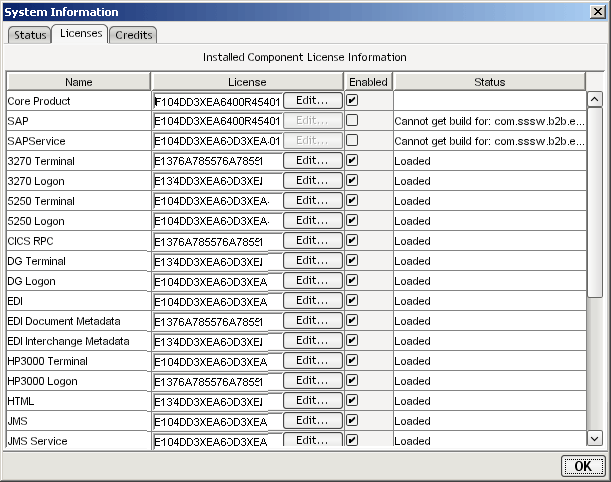
At the bottom of the "About" dialog, click the System button. A new dialog appears:
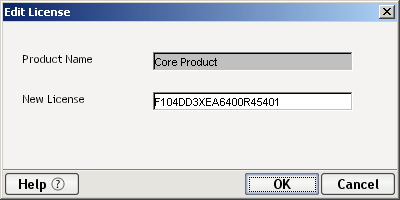
The columns of the table shown on this tab give useful information about the name and status of each Composer product, including those that for some reason didn't load properly. To edit a license string, click the Edit... button next to the appropriate string under the License column. A new dialog will appear.
Click OK to dismiss the dialog.
NOTE: If the string you enter is not correct, you will get an alert dialog at this point. Doublecheck the string and reenter it. If problems persist, Cancel out of all dialogs to return to Composer, then contact Customer Support.
In the System Information dialog, check the Enabled checkbox next to the field you edited, if it is not already checked.
Click OK (or use the Enter key on your keyboard) twice to return to Composer.
If you have not already updated the same license string on the app server, continue now to the following procedure.
When changing license strings in the design-time environment, it is critical that you make corresponding changes in the app-server environment so that Composer Enterprise Server will treat the corresponding product(s) as enabled at runtime.
To update a Composer product license string on the app server:
Launch the app server, if it is not already running. This should also launch Composer Enterprise Server, if it was previously installed.
Go to Composer's default Administrative Console page, which is typically at http://localhost/exteNdComposer/Console.
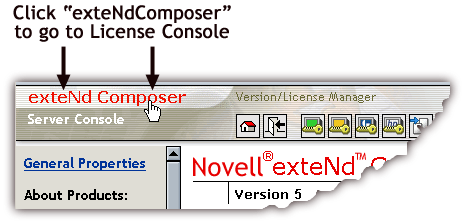
In the upper left corner of the main console page, hover the mouse over the words "exteNd Composer." (See illustration below.)
When you hover the mouse over the words "exteNd Composer," the words change color (to red) and new text, "Version/License Manager," appears off to the side.
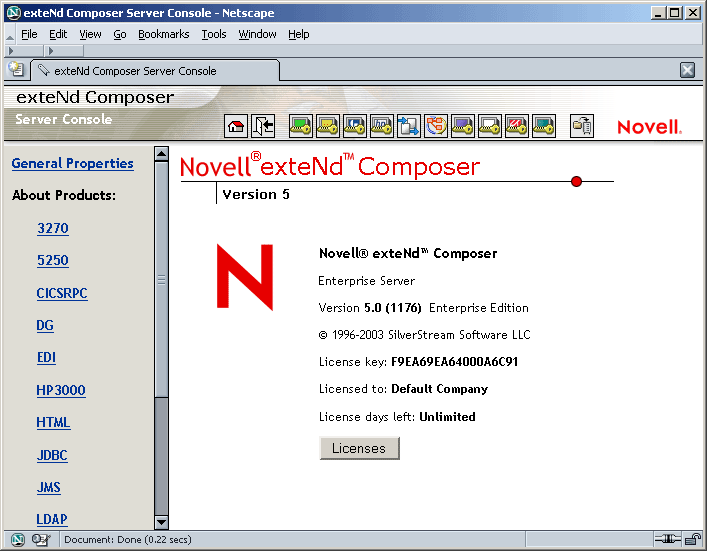
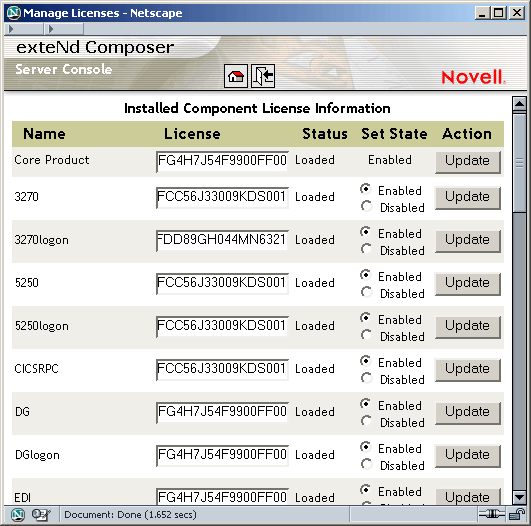
This is the main License Manager screen. In the center of the screen, you will see version and license information for Composer Enterprise Server. To see additional information (and edit license strings), click the Licenses button. A new window appears:
This page shows name and status information for all installed components. Each text field in the License column is editable. Enter a new string as appropriate, then ensure that the correct Enabled/Disabled radio button is active next to the text field in question.
Perhaps the best way to understand Composer is to see it in action. The Composer installation includes a fully functional project, in the Tutorial Solution, that you can step through to see how the application handles a practical business operation. See the \tutorial folder, under the main exteNd Composer installation folder.
For the most up-to-date documentation and tutorials (plus other resources), be sure to consult http://developer.novell.com/extend/composer/.
Copyright © 2004 Novell, Inc. All rights reserved. Copyright © 1997, 1998, 1999, 2000, 2001, 2002, 2003 SilverStream Software, LLC. All rights reserved. more ...