Using standard property values such as object names makes your network more intuitive to both users and administrators. Written standards can also specify how administrators set other property values, such as telephone numbers and addresses.
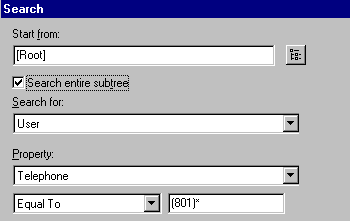
Searching and browsing the Directory rely greatly on the consistency of property values. For instance, the NWAdmin Search window below shows a search for User objects with a telephone number beginning with '(801).'
If some of the values for the Telephone property were entered beginning with 1-801, the search returns an incomplete list of results.
Following is a sample document containing standards for some of the most often used properties. Of course, you only need to have standards for those properties you use. You should distribute the standards document to all administrators responsible for creating or modifying objects.
Object Class | Property |
Standard |
Examples |
Rationale |
User | Login name |
First initial, middle initial (if applicable), last name (all lowercase), 8 characters maximum. All common names are unique in the company |
msmith, bgashler |
Using unique names company-wide is not required by NDS but helps avoid conflicts within the same context (or bindery context). |
User | Last name |
Last name (normal capitalization) |
Van Pelt |
Used for generation of mailing labels. |
Telephone and fax numbers |
Numbers separated by dashes |
US: 123-456-7890 Other: 44-344-123456 |
Used by autodialing software. |
Multiple classes | Location |
Two-letter location code (uppercase), dash, mail stop |
BA-C23 |
Used by interoffice mail carriers. |
Organization | Name |
YourCo for all trees. |
YourCo |
If you have separate trees, a standard Organization name allows for future merging of trees. |
Organizational Unit | Name (based on location) |
Two or three-letter location code, all uppercase |
ATL, CHI, CUP, LA, BAT, BOS, DAL |
|
|
|
|
|
Organizational Unit | Name (based on department) |
Department name or abbreviation |
Sales, Eng |
Short, standard names are used for efficient searching. |
Group | Name |
Descriptive name |
Project Managers |
|
Directory Map | Name |
Contents of the directory indicated by the Directory Map |
DOSAPPS |
|
Profile | Name |
Purpose of the profile |
MobileUser |
|
NetWare Server | Name |
SERV, dash, department, dash, unique number |
SERV-Eng-1 |
NDS requires server names to be unique in the tree |