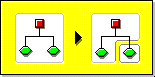
When you create partitions, you make logical divisions of your NDS* tree. These divisions can be replicated and distributed among different NetWare 4* servers in your network.
When you create a new partition, you split the parent partition and end up with two partitions. The new partition becomes a child partition.
For example, if you select an Organizational Unit and create it as a new partition, you split the Organizational Unit and all of its subordinate objects from its parent partition.
The Organizational Unit you select becomes the root of a new partition. The replicas of the new partition will exist on the same servers as the replicas of the parent, and objects in the new partition will belong to the new partition's root object.
A partition consists of at least one container object and its associated subordinate objects. The container at the top of the partition is called the 'root' of the partition.
Creating a partition may take some time, since all of the replicas need to be synchronized with the new partition information.
When you create a new partition, NDS Manager informs you that the Create Partition command was issued to NDS. If you attempt another partition operation while the partition is being created, you will receive a message telling you that the partition is busy.
You can look at the replica list for the new partition and know that the operation is complete when all replicas in the list are in an On state. You must manually refresh the view periodically, or else the states will not appear to change.
When you merge a partition with its parent partition, the chosen partition and its replicas combine with the parent partition. You do not delete partitions--you only merge and create partitions to define how the Directory tree is split into logical divisions.
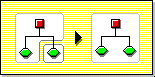
There are several reasons you might want to merge a partition with its parent:
Consider keeping partitions separate if the partitions are large (contain hundreds of objects) because large partitions slow down network response time.
The root partition in the tree cannot be merged because it is the top partition and has no parent partition to merge with.
The partition is merged when the process is completed on the servers. The operation could take a while to complete.
WARNING: Before merging a partition, check the partition synchronization of both partitions and fix any errors before proceeding. By fixing the errors, you can isolate problems in the Directory and avoid propagating the errors or creating new ones.
Make sure all servers that have replicas (including subordinate references) of the partition you want to merge are up before attempting to merge a partition. If a server is down, NDS won't be able to read the server's replicas and won't be able to complete the operation.
If you receive errors in the process of merging a partition, resolve the errors as they appear. Don't try to fix the error by continuing to perform operations--doing so will result in more errors.