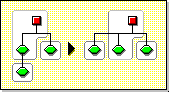
Moving a partition lets you move a subtree in your Directory tree. You can move a partition root object (which is a container object) only if it has no subordinate partitions.
NOTE: When you move a partition, you must follow NDS* containment rules. For example, you cannot move an Organizational Unit directly under the root of the current tree, because the root's containment rules allow Locality, Country, or Organization objects, not Organizational Unit objects.
When you move a partition, NDS changes all references to the partition root object. Although the object's common name remains unchanged, the complete name of the container (and of all its subordinates) changes.
When you move a partition, you should select the option to create an Alias object in place of the container you're moving. Doing so allows users to continue to log in to the network and find objects in their original Directory location.
The Alias object that is created will have the same common name as the moved container and will reference the new complete name of the moved container.
WARNING: If you move a partition and do not create an Alias object in place of the moved partition, users who are unaware of the partition's new location will not easily find that partition's objects in the Directory tree, since they will look for them in their original Directory location.
This might also cause client workstations to fail at login if the workstation NAME CONTEXT parameter is set to the original location of the container in the Directory tree.
Because the context of an object changes when you move it, users whose name context references the moved object need to update their NAME CONTEXT parameter so that it references the object's new name.
(To automatically update users' NAME CONTEXT after moving a container object, use the NCUPDATE utility.)
After moving the partition, if you don't want the partition to remain a partition, merge it with its parent partition.
Make sure your Directory tree is synchronizing correctly before you move a partition. If you have any errors in synchronization in either the partition you want to move or the destination partition, do not perform a move partition operation. First fix the synchronization errors.
You can abort a Create or Merge Partition operation if the operation has not yet progressed past the stage at which the change is committed.
Use this feature to back out of an operation, or if your NDS network returns NDS errors or fails to synchronize following a partition operation.
NOTE: If replicas in your Directory tree experience synchronization errors, an abort operation may not always solve the problem. However, you can use this feature as an initial troubleshooting option.
If a partition operation cannot be completed because a server is down (or otherwise unavailable), either make the server visible to the network so the operation can complete, or attempt to abort the operation. If NDS cannot synchronize because the database is corrupted, you should abort any partition operation in progress.
Many partition operations may take considerable time to fully synchronize across the network, depending on the number of replicas involved, the visibility of servers involved, and the existing wire traffic.
If you get an error that says a partition is busy, it doesn't mean that you should abort the operation. You can usually expect partition operations to complete within 24 hours. If a particular operation fails to complete within this time frame, you should then attempt to abort the operation in progress.
HINT: If you are attempting to abort a merge partition operation, select the partition (the child partition) that is merging with its parent. If you are attempting to abort a create partition operation, select the parent partition.