Select Setup > Customize
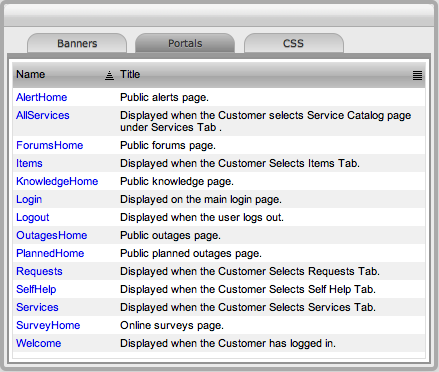
Select the Name hyperlink
The HTML editor appears.
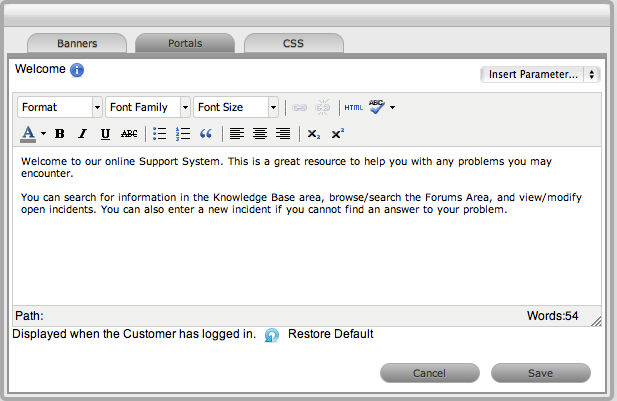
Edit the message as required
Click Save.
All Public Access home page messages and some Customer Portal pages can be customized within the Portals tab.
Knowledge of HTML is required to edit this section. Links to documents and downloads may be added. The content can be customized for the following system Portals:
Name |
Description |
AlertHome |
Accessed by clicking the Alerts link on the system Login screen. |
AllServices |
Visible as the header within the Service Catalog screen of the Services tab in the Customer Portal. |
CustomerForums |
Visible as the header within the Forums page of the Customer Portal. |
ForumsHome |
Visible as the header within the Forums pages of Public Forums. |
Items |
Visible in the Items tab within the Customer Portal. |
KnowledgeHome |
Accessed by clicking the Knowledge Base link on the system Login screen. |
Login |
Visible on the screen where system users enter their login credentials. |
Logout |
Visible on the page displayed when system users log out. |
OutagesHome |
Accessed by clicking the Outage link on the system Login screen of Service Manager installations. |
PlannedHome |
Accessed by clicking the Planned Outage link on the system Login screen of Service Manager installations. |
Requests |
Visible in the Requests tab within the Customer Portal. |
SelfHelp |
Visible in the Self Help tab within the Customer Portal. |
Services |
Visible as the header within the Services tab of the Customer Portal. |
SurveyHome |
Displayed in the public online surveys page. |
Welcome |
Displayed on the landing page when the Customer logs into the Customer Portal. |
To customize a Portal message:
Select Setup > Customize
Select the Name hyperlink
The HTML editor appears.
Edit the message as required
Click Save.
The system can be further customized using cascading style sheets (CSSs) to amend:
Color
Fonts
Tabs
Graphics.
See: CSS Tab.