After allocating a Customer and Item(s) if required, click Next to move to the Details tab
Within
the Request Type drop-down list, select the relevant Quick Call template
displayed below the dashed line
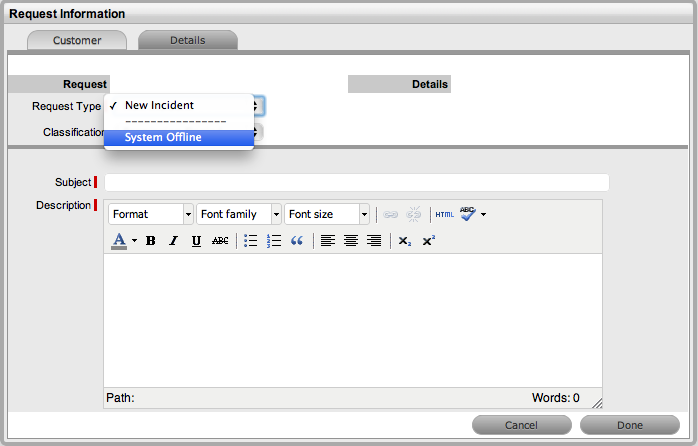
Quick Calls are used for common requests that are logged using a template during the Incident creation process.
If the Quick Call functionality is enabled for the system, after the Customer and if relevant, Item details are assigned to an Incident, within the Details tab the Quick Call options are displayed below the dashed line in the Request Type drop-down list.
If the Item is to be assigned to the Incident using the Quick Call Template configuration, the User simply selects the Next button after assigning the Customer information to the Incident. The application moves to the Details tab and within the Request Type options, the list displayed only includes Templates that have Items preset.
The Next button will only be visible after the Customer has been assigned to the Incident, if Quick Call templates that have Items assigned are configured in the system.
If a specific Item is associated with the Quick Call Request within the Customer tab, the options displayed within the Request Type drop-down list will include Quick Call templates associated with the Item already assigned to the Incident, and templates assigned the Unknown Item.
For Incidents created with multiple Items assigned that use different Items, Quick Call templates with no Items assigned are displayed. For Incidents where the same Item is assigned on multiple occasions, Quick Call templates that have the matching Item and no Items assigned are made available in the Request Type drop-down list.
To create an Incident using a Quick Call:
After allocating a Customer and Item(s) if required, click Next to move to the Details tab
Within
the Request Type drop-down list, select the relevant Quick Call template
displayed below the dashed line
Assign a Classification
Click
Done.
All Incident details will be populated according to the Quick Call
template. Any amendments can be made through the Incident Summary
screen.
When saved, the Incident created using the Quick Call template can be duplicated to minimise data entry requirements for multiple similar Incidents.