Server Profile Form
Display and manage server information and global parameters using the following screens:
These screens are shown and described in the following sections.
If you need information about a specific field when accessing an online form using the UNICON utility, press <F1>
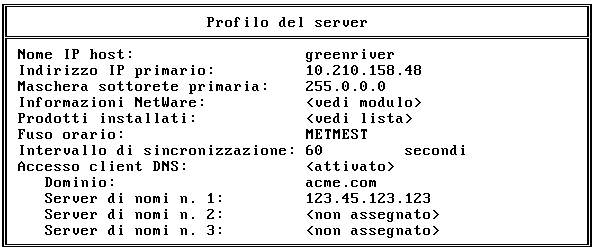
Use the Server Profile form to display global information about the server. A description is given for all the fields.
Figure D-1.
Server Profile Form
From UNICON's Main Menu, choose the following to display the Server Profile form:
The Server Profile form contains the following fields:
Host IP Name ---the IP name of the NetWare host. This field is display only.
Primary IP Address ---the IP address of the NetWare Server. This field is display only.
Primary Subnet Mask ---the subnet mask which, when added to the IP address, provides the IP network number. This field is display only.
NetWare Information ---form displays the following information:
Operating System Version ---the operating system of the specified host. This field is display only.
Current NDS Context ---the context or logical position of the server within the Directory tree.
Current NDS Tree ---the current Directory tree
Installed Products ---list identifies all NetWare installed products by name, version, stratification, and serial number.
Time Zone ---the world time reference for your area. The time zone is used to set time synchronization. The correct time is important for time stamps, such as file modification time. The time zone reference is set during installation of NetWare.
Synchronization Interval ---the interval (in seconds) after which the NetWare server checks the following files in the ETC directory for changes: NFSUSERS, NFSGROUP, and NWPARAMS. When a change is detected, the file is reread into memory. You can modify this field by typing a new value. Valid parameter values are integers from 1 to 1000. The default value is 60 seconds.
DNS Client Access ---this field allows you to enable or disable DNS access. The fields that follow configure access to DNS services.
NOTE: Do NOT disable DNS access at any time.
(DNS) Domain ---this field displays the DNS Domain name entered during installation. You can change the DNS Domain by typing a new Domain name. When you exit the Server Profile form, the utility checks to see that you have entered a valid DNS domain name. If you have not, the utility provides you with the option of returning to the Server Profile form to either change the DNS domain or to disable DNS access.
(DNS) Name Server #1 ---this field displays the primary DNS server you entered during installation. The primary server serves as the primary DNS host database. You can change the primary server by typing a new DNS server name or IP address.
When you exit the Server Profile form, the utility checks to see that you have entered at least one (primary) valid DNS server. If you have not, the utility provides you with the option of returning to the Server Profile form to either change the DNS server or to disable DNS access.
(DNS) Name Server #2 ---the secondary DNS server provides an additional host database if your host request cannot be located in your primary server or if your primary server is down. You do not need to specify a secondary server if all your host entries are available through your primary server. You can enter or modify the secondary server by typing a new DNS server name or IP address.
(DNS) Name Server #3 ---the tertiary DNS server provides an additional host database if your host request cannot be located in your primary or secondary server or if both servers are down. You do not need to specify a tertiary DNS server if all your host entries are available through your primary and secondary servers. You can enter or modify the tertiary server by typing a new DNS server name or IP address.
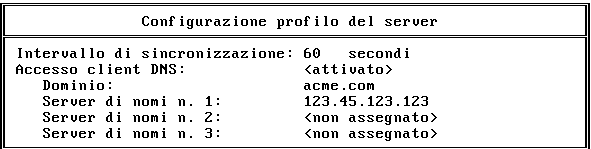
Use the Server Profile Configuration form to change configurable global parameters.
Figure D-2.
Server Profile Configuration Form
From UNICON's Main Menu, choose the following to display the Server Profile Configuration form:
The Server Profile Configuration form includes a subset of the fields on the Server Profile form containing only those fields that can be changed. The previous section provides a description of these fields as part of the overall description of fields in the Server Profile form.
The next section describes how to modify the synchronization interval.