1.4 Context and Thread Groups
The abstractions of context and thread groups are unique to NetWare. These abstractions allow for various kinds of efficiency in the way threads perform, but they also require understanding of certain key concepts to avoid the pitfalls associated with that efficiency. Many if not most of the threads in an NLM require access to important global data. That global data can belong to the thread itself, to the thread group to which the thread belongs, or to an entire NLM. Of particular importance are the data associated with a thread itself and the data associated with its thread group. This thread group data is also called CLib context, and access to that data is essential to most of the threads created by an NLM in the execution of an NLM developer's code. For more detail, refer to Section 1.5, NetWare Global Data and Section 1.8, Context below.
Each NLM can have more than one thread group, and each thread group may consist of one or more threads, as defined by the programmer. When an NLM is started, it has one thread group that includes the thread that executes the user-supplied main function.
Threads are created by the NetWare® API in four ways, which determine the thread group:
- By default, a thread is started at the function main. This thread belongs to a default thread group.
- BeginThread is called, creating a new thread that belongs to the current thread group.
- BeginThreadGroup is called, creating a new thread group with one new thread belonging to it.
- ScheduleWorkToDo is called, creating a new thread that belongs to the current thread group. ScheduleWorkToDo is works on the NetWare 4.x, 5.x, and 6.x OS.
The following figure shows a sample multithreaded NLM configuration. Threads 1 and 2 belong to the same group, Thread Group 1. All other numbered threads belong to Thread Group 2. This means threads 1 and 2 share the same thread group level context information (where their CWD could be \MYDIR1) and threads 3 through n share a different thread group level context (where their CWD could be \MYDIR2). Developers must understand that when there is more than one thread in a thread group, changing the context (such as CWD) for one thread changes the context for all of the threads in the group. For example, if thread 3 changes its CWD, it also changes the CWD of threads 4 through n.
Figure 1-3 Multithreaded NLM
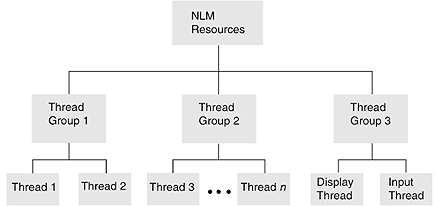
Because the display and input threads work together to handle server commands, the two threads have been assigned to the same thread group. This allows them to share the current working directory and current screen, among other resources.
1.4.1 Creating and Terminating Threads
The BeginThread function creates a thread. A thread can terminate itself using the ExitThread function as follows:
     ExitThread(EXIT_THREAD, ...)
     ExitThread(TSR_THREAD, ...)
A return statement from the original function (the function that was started by BeginThread) also terminates the thread.
1.4.2 Creating and Terminating Thread Groups
A single thread or multiple threads can be grouped to have a unique context.
The BeginThreadGroup function creates a thread group. A thread group can be terminated using the ExitThread function as follows:
  ExitThread(EXIT_THREAD, ...)
  in the last thread in the group
  ExitThread(TSR_THREAD, ...)
  in the last thread in the group,
A return statement from the original function (the function that was started by BeginThread) in the last thread in the group also terminates the thread group.
1.4.3 Interprocess Synchronization
Use local semaphores to control finite resources, to synchronize execution among threads, or to queue threads that need to use critical code sections. A semaphore has an associated signed 32-bit value.
Local semaphores can be used only by NLM applications running on a particular server (as opposed to network semaphores, which can be used by all NLM applications executing on, and all workstations attached to, the server).
The following Execution Thread functions deal with local semaphores:
- CloseLocalSemaphore
- ExamineLocalSemaphore
- OpenLocalSemaphore
- SignalLocalSemaphore
- WaitOnLocalSemaphore
The OpenLocalSemaphore function allocates a semaphore and gives the NLM access (a handle) to it.
A thread can use the WaitOnLocalSemaphore call to gain access to the associated resource or to wait for the resource to become available. WaitOnLocalSemaphore can also be used to cause one thread to wait for another thread to signal it to continue. WaitOnLocalSemaphore decrements the semaphore’s associated value.
When a thread is finished using a semaphore’s resource, it typically calls SignalLocalSemaphore to increment the semaphore’s value. A thread can also use this function to cause a thread that is waiting on a semaphore to resume execution. SignalLocalSemaphore increments the semaphore’s associated value.
The ExamineLocalSemaphore call allows a thread to retrieve a semaphore’s value. The semaphore value can be positive or negative (from -2 31 through 2 31 -1). A negative value means that one or more threads are waiting on the semaphore.