1.8 Context
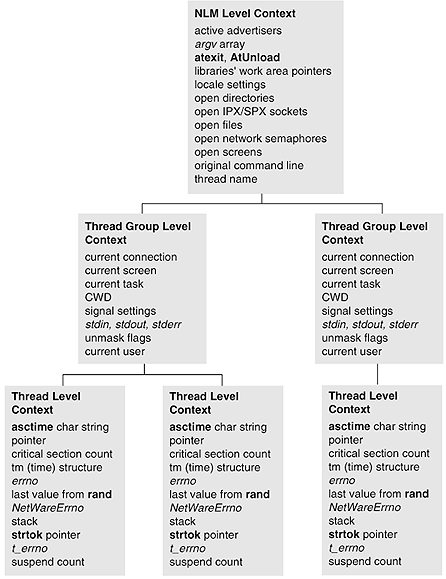
The NetWare API maintains a context for each NLM that is running. The context is divided into three levels of scope: thread level context, thread group level context, and NLM level context. (The following figure illustrates the three levels of context.) Because this context is created using the functions found in CLIB.NLM, it is commonly known as CLIB context.
Figure 1-5 Levels of NLM Context
NOTE:An understanding of context is critical to NLM development. Many errors in NLM applications are caused by developers not understanding context and how it can change.
Threads created in one of the four ways described in Section 1.4, Context and Thread Groups have the CLIB thread level, group level, and NLM level context. These context levels contain different information that is changed by the NetWare API. The context information cannot be changed directly by the programmer.
NOTE:A fifth way to create threads is for the OS to create threads. These threads do not have CLIB context, and must be given CLIB context. This issue is discussed after the following discussion about the context levels.
1.8.1 Thread Level Context
Thread level context is the most private level of context information within an NLM; the context of each thread is available only to each thread. These values are separate for each thread. The data items of one thread cannot be referenced by another thread.
Threads maintain the following context:
- asctime char string pointer
- This character string is only allocated if the asctime, asctime_r function is called. The asctime, asctime_r function returns a char *. (NDK: Program Management)
- critical section count
- This count contains the number of outstanding EnterCritSec calls against a thread.
- ctime, ctime_r, gmtime, gmtime_r, and localtime, localtime_r tm structure pointer ( NDK: Program Management)
- The ctime, ctime_r, gmtime, gmtime_r, and localtime, localtime_r functions return a pointer to a tm structure. Each thread has its own tm structure. The tm structure is allocated only if one of these three functions is called.
- errno
- Some functions set the errno return code to the last error code that was detected.
- Last value from the function rand
- Each thread has its own seed value (to start or continue a sequence of random numbers). (See rand, rand_r (NDK: Program Management).)
- NetWareErrno
- This error code is a NetWare specific error code. Some functions set both NetWareErrno and errno.
- Stack
- This points to the block of memory BeginThread allocated for the thread’s stack.
- strtok pointer
- The strtok function maintains a pointer into the string being parsed (NDK: Program Management).
- t_errno
- This error code is used by TLI functions.
- Suspend count
- This count contains the number of outstanding SuspendThread calls against a thread.
1.8.2 Thread Group Level Context
All of the threads in a thread group share the same thread group level context. Any change that one thread makes to the value of a thread group data item affects all the threads in the group. The context of a thread group, however, is not shared with other thread groups, so changes within one thread group do not affect another group.
Thread groups maintain the following context:
- Current connection
- The current connection number is described in Connection Number and Task Management Concepts (NDK: Connection, Message, and NCP Extensions).
- Current screen
- The current screen is the target of screen I/O functions, as described in Screen Handling Concepts (NDK: NLM Development Concepts, Tools, and Functions).
- Current task
- The current task number is described in Connection Number and Task Management Concepts (NDK: Connection, Message, and NCP Extensions).
- CWD
- Current Working Directory (NDK: NLM Development Concepts, Tools, and Functions, as described in "OS Related Issues" in this documentation.
- Signal settings
- Signal handler functions are set by signal. (The signal and raise functions are discussed in Signal Handling in NDK: NLM Development Concepts, Tools, and Functions.)
- stdin, stdout, stderr
- These data items are the second-level standard I/O handles, as mentioned in Stream I/O Concepts (Single and Intra-File Services).
- umask flags
- These flags are set by the umask (Multiple and Inter-File Services) function.
- Current user
- The "current user" is the user context used by NDS™ functions (NetWare® 4.x, 5.x, and 6.x).
1.8.3 NLM Level Context
The NLM™ level context is shared by all thread groups and threads in the NLM, and these data items have only one value for the entire NLM. The data items are global to all the thread groups and threads in the NLM. Any changes made to the values of NLM global data items affect all the thread groups and threads in the NLM.
NLM applications maintain the following context on a per NLM basis:
- "Active advertisers"
- Each NLM can have a set of "active advertisers" (started by AdvertiseService (NLM)).
- argv array
- This is the argv array passed to main.
- atexit, AtUnload (which signal the SIGTERM handler)
- These functions register functions that are to be called when the NLM exits normally or is unloaded.
- Libraries’ work areas pointers
- These are pointers to the data areas of any NLM libraries that the NLM has called, as described in Library Concepts (NDK: Program Management).
- Locale settings
- These settings are used by the locale functions.
- Open directories
- The set of directories (opened by opendir) the NLM has open.
- Open IPX/SPX/SPX II sockets
- The set of IPX/SPX/SPX II sockets the NLM has open.
- Open files
- The set of files the NLM has open. First-level open files include those opened with open, sopen, and creat. Second-level files include those opened with fopen, fdopen, and freopen (Single and Intra-File Services).
- Open network semaphores
- The set of network semaphores (opened by NWOpenSemaphore (Single and Intra-File Services)) the NLM has open.
- open screens
- The set of screens the NLM has open.
- original command line
- A copy of the original command line when the NLM was started is saved (used by the getcmd function).
- thread name
- This pattern is used for naming new threads (used by BeginThread and BeginThreadGroup).
1.8.4 Context Problems with OS Threads
There are two types of threads running in the NetWare® OS: OS threads (such as callbacks) and CLIB threads (those created by the CLIB.NLM functions). The OS threads are created by the OS in instances such as when the LOAD and the UNLOAD commands are used. CLIB threads are created by calling the NetWare API functions BeginThread, ScheduleWorkToDo, and BeginThreadGroup, and by a default thread starting at the main function. The following figure shows that OS threads are missing the context that CLIB threads have.
Figure 1-6 Context of OS and CLIB Threads
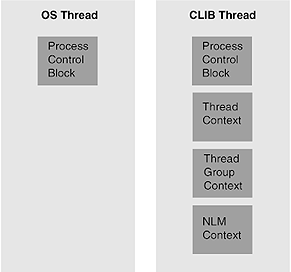
The problem here is that many-but not all-NetWare API functions need to have a context in order to work correctly. For example: printf writes to the calling thread’s current screen. The current screen is kept in the thread’s thread group context. OS threads do not have any CLIB context, so their calls to printf do not produce output anywhere. In more extreme cases, OS threads calling the NetWare API functions that need CLIB context can cause the server to abend.
NOTE:The solution to this problem is to give the OS threads context, thereby turning them into CLIB threads. The method for doing this is presented in the following section.
Developers must be aware of all the situations where NLMs will be running with OS threads instead of CLIB threads, and adjust their code accordingly to give the OS threads CLIB context. The following is a list of conditions where the NLM runs with OS threads:
- In the optional startup function that is specified with the "OPTION START" directive, when using the WLINK linker, or with the "START" directive for NLMLINK
- In the check function that is specified with the "OPTION CHECK" directive when using the WLINK linker, or with the "CHECK" directive for NLMLINK
- In the function registered with FERegisterNSPathParser (might not have the correct context)
- In the library cleanup function set by RegisterLibrary
In the following conditions, threads might or might not have CLIB context, depending on the context specifier:
- In functions registered with RegisterForEvent
- In functions registered with ScheduleSleepAESProcessEvent
- In functions registered with ScheduleNoSleepAESProcessEvent
- In the function registered with RegisterConsoleCommand (see Adding Console Commands: Example.)
1.8.5 Context Solutions for OS Threads
Two solutions to these context problems are as follows:
NetWare 3.11, 4.x, 5.x, and 6.x solution: read group ID of one of the groups, such as for the default thread group created for the main function. (You might also want to create a global variable for each of the thread groups that are created.) The thread group ID of the current thread group can be obtained with GetThreadGroupID, as shown in the following example:
  #include <process.h>
     int globalThreadGroupID;

     main()
     {
        globalThreadGroupID = GetThreadGroupID();
        ...
     }
Then, when you have an OS thread running, you give the OS thread context using SetThreadGroupID as follows:
  oldTGID = SetThreadGroupID(globalThreadGroupID); /* do work */
  ...
  SetThreadGroupID(oldTGID); /* always set back the thread group ID */
At this point, the NetWare® API takes the OS thread and gives it context, just as if it had been a CLIB thread. This lets you use the NetWare API functions that need context.
IMPORTANT:You must be careful when using the thread group ID that other threads are using. Changes to the context affect all threads in that group.
NetWare 4.x, 5.x, and 6.x solution: CLIB threads in the NetWare 4.x, 5.x, and 6.x OS have been given a context specifier that gives these threads the ability to automatically give context to callbacks (OS threads that are registered to be called to run when specific conditions occur) that they register. The context that is given to the callbacks when they are registered is determined by the setting of the registering thread’s context specifier. The context specifier can be set to one of the following settings:
- NO_CONTEXT
- Use this when you don’t want callbacks
to be automatically registered with a CLIB context. The advantage
here is that you avoid the overhead needed for setting up CLIB context.
The disadvantage is that without the context, the callback is only
able to call NetWare API functions that manipulate data or manage
local semaphores.
Call SetThreadGroupID and pass in a valid thread group ID. Use this once inside your callback to give your callback thread CLIB context.
- USE_CURRENT_CONTEXT
- Use this to register callbacks to have the thread group context of the registering thread.
- A valid thread group ID
- Use this when you want the callbacks to have a different thread group context than the thread that schedules them.
You can determine the existing setting of the registering thread’s context specifier by calling GetThreadContextSpecifier. Call SetThreadContextSpecifier to set a thread’s context specifier.
When a new thread is started with BeginThread, BeginThreadGroup, or ScheduleWorkToDo, its context specifier is set to USE_CURRENT_CONTEXT by default.
Using this solution, if you want the registered thread to have the thread group context of the registering thread, you would set the registering thread’s context specifier to USE_CURRENT_CONTEXT (if it has been changed from the default) and then register the function that will run as a callback.
NOTE:The drawback to using this solution is that the context specifier is specific to the NetWare 4.x, 5.x, and 6.x OS. If you use this solution, your NLM will not run on the NetWare 3.11 OS.