2.1 eDirectory Names
eDirectory names are made up of a series of components and their respective types. A typical eDirectory name would look something like CN=JRoss.OU=Engineering.O=ACME. The components of this name represent objects in the tree and their types represent the naming attribute of that object. So in this example, JRoss is the name of a user object and CN is the naming attribute for a user object. Engineering is the name of an Organizational Unit and OU is the naming attribute for an Organizational Unit. Each component in the name is separated by a period.
See Also:
2.1.1 Hierarchical Naming
The arrangement of names in the eDirectory tree reflects the hierarchical relationships that exist among objects. The following figure shows an example of an eDirectory tree. All the objects of this particular tree are subordinate to the Organization (O) WimpleMakers, which is referred to as the partition root.
Figure 2-1 Example eDirectory Tree
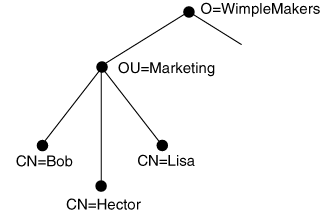
WimpleMakers is actually subordinate to an object called [root] All eDirectory trees have [root] as the topmost object.
The Organization Unit (OU) Marketing is subordinate to WimpleMakers. At the bottom of the tree are the names of three employees.
As you study this tree, you can observe several things. First, if you begin with any object in the tree and follow the names back to the root, you trace a unique path of names. For example, the naming path for Bob would include Bob, Marketing, and WimpleMakers. The complete naming path from a particular object to the root of eDirectory is called the object’s distinguished name (DN), or complete name. The distinguished name forms a unique reference that identifies the location and identity of an object in eDirectory.
Another feature of the tree is that each name is identified by type. The name WimpleMakers is of type Organization, Marketing is of type Organization Unit, and so on. The Schema specifies the rules for object relativity within the tree. For example, an object of type Common Name can be subordinate to an Organizational Unit, but not the other way around.
The individual name assigned to an object is called the object’s relative distinguished name (RDN), or partial name. The partial name must be unique in relation to the object’s superior. In our example, there can be only one object named Marketing that is subordinate to WimpleMakers, one object named Bob that is subordinate to Marketing, and so on.
A relative distinguished name can include the name’s type specification. The type and its value are joined by an equal sign:
Common Name=Bob
Using an abbreviated attribute type, the above name is:
CN=Bob
If a partial name includes more than one naming attribute, the names are separated by a plus sign:
L=NPD+S=Utah
When expressing part or all of a complete name, the partial names are separated by periods. A complete name requires type specifications for each partial name that can be specified explicitly, as shown below:
CN=Bob.OU=Marketing.O=WimpleMakers
Names without the types explicitly shown are called typeless names as shown below:
Bob.Marketing.WimpleMakers
The types are implied based on the default context:
Components of a complete name that are further from the root are referred to as less significant, while those closer to the root are more significant. Thus, Bob is the least significant component in the complete name above, while WimpleMakers is the most significant.
eDirectory reserves a few character symbols, for denotative purposes. The reserved characters are the period (.), the comma (,), the equal sign (=), the plus sign (+), and the backslash (\).
If these characters are a part of a name, then they must be escaped with a backslash (\). To show the period in “Inc.” you would use the backslash, as shown in the following example:
    OU=Bearskins,Busbies,and Green Berets,Inc\..
        O=WimpleMakers
2.1.2 Alias Naming
An alias is a name that can be used as a substitute name for identifying an object. The alias provides an alternate naming path for locating the object in eDirectory. Any object in eDirectory can be aliased. If an object has subordinates, its alias appears to have the same subordinates. However, the location of the alias itself must be a leaf node (a node having no subordinates) in the eDirectory tree.
The following figure illustrates how aliases can be used. In this example, the server FS1 is found in the subtree Engineering. However, if users in the Marketing subtree access this server often, they may find it convenient to create an alias for the server under Marketing. That way, the server FS1 can be referenced relative to a local name context (“OU=Marketing.O=WimpleMakers”) that is already set rather than establishing a new context (“OU=Engineering.O=WimpleMakers”).
Figure 2-2 Using Alias Names
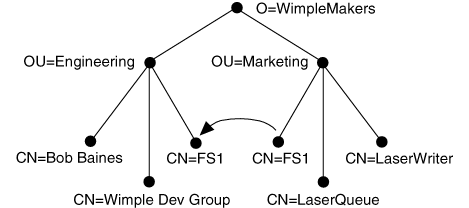
Aliasing is a convenience that has many applications. For example, aliases can be used to simplify searches of eDirectory. An administrator could create aliases in a particular subtree for all the modems on the network so users would have to search only that one subtree to receive information about all available modems.
2.1.3 eDirectory Context
An eDirectory context is a reference point into an eDirectory tree. The complete name of the container pointed to is called the name context, and serves as a default naming path for eDirectory operations. When a workstation’s requester is loaded, the name that is used for the context comes from the client networking configuration files.
An object’s context can be expressed either as a Distinguished Name (DN) or as a Relative Distinguished Name (RDN). The DN is similar to a file name with the full path. The RDN is the partial name relative to the current context. For example: a user JSmith exists in the container HR.Novell. If you set the current context to HR.Novell, the RDN is JSmith and the DN is JSmith.HR.Novell. However, if you set the current context to Novell, the RDN is JSmith.HR and the DN is still JSmith.HR.Novell. In fact, the DN is always the same regardless of the current context.
Understanding how DNs and RDNs are used is important, especially if you are writing an application that is going to “walk the tree.” If you save the RDN and then change the current context, that RDN becomes invalid and an error is returned. However, if an object with the same CN exists in the new context, you don’t get an error, but you could get the wrong data. For example, you store the name JSmith and your current context is HR.Novell. You then change the current context to Security.Novell and there happens to be a JSmith whose DN is JSmith.Security.Novell. You would get the results of JSmith.Security.Novell and not JSmith.HR.Novell. No error would be returned, but you would receive the wrong data.
The name context is implemented as a value in the operation’s eDirectory context variable that is created with NWDSCreateContextHandle. Initially, the value of the name context is taken from a global name context created as follows:
- If the application is running on a workstation, the requester’s configuration file is used to initialize the global name context.
- If the application is an NLM™ application, the global name comes from the server’s Bindery context setting that is set with the set bindery context = command. This setting can be entered at the system console, or it can be placed in the server’s STARTUP.NCF file.
When an application creates an eDirectory context, the name context field takes its initial value from the global name context. Thereafter, the name context for the current session can be modified using the eDirectory functions. The eDirectory functions do not modify the requester’s context setting or the server’s bindery context.
Any partial names submitted by a client for a particular request can be expressed relative to the requester’s name context. The client agent examines each name and expands it accordingly before sending the name to eDirectory.
The following example shows how the name context is typically applied to input name:
If the name context is
OU=Marketing.O=WimpleMakers
and the client submits the partial name
CN=Bob
the client agent appends the name context to the partial name, thus forming the complete name
CN=Bob.OU=Marketing.O=WimpleMakers
2.1.4 Character Encoding
Character sets familiar to humans are represented in computers by a sequence of bit settings. A complete set of computer representations mapped to human readable characters is stored in memory in what is called a code page.
Unfortunately, the same set of characters may have different computer representations. One computer might send a set of bits with binary value 65 representing the letter “A” but the receiving computer’s code page interprets 65 as something entirely different.
To resolve this and other multilingual translation problems, a group of computer companies formed the Unicode* Consortium. They established a 16-bit representation for almost every character used in any language. Subsequently, the ISO adopted the Unicode set as a subset of its 10646 specification, which is meant to do the same thing.
All eDirectory information is stored and transmitted in Unicode representation. Since not all computers today know how to convert Unicode into human readable characters, a translation from Unicode to the computer’s local code page representation is often needed. By default, the library converts all strings from Unicode to the local code page representation, but this conversion can be disabled if desired.