4.3 NWEntries Collection
The NWEntries collection allows you to manage and reference NWEntry objects. It lets you add and delete entries within the specified NDS tree.
Use this object to:
-
Create and delete entries in NDS objects.
-
Return a count of the objects in the collection.
-
Select the object from the collection.
4.3.1 Object Diagram
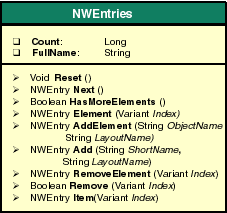
4.3.2 Count property
Returns the number of Entry objects in the collection.
object.Count
Type
Long.
Attributes
Read-only.
Example
This example returns the number of entries in NDS and prints the shortname of all the entries.
Set dirObj = CreateObject("UCX:NWDIR")
Set Entry = dirObj.Entries
Count = Entry.Count
Print "Total Entries: "&Count
For each Entry In dirobj.Entries
  Print "The entry is"&Entry.ShortName
Next
See Also
4.3.3 FullName property
Gives the full name of the context containing the entries.
Syntax
object.FullName
Type
String.
Attributes
Read-only.
Example
This example returns the full name of the context.
Set dirObj = CreateObject("UCX:NWDIR")
Set Entries = dirObj.Entries
Count = Entries.Count
Print "FullName: "&Entries.FullName
Print "The number of entries is" &Count
See also
4.3.4 Reset method
Initializes for a search of all the NWEntry objects.
Syntax
object.Reset()
Parameters
None.
Return Values
Void.
Example
This example shows how to reset entries in NDS.
Set nwdir=CreateObject("UCX:NWDIR")
nwdir.Login ("User", "Password")
Set entries = nwdir.Entries
Print "Total number of entries: "&Entries.Count
Entries.Reset()
While Entries.HasMoreElements()
    Set Entry = Entries.Next()
    Print Entry.ShortName
Wend
See Also
4.3.5 Next method
Gets the NWEntry object.
Syntax
object.Next()
Parameters
None.
Return Values
NWEntry.
Example
This example list all the objects in the current NDS.
Set nwdir=CreateObject("UCX:NWDIR")
nwdir.Login("User", "password")
Set entries = nwdir.Entries
Print "Total number of entries: "&Entries.Count
Entries.Reset()
While Entries.HasMoreElements()
    Set Entry = Entries.Next()
    Print Entry.ShortName
Wend
4.3.6 HasMoreElements method
Determines whether or not any more Entry objects exist in the collection based on the specified path.
Syntax
object.HasMoreElements()
Parameters
None.
Return Values
Boolean. Returns TRUE, if there are any more NWEntry objects.
Example
This example lists all the objects in the current NDS.
Set nwdir=CreateObject("UCX:NWDIR")
nwdir.Login ("User", "password")
Set entries = nwdir.Entries
Print "Total number of entries: "&Entries.Count
Entries.Reset()
while Entries.HasMoreElements()
    Set Entry = Entries.Next()
    Print Entry.ShortName
Wend
4.3.7 Element method
Returns the specified NWEntry object.
Syntax
object.Element(
  Index As Variant)
Parameters
- Index
-
Index can be numeric or a string (object name). The string value represents the element name and the integer value gives the iterated number of that element starting from 0 to Count-1.
Return Values
NWEntry.
Example
This example gets the specified NWEntry object.
Set nwdir=CreateObject("UCX:NWDIR")
nwdir.Login ("User", "password")
’Enter the full name of the location where the new entry is
to be created
nwdir.Fullname = "NDS:\\ACMECorporation\Sales\Newyork"
Set entries = nwdir.Entries
Print "Total number of entries: "&Entries.Count
Entries.Reset()
While Entries.HasMoreElements()
    Set Entry = Entries.Next()
    Print Entry.ShortName
Wend
’Create a new User object
Set newEntry=Entries.Add ("TestUser3","User")
’Set the mandatory fields and create the entry
newEntry.SetFieldValue "Surname", "Test Surname"
newEntry.Update()
’Confirm the creation of test user
Entries.Reset()
’Enter the Object name or the iterated index
Set TestUser=Entries.Element (1)
Print TestUser.FullName
See Also
4.3.8 Item method
Returns the specified NWEntry object.
Syntax
object.Item(
  Index As Variant)
Parameters
- Index
-
Returns the specified NWEntry object.
Return Values
NWEntry.
Example
This example gets the specified NWEntry object.
Set nwdir=CreateObject("UCX:NWDIR")
’Enter the username and password
nwdir.Login ("User", "password")
’Enter the NDS context
nwdir.Fullname = "NDS:\\ACMEcopporation\sales"
Set entries = nwdir.Entries
Print "Total number of entries: "&Entries.Count
Entries.Reset()
While Entries.HasMoreElements()
    Set Entry = Entries.Next()
    Print Entry.ShortName
Wend
’Create a new User object
Set newEntry=Entries.Add ("TestUser3", "User")
’Set the mandatory fields and create the entry
newEntry.SetFieldValue "Surname", "Test Surname"
newEntry.Update()
’Confirm the creation of test user
Entries.Reset()
Set TestUser=Entries.Item("TestUser3")
Print TestUser.FullName
4.3.9 AddElement method
Adds an entry into the NDS tree.
Syntax
object.AddElement(
  ShortName As String,
  LayoutName As String)
Parameters
- ShortName
-
Short name of the object.
- LayoutName
-
The NDS class name.
Return Values
NWEntry.
Remarks
To add an entry into the NDS tree, call AddElement method. Then modify the values of the mandatory fields for the resulting NWEntry object. Then call update method, which actually creates an entry object in the NDS tree.
Example
This example shows how to create and add an entry into NDS.
nwdir.Login ("User","password")
Set entries = nwdir.Entries
Print "Total number of entries: "&Entries.Count
Entries.Reset()
While Entries.HasMoreElements()
    Set Entry = Entries.Next()
    Print Entry.ShortName
Wend
’Create a new User object
Set newEntry=Entries.AddElement("TestUser1", "User")
’Set the mandatory fields and create the entry
newEntry.SetFieldValue "Surname", "Test Surname"
newEntry.Update()
’Confirm the creation of test user
Entries.Reset()
Set TestUser=Entries.Element ("TestUser1")
Print " The new user is"&TestUser.FullName
See Also
4.3.10 Add method
Adds an entry in the NDS tree.
Syntax
object.Add(
  ShortName As String,
  LayoutName As String)
Parameters
- ShortName
-
Short name of the object.
- LayoutName
-
The NDS class name.
Return Values
NWEntry.
Remarks
To add an entry in the NDS tree, call addElement method. Then modify the values of the mandatory fields for the resulting NWEntry object. Then call update method, which actually creates an entry object in the NDS tree.
Example
This example shows how to create and add an entry into NDS.
Set nwdir=CreateObject("UCX:NWDIR")
’Enter the login name and password
nwdir.Login ("User", "password")
Set entries = nwdir.Entries
Print "Total number of entries: "&Entries.Count
Entries.Reset()
While Entries.HasMoreElements()
      Set Entry = Entries.Next()
    Print Entry.ShortName
Wend
’Create a new User object
Set newEntry=Entries.Add ("TestUser", "User")
’Set the mandatory fields and create the entry
newEntry.SetFieldValue "Surname", "Test Surname"
newEntry.Update()
’Confirm the creation of test user
Entries.Reset()
Set TestUser=Entries.Element ("TestUser")
Print TestUser.FullName
’Delete the added entry and confirm deletion
status = Entries.RemoveElement("TestUser")
Print "The deletion status is "&status
See Also
4.3.11 RemoveElement method
Removes an element from the NDS tree.
Syntax
object.RemoveElement(
  Index As Variant)
Parameters
- Index
-
Index can be numeric or a string (object name).
Return Values
Boolean.
Example
This example shows how to remove an entry from NDS.
Set nwdir=CreateObject("UCX:NWDIR")
’Enter the login name and password
nwdir.Login ("User", "password")
Set entries = nwdir.Entries
Print "Total number of entries: "&Entries.Count
Entries.Reset()
While Entries.HasMoreElements()
      Set Entry = Entries.Next()
    Print Entry.ShortName
Wend
’Create a new User object
Set newEntry=Entries.Add ("TestUser", "User")
’Set the mandatory fields and create the entry
newEntry.SetFieldValue "Surname", "Test Surname"
newEntry.Update()
’Confirm the creation of test user
Entries.Reset()
Set TestUser=Entries.Element ("TestUser")
Print TestUser.FullName
’Delete the added entry and confirm deletion
status = Entries.RemoveElement("TestUser")
Print "The deletion status is "&status
See Also
4.3.12 Remove method
Removes the specified object from the current tree.
Syntax
object.Remove(
  Index As Variant)
Parameters
- Index
-
Index can be numeric or a string (object name).
Return Values
Boolean.
Example
This example shows how to remove an object from NDS.
Set nwdir=CreateObject("UCX:NWDIR")
’Enter the login name and password
nwdir.Login ("User", "password")
Set entries = nwdir.Entries
Print "Total number of entries: "&Entries.Count
Entries.Reset()
While Entries.HasMoreElements()
      Set Entry = Entries.Next()
    Print Entry.ShortName
Wend
’Create a new User object
Set newEntry=Entries.Add ("TestUser", "User")
’Set the mandatory fields and create the entry
newEntry.SetFieldValue "Surname", "Test Surname"
newEntry.Update()
’Confirm the creation of test user
Entries.Reset()
Set TestUser=Entries.Element ("TestUser")
Print TestUser.FullName
’Delete the added entry and confirm deletion
status = Entries.Remove("TestUser")
Print "The deletion status is "&status