4.7 NWFilter Object
This object represents the search filter which can be used to search NDS. You can use this object to set various conditions for a search; such as the context, scope, and also set options to dereference object aliases.
4.7.1 Object Diagram
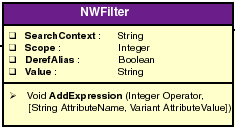
4.7.2 SearchContext property
Accepts the object name to search.
Syntax
object.SearchContext
Type
String.
Attributes
Read-write.
Remarks
Default value is fullName of the NDS object.
Example
This example sets search context, scope, filter and performs a search for the specified user.
’List all the users whose names start with the word User3
Set nwdir=CreateObject("UCX:NWDIR")
nwdir.Login ("User", "Password")
Set Filter1 = nwdir.Filter()
’Search entire subtree and derefrence the alias objects
Filter1.Scope = SEARCH_SUBTREE
Filter1.DerefAlias = FALSE
Filter1.AddExpression FTOK_APPROX, "CN", "User3"
Filter1.AddExpression FTOK_END
Print "Filter Expression " &Filter1.Value
Print "Default Search Context: "&Filter1.SearchContext
Set Entries = nwdir.Search(Filter1)
For each Entry in Entries
    Print Entry.FullName
Next
4.7.3 Scope property
Accepts the scope of the search.
Syntax
object.Scope
Type
Integer.
Attributes
Read-write.
Remarks
This can be one of the search scope constants defined here. The default value is SEARCH_SUBTREE. See also Section A.13, Filter/Search Scope Constants.
Example
This example sets search context, scope, filter and performs a search for the specified user.
’List all the users whose names start with the word User3
Set nwdir=CreateObject("UCX:NWDIR")
nwdir.Login ("User", "Password")
Set Filter1 = nwdir.Filter()
’Search entire subtree and derefrence the alias objects
Filter1.Scope = SEARCH_SUBTREE
Filter1.DerefAlias = FALSE
Filter1.AddExpression FTOK_APPROX, "CN", "User3"
Filter1.AddExpression FTOK_END
Print "Filter Expression " &Filter1.Value
Print "Default Search Context: "&Filter1.SearchContext
Set Entries = nwdir.Search(Filter1)
For each Entry in Entries
    Print Entry.FullName
Next
4.7.4 DerefAlias property
If true, de-references alias objects.
Syntax
object.DerefAlias
Type
Boolean.
Attributes
Read-write.
Remarks
By default this property will be set to FALSE.
Example
This example sets search context, scope, filter and performs a search for the specified user.
’List all the users whose names start with the word User3
Set nwdir=CreateObject("UCX:NWDIR")
nwdir.Login ("User", "Password")
Set Filter1 = nwdir.Filter
’Search entire subtree and derefrence the alias objects
Filter1.Scope = SEARCH_SUBTREE
Filter1.DerefAlias = TRUE
Filter1.AddExpression FTOK_APPROX, "CN", "User3"
Filter1.AddExpression FTOK_END
Print "Filter Expression " &Filter1.Value
Print "Default Search Context: "&Filter1.SearchContext
Set Entries = nwdir.Search(Filter1)
For each Entry in Entries
    Print Entry.FullName
Next
4.7.5 Value property
Filter expression represented by this object.
Syntax
object.Value
Type
String.
Attributes
Read-only.
Remarks
Represents the filter expression contained in this filter object.
Example
This example sets search context, scope, filter and performs a search for the specified user.
’List all the users whose names start with the word User3
Set nwdir=CreateObject("UCX:NWDIR")
nwdir.Login ("User", "Password")
Set Filter1 = nwdir.Filter()
’Search entire subtree and derefrence the alias objects
Filter1.Scope = SEARCH_SUBTREE
Filter1.DerefAlias = FALSE
Filter1.AddExpression FTOK_APPROX, "CN", "User3"
Filter1.AddExpression FTOK_END
Print "Filter Expression " &Filter1.Value
Print "Default Search Context: "&Filter1.SearchContext
Set Entries = nwdir.Search(Filter1)
For each Entry in Entries
    Print Entry.FullName
Next
See Also
4.7.6 AddExpression method
Helps in building the search filter.
Syntax
object.AddExpression(
  Operator As Integer),
  [AttributeName As String],
  [AttributeValue As Variant])
Parameters
- Operator
-
Any of the operator constants.
- AttributeName
-
Name of the attribute. This is the first operand.
- Value
-
Value of the attribute. This is the second operand.
Return Values
Void.
Remarks
Following is a sample expression:
NOT(Surname EQ "brown").
Following is the sequence of calls to build the expression.
Object.addExpression(FTOK_NOT)
Object.addExpression(FTOK_LPAREN)
Object.addExpression(FTOK_ANAME,"surname")
Object.addExpression(FTOK_EQ)
Object.addExpression(FTOK_AVAL,"brown")
Object.addExpression(FTOK_RPAREN)
Object.addExpression(FTOK_END)
See also Section A.13, Filter/Search Scope Constants and Section A.23, Operator Constants
Example
This example sets search context, scope, filters and performs a search for the specified user.
’List all the users whose names start with the word User3
Set nwdir=CreateObject("UCX:NWDIR")
nwdir.Login "User", "Password"
Set Filter1 = nwdir.Filter
’Search entire subtree and derefrence the alias objects
Filter1.Scope = SEARCH_SUBTREE
Filter1.DerefAlias = FALSE
Filter1.AddExpression FTOK_APPROX, "CN", "User3"
Filter1.AddExpression FTOK_END
Print "Filter Expression " &Filter1.Value
Print "Default Search Context: "&Filter1.SearchContext
Set Entries = nwdir.Search(Filter1)
For each Entry in Entries
    Print Entry.Fullname
Next