4.10 NWFieldTypes Collection
The NWFieldTypes collection represents a set of NWFieldType objects. The collection allows you to add, delete, count, and access layouts.
Use this object to:
-
Create a new field type.
-
Return a count of the objects in the collection.
-
Select the object from the collection.
4.10.1 Object Diagram
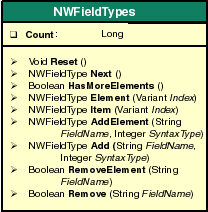
4.10.2 Count property
Gives the count of field types in the NDS Schema.
Syntax
object.Count
Type
Long.
Attributes
Read-only.
Example
This example lists the number of FieldTypes in the NDS schema.
Set nwdir=CreateObject("UCX:NWDIR")
nwdir.Login ("User", "Password")
Set FieldTypes = nwdir.FieldTypes
Print "Total number of field types: "&FieldTypes.Count
4.10.3 Reset method
Initializes the collection for the enumeration with all the NWFieldType objects.
Syntax
object.Reset()
Return Values
Void.
Example
This example lists the number of FieldTypes in the NDS schema.
Set nwdir=CreateObject("UCX:NWDIR")
nwdir.Login ("User", "Password")
Set FieldTypes = nwdir.FieldTypes
Print "Total number of field types: "&FieldTypes.Count
FieldTypes.Reset()
While FieldTypes.HasMoreElements()
    Set FieldType=FieldTypes.Next()
    Print FieldType.Name
Wend
4.10.4 Next method
Gets the next NWFieldType object.
Syntax
object.Next()
Parameters
None.
Return Values
NWFieldType.
Example
This example gets the next Field Type object in the collection.
Set nwdir=CreateObject("UCX:NWDIR")
nwdir.Login ("User", "Password")
Set FieldTypes = nwdir.FieldTypes
Print "Total number of field types: "&FieldTypes.Count
FieldTypes.Reset()
While FieldTypes.HasMoreElements()
    Set FieldType=FieldTypes.Next()
    Print FieldType.Name
Wend
4.10.5 HasMoreElements method
Determines whether or not any more NWFieldType objects exist in the collection based on the specified path.
Syntax
object.HasMoreElements()
Parameters
None.
Return Values
Boolean.
Remarks
Returns TRUE, if the collection contains some more NWFieldType objects.
Example
This example checks whether there any more Field Type object in the collection.
Set nwdir=CreateObject("UCX:NWDIR")
nwdir.Login ("User", "Password")
Set FieldTypes = nwdir.FieldTypes
Print "Total number of field types: "&FieldTypes.Count
FieldTypes.Reset()
While FieldTypes.HasMoreElements()
    Set FieldType=FieldTypes.Next()
    Print FieldType.Name
Wend
4.10.6 Element method
Returns the NWFieldType object for the specified index.
Syntax
object.Element(
  Index As Variant)
Parameters
- Index
-
Index can be either numeric or string. String index represents the name of NWFieldType object.
Return Values
NWFieldType.
Example
This example gets the specified Field Type object in the collection; here, the Surname.
Set nwdir=CreateObject("UCX:NWDIR")
nwdir.Login ("User", "Password")
Set FieldTypes = nwdir.FieldTypes
Print "Total number of field types: "&FieldTypes.Count
FieldTypes.Reset()
While FieldTypes.HasMoreElements()
    Set FieldType=FieldTypes.Next()
    Print FieldType.Name
Wend
’Display information about the field type "Surname"
Set SurnameField = FieldTypes.Element ("Surname")
Print SurnameField.SyntaxName
4.10.7 Item method
Returns the NWFieldType object for the specified index.
Syntax
object.Item(
  Index As Variant)
Parameters
- Index
-
Index can be either numeric or string. String index represents the name of NWFieldType object.
Return Values
NWFieldType.
Example
This example gets the specified Field Type object in the collection; here, the Surname.
Set nwdir=CreateObject("UCX:NWDIR")
nwdir.Login ("User", "Password")
Set FieldTypes = nwdir.FieldTypes
Print "Total number of field types: "&FieldTypes.Count
FieldTypes.Reset()
While FieldTypes.HasMoreElements()
    Set FieldType=FieldType.Next()
    Print FieldType.Name
Wend
’Display information about the field type "Surname"
Set SurnameField = FieldTypes.Item ("Surname")
Print SurnameField.SyntaxName
4.10.8 AddElement method
Creates a new field in the NDS Schema.
Syntax
object.AddElement(
  FieldName As String),
  (SyntaxType As Integer)
Parameters
- FieldName
-
Name of the desired field.
- SyntaxType
-
The NDS syntax type.
Return Values
NWFieldType.
Example
This example shows how to add a field into the NDS Schema.
Set nwdir = CreateObject("UCX:NWDIR")
nwdir.Login ("user", "password")
’Create object or attribute for relating the schema and the
create the schema
’ Build required parameters
MandatoryFields = Array("CN")
ContainmentLayouts = Array("Organization", "Organizational
Unit")
NamingFields = Array("CN")
LayoutName = "NSN Layout"
’ Create a new Layout
nwdir.Layouts.Add (LayoutName, "Top", MandatoryFields,
ContainmentLayouts, NamingFields)
  If (Err.Number = 0) Then
    Print "New Layout Created Succesfully"
  Else
    Print "Failed to Create New Layout"
  End If
’Create a new field type
 newFieldTypeName = "NSN FieldType"
 Set fieldtypes = nwdir.fieldtypes
 fieldtypes.AddElement(newFieldTypeName, SYN_CI_STRING)
 ’Add new field type into the NSN Layout
 Set newLayout = nwdir.layouts.Element("NSN Layout")
 newLayout.Fields.Add newFieldTypeName
 If (Err.number = 0) Then
    Print "New field is added to the layout"
 Else
    Print "Failed to new Field"
 End If
4.10.9 Add method
Creates a new field in the NDS Schema.
Syntax
object.Add(
  FieldName As String),
  (SyntaxType As Integer)
Parameters
- FieldName
-
Name of the desired field.
- SyntaxType
-
Returns the NDS syntax type.
Return Values
NWFieldType.
Example
This example shows how to add a field into the NDS Schema.
Set nwdir = CreateObject("UCX:NWDIR")
nwdir.Login ("user", "password")
’Create object or attribute for relating the schema
’ Build required parameters
MandatoryFields = Array("CN")
ContainmentLayouts = Array("Organization", "Organizational
Unit")
NamingFields = Array("CN")
LayoutName = "NSN Layout"
’Create a new Layout
nwdir.Layouts.Add (LayoutName, "Top", MandatoryFields,
ContainmentLayouts, NamingFields)
  If (Err.Number = 0) Then
    Print "New Layout Created Succesfully"
Else
    Print "Failed to Create New Layout"
End If
’Create a new field type
  newFieldTypeName = "NSN FieldType"
 Set fieldtypes = nwdir.Fieldtypes
 fieldtypes.AddElement(newFieldTypeName, SYN_CI_STRING)
 ’Add new field type into the NSN Layout
 Set newLayout = nwdir.Layouts.Element("NSN Layout")
 newLayout.Fields.Add newFieldTypeName
If (Err.number = 0) Then
    Print "New field is added to the layout"
 Else
    Print "Failed to new Field"
 End If
See Also
4.10.10 RemoveElement method
Removes a FieldType from the NDS Schema.
Syntax
object.RemoveElement(
  FieldName As String)
Parameters
- FieldName
-
Name of the desired field to be removed.
Return Values
Boolean.
Example
This example shows how to remove a field from the NDS Schema.
Set nwdir = CreateObject("UCX:NWDIR")
nwdir.Login ("username", "password")
’Delete the object or attribute associated with the schema and
then delete the schema
Set Layouts = nwdir.Layouts()
If Layouts.RemoveElement("NSN Layout") Then
    Print "Successfully removed the Layout"
Else
    Print "Failed to remove the Layout"
End If
If (Nwdir.fieldtypes.Remove("NSN Fieldtype")) Then
    Print "Successfully removed the fieldtype"
Else
    Print "Failed to remove the fieldtype"
End If
See Also
4.10.11 Remove method
Removes the field type from the NDS Schema.
Syntax
object.Remove(
  FieldName As String)
Parameters
- FieldName
-
Name of the desired field to be removed.
Return Values
Boolean.
Example
This example shows how to remove a field from the NDS Schema.
Set nwdir = CreateObject("UCX:NWDIR")
nwdir.Login ("Username", "password")
’Delete the object or attribute associated with the schema and
then delete the schema
Set Layouts = nwdir.Layouts()
If Layouts.Remove("NSN Layout") Then
    Print "Successfully removed the Layout"
Else
    Print "Failed to remove the Layout"
End If
If (nwdir.Fieldtypes.Remove("NSN Fieldtype")) Then
    Print "Successfully removed the fieldtype"
Else
    Print "Failed to remove the fieldtype"
End If