15.1 Directory
The Directory UCX component (Directory) is a multi-object component that provides NSN extensions for Novell Directory Services (NDS). The NDS extensions provide a set of high-level functions that allow complete access to the management, maintenance, and administrative operations associated with NDS programming in the lower-level SDK environment.
This component requires the following constant types:
15.1.1 Object Diagram
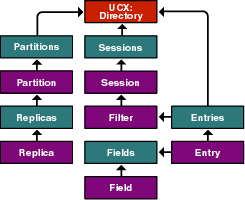
15.1.2 Directory Object
Features:
-
The top-level object of the Directory UCX component.
-
Enumerates entries, partitions, and sessions.
-
Changes and verifies passwords.
-
Acts as the entry point to other objects.
Entries property
Represents the Entries object and contains methods to enumerate the Entry objects.
Syntax
object.Entries
Type
Entries.
Attributes
None.
Example
This example shows the Entries object in its typical context.
set NDS = CreateObject("UCX:Directory")
set entrs = NDS.Entries
Partitions property
Represents the Partitions object and contains methods and properties that manage the partition.
Syntax
object.Partitions
Type
Partitions.
Attributes
None.
Example
This example shows the Partitions object in its typical context.
set NDS = CreateObject("UCX:Directory")
set entrs = NDS.Partitions
Sessions property
Represents the Sessions object and contains a method that allows any user to log in to NDS.
Syntax
object.Sessions
Type
Sessions.
Attributes
None.
Example
This example shows the Sessions object in its typical context.
set NDS = CreateObject("UCX:Directory")
set entrs = NDS.Sessions
ContextDSServer method
Retrieves the name of the server that processed the last NDS call.
Syntax
object.ContextDSServer()
Parameters
None.
Return Values
String.
Example
This example retrieves the name of the server that processed the last NDS call.
set NDS = CreateObject("UCX:Directory")
set sess = NDS.Sessions
set ses = sess.Login("Admin","Novell")
If ( Err.Number = 0 ) Then
     Print(NDS.ContextDSServer)
     ses.Logout
Else
     Print("Failed to log in to the specified account " & Err.Description )
EndIf
See Also
MapID method
Returns the object name for valid object IDs.
Syntax
object.MapID(
   ObjID As Long)
Parameters
- ObjID
-
The object ID for which the name is to be obtained.
Return Values
String.
Remarks
This method is the reverse of the MapName method.
Example
This example returns the object name for the object ID with the value of 1.
set NDS = CreateObject("UCX:Directory")
set sess = NDS.Sessions
set ses = sess.Login("Admin","Novell")
If ( Err.Number = 0 ) Then
     name = NDS.MapID(1)
     If ( Err.Number = 0 ) Then
          Print(name)
     Else
          Print("Failed to get the name " & Err.Description )
     EndIf
     ses.Logout
Else
     Print("Failed to log in to the specified account " & Err.Description )
EndIf
See Also
MapName method
Returns the object ID for an existing object name.
Syntax
object.MapName(
   ObjName As String)
Parameters
- ObjName
-
The object name for which the ID is to be obtained.
Return Values
String.
Remarks
This method is the reverse of the MapID method.
Example
This example returns the object ID for the Supervisor object.
set NDS = CreateObject("UCX:Directory")
set sess = NDS.Sessions
set ses = sess.Login("Admin","Novell")
If ( Err.Number = 0 ) Then
     id = NDS.MapName("[Supervisor])"
     If ( Err.Number = 0 ) Then
          Print(id)
     Else
          Print("Failed to get the ID " & Err.Description )
     EndIf
     ses.Logout
Else
     Print("Failed to log in to the specified account " & Err.Description )
EndIf
See Also
PasswordChange method
Replaces the object password with a new password.
Syntax
object.PasswordChange(
   ObjName As String,
   OldPasswd As String,
   NewPasswd As String)
Parameters
- ObjName
-
The object whose password is to be changed.
- OldPasswd
-
The old password for the object.
- NewPasswd
-
The new password for the object.
Return Values
Boolean. Returns TRUE if the password is changed; otherwise, FALSE.
Example
This example replaces the old password (2difficult) with the new password (golfman1) for the user TestUser.
set ses NDS = CreateObject("UCX:Directory")
set sess = NDS.Sessions
set ses = sess.Login("Admin","Novell")
If ( Err.Number = 0 ) Then
     NDS.PasswordChange("TestUser","2difficult","golfman1")
     If ( Err.Number = 0 ) Then
          Print("Password changed successfully")
     Else
          Print("Failed to change password" & Err.Description )
     EndIf
     ses.Logout
Else
     Print("Error: " & Err.Description )
EndIf
See Also
PasswordVerify method
Verifies an object's password.
Syntax
object.PasswordVerify(
   ObjName As String,
   Passwd As String,)
Parameters
- ObjName
-
The object whose password is to be verified.
- Passwd
-
The password to be verified.
Return Values
Boolean. Returns TRUE if the password is verified; otherwise, FALSE.
Example
This example verifies the password of golfman1 for TestUser.
set NDS = CreateObject("UCX:Directory")
set sess = NDS.Sessions
set ses = sess.Login("Admin","Novell")
If (Err.Number = 0) Then
     NDS.PasswordVerify("TestUser","golfman1")
     If (Err.Number = 0) Then
          Print("Password correct")
     Else
          Print("Password wrong" & Err.Description)
     EndIf
     ses.Logout
Else
     Print("Error: " & Err.Description)
EndIf
See Also
Rights method
Returns the rights of an object.
Syntax
object.Rights(
   SubjName As String,
   ObjName As String,
   AttrName As String)
Parameters
- SubjName
-
The name of the object that has granted rights.
- ObjName
-
The name of the object that has rights on an attribute of SubjName.
- AttrName
-
The attribute for which rights are assigned.
Return Values
String.
Example
This example returns the rights that have been granted by User1 on the attribute Account Balance in Team1.
set NDS = CreateObject("UCX:Directory")
set sess = NDS.Sessions
set ses = sess.Login("Admin","Novell")
If ( Err.Number = 0 ) Then
     ' Where ObjectA and ObjectB are objects and Org is the organization
     rghts = NDS.Rights(".Team1.org",".User1.org","Account Balance")
     If ( Err.Number = 0 ) Then
          Print("Rights " & rghts)
     Else
          Print("Error: & Err.Description )
     EndIf
     ses.Logout
Else
     Print("Error: " & Err.Description )
EndIf
See Also
SecurityAdd method
Adds an object to a security equivalence list.
Syntax
object.SecurityAdd(
   SecTo As String,
   SecFrom As String)
Parameters
- SecTo
-
The destination object whose security equivalence list is added to.
- SecFrom
-
The source object.
Return Values
Boolean. Returns TRUE if the security add operation is successful; otherwise, FALSE.
Remarks
This method is the reverse of the SecurityRemove method.
Example
This example adds ObjectB to the security equivalence list of Admin.
set NDS = CreateObject("UCX:Directory")
set sess = NDS.Sessions
set ses = sess.Login("Admin","Novell")
If ( Err.Number = 0 ) Then
     ' Where Admin and User1 are objects and Org is the organization
     NDS.SecurityAdd("Admin",".User1.org")
     If ( Err.Number = 0 ) Then
          Print("Security add is successful")
     Else
          Print("Error: & Err.Description )
     EndIf
     ses.Logout
Else
     Print("Error: " & Err.Description )
EndIf
See Also
SecurityRemove method
Removes an object from a security equivalence list.
Syntax
object.SecurityRemove(
   SecFrom As String,
   SecTo As String)
Parameters
- SecFrom
-
The destination object from which security is to be deleted.
- SecTo
-
The source object.
Return Values
Boolean. Returns TRUE if the security remove operation is successful; otherwise, FALSE.
Remarks
This method is the reverse of the SecurityAdd method.
Example
This example removes ObjectB from the security equivalence list of Admin.
set NDS = CreateObject("UCX:Directory")
set sess = NDS.Sessions
set ses = sess.Login("Admin","Novell")
If ( Err.Number = 0 ) Then
     ' Where Admin and User1 are objects and Org is the organization
     NDS.SecurityRemove("Admin",".User1.org")
     If ( Err.Number = 0 ) Then
          Print("Security remove is successful")
     Else
          Print("Error: & Err.Description )
     EndIf
     ses.Logout
Else
     Print("Error: " & Err.Description )
EndIf
See Also
15.1.3 Entries Collection
Enumerates the Entries in the directory.
This object requires the following constant types:
RootEntry property
Gives the name of the root Entry object.
Syntax
object.RootEntry
Type
String.
Attributes
Read/write.
Example
This example gives the name of the root entry object.
set NDS = CreateObject("UCX:Directory")
set entrs = NDS.Entries
print(entrs.RootEntry)
SearchFilter property
Contains the filter for a search operation.
Syntax
object.SearchFilter
Type
Filter.
Attributes
Read/write.
Example
This example sets the filter for a search operation.
set NDS = CreateObject("ucx:Directory")
set entrs = nds.entries
set sess = nds.Sessions
set ses = sess.Login("Admin","Novell")
if (Err.Number = 0 ) Then
     set flt = entrs.searchfilter
     flt.ObjectName = "[Root]"
     flt.Scope = SEARCH_SUBTREE
     flt.DerefAlias = False
     flt.AttrName = "Object Class"
     flt.Operator = "="
     flt Value = "Server"
     entrs.Search
     entrs.Reset
     while(entrs.HasMoreElements)
          set entr = entrs.Next
          Print("Fullname: " & entr.fullname & " BaseClass: " & entr.baseclass)
     wend
     ses.logout
else
     Print("Error: " & Err.description )
endif
See Also
AddAfpServer method
Adds an AppleTalk filing protocol (AFP) server object to the current tree.
Syntax
object.AddAfpServer(
   ServName As String)
Parameters
- ServName
-
The name of the server to be added.
Return Values
Boolean. Returns TRUE if successful; otherwise, FALSE.
Remarks
The AFP server object enables workstations to share files and programs using the AppleTalk filing protocol.
Example
This example adds an AFP server to the current tree.
set NDS = CreateObject("UCX:Directory")
set entrs = NDS.Entries
set sess = NDS.Sessions
set ses = sess.Login("Admin","Novell")
if (Err.Number = 0) Then
     entrs.AddAfpServer("AfpServer")
     if (Err.Number = 0) Then
          Print("Success ")
     Else
          Print("Error: " & Err.Description)
     EndIf
     ses.Logout
Else
     Print("Error: "& Err.Description)
EndIf
See Also
AddAlias method
Adds an Alias object for a specified object.
Syntax
object.AddAlias(
   AliasName As String,
   ObjName As String)
Parameters
- AliasName
-
The name of the object alias.
- ObjName
-
The name of the object to be aliased.
Return Values
Boolean. Returns TRUE if successful; otherwise, FALSE.
Example
This example adds ObjectAlias as an alias of ObjectA.
set NDS = CreateObject("UCX:Directory")
set entrs = NDS.Entries
set sess = NDS.Sessions
set ses = sess.Login("Admin","Novell")
if (Err.Number = 0) Then
     entrs.AddAlias(".objectAlias.org",".ObjectA.org)
     if (Err.Number = 0) Then
          Print("Success ")
     Else
          Print("Error: " & Err.Description)
     EndIf
     ses.Logout
Else
     Print("Error: "& Err.Description)
EndIf
See Also
AddBinderyObject method
Creates a Bindery object with the specified restriction code and type.
Syntax
object.AddBinderyObject(
   ObjName As String,
   ResCode As Integer,
   BinType As String)
Parameters
- ObjName
-
The name of the Bindery object to be created.
- ResCode
-
The object restriction code. See Section A.30, Restriction Codes.
- BinType
-
The Bindery object type.
Return Values
Boolean. Returns TRUE if successful; otherwise, FALSE.
Remarks
Example
This example creates the Bindery object BindObj of object type BINDERY_USER with the restriction BINDERY_ANY_READ.
set NDS = CreateObject("ucx:Directory")
set entrs = nds.entries
set sess = nds.Sessions
set ses = sess.Login("Admin","Novell")
if (Err.Number = 0 ) Then
     entrs.AddBinderyObject(".cn=BindObj.0=Org", BINDERY_ANY_READ, "BINDERY_USER")
     if (Err.Number = 0 ) Then
          Print("Success " )
     else
          Print("Error: " & Err.Description)
     endif
     ses.logout
else
     Print("Error: " & Err.description )
endif
AddBinderyQueue method
Adds a Bindery Queue object to the NDS tree.
Syntax
object.AddBinderyQueue(
   ObjName As String,
   BindType As String,
   DirPath As String)
Parameters
- ObjName
-
The name of the Queue object to be added.
- BindType
-
The Bindery object type. See Section A.22, Object Type Values.
- DirPath
-
The path to the queue.
Return Values
Boolean. Returns TRUE if successful; otherwise, FALSE.
Example
This example adds the Bindery queue object BindQue of object type OT_PRINT_QUEUE in the directory Sys:\Temp.
set NDS = CreateObject("ucx:Directory")
set entrs = nds.entries
set sess = nds.Sessions
set ses = sess.Login("Admin","Novell")
if (Err.Number = 0 ) Then
     entrs.AddBinderyQueue(".cn=BindQue.0=Org", OT_PRINT_QUEUE, "Sys:\TEMP")
     if (Err.Number = 0 ) Then
          Print("Success " )
     else
          Print("Error: " & Err.Description)
     endif
     ses.logout
else
     Print("Error: " & Err.description )
endif
AddComputer method
Adds a Computer object to the NDS tree.
Syntax
object.AddComputer(
   CompName As String)
Parameters
- CompName
-
The name of the Computer object to be added.
Return Values
Boolean. Returns TRUE if successful; otherwise, FALSE.
Example
This example adds the Computer object BARNEY to the NDS tree.
set NDS = CreateObject("ucx:Directory")
set entrs = nds.entries
set sess = nds.Sessions
set = sess.Login("Admin","Novell")
if (Err.Number = 0) Then
     entrs.AddComputer("BARNEY")
     if (Err.Number = 0) Then
          Print("Success ")
     else
          Print("Error: " & Err.Description)
     endif
     ses.logout
else
     Print("Error: " & Err.description)
endif
See Also
AddCountry method
Adds a Country object to the NDS tree.
Syntax
object.AddCountry(
   CountryName As String)
Parameters
- CountryName
-
The two-digit country code of the Country object to be added.
Return Values
Boolean. Returns TRUE if successful; otherwise, FALSE.
Example
This example adds the Country object US to the NDS tree.
set NDS = CreateObject("ucx:Directory")
set entrs = nds.entries
set sess = nds.Sessions
set = sess.Login("Admin","Novell")
if (Err.Number = 0) Then
     entrs.AddCountry("c.=US")
     if (Err.Number = 0) Then
          Print("Success ")
     else
          Print("Error: " & Err.Description)
     endif
     ses.logout
else
     Print("Error: " & Err.description)
endif
AddDirectoryMap method
Adds a Directory Map object to the NDS tree.
Syntax
object.AddDirectoryMap(
   ObjName As String,
   ServerName As Server)
Parameters
- ObjName
-
The Directory Map object to be added.
- ServerName
-
The server in which the Directory Map object is to be added.
Return Values
Boolean. Returns TRUE if successful; otherwise, FALSE.
Example
This example adds the Directory Map object FRED to the server BARNEY.
set NDS = CreateObject("ucx:Directory")
set entrs = nds.entries
set sess = nds.Sessions
set = sess.Login("Admin","Novell")
if (Err.Number = 0) Then
     entrs.AddDirectoryMap("FRED","BARNEY")
     if (Err.Number = 0) Then
          Print("Success ")
     else
          Print("Error: " & Err.Description)
     endif
     ses.logout
else
     Print("Error: " & Err.description)
endif
See Also
AddExtEntity method
Adds an External Entity object to the NDS tree.
Syntax
object.AddExtEntity(
   ObjName As String)
Parameters
- ObjName
-
The External Entity object to be added.
Return Values
Boolean. Returns TRUE if successful; otherwise, FALSE.
Example
This example adds the External Entity object WILMA to the NDS tree.
set NDS = CreateObject("ucx:Directory")
set entrs = nds.entries
set sess = nds.Sessions
set = sess.Login("Admin","Novell")
if (Err.Number = 0) Then
     entrs.AddExtEntity("WILMA")
     if (Err.Number = 0) Then
          Print("Success ")
     else
          Print("Error: " & Err.Description)
     endif
     ses.logout
else
     Print("Error: " & Err.description)
endif
See Also
AddGroup method
Adds a Group object to the NDS tree.
Syntax
object.AddGroup(
   GrpName As String)
Parameters
- GrpName
-
The Group object to be added.
Return Values
Boolean. Returns TRUE if successful; otherwise, FALSE.
Example
This example adds the Group object FLNTSTNS to the NDS tree.
set NDS = CreateObject("ucx:Directory")
set entrs = nds.entries
set sess = nds.Sessions
set = sess.Login("Admin","Novell")
if (Err.Number = 0) Then
     entrs.AddGroup("FLNTSTNS")
     if (Err.Number = 0) Then
          Print("Success ")
     else
          Print("Error: " & Err.Description)
     endif
     ses.logout
else
     Print("Error: " & Err.description)
endif
See Also
AddList method
Adds a List object to the NDS tree.
Syntax
object.AddList(
   GrpName As String)
Parameters
- ListName
-
The List object to be added.
Return Values
Boolean. Returns TRUE if successful; otherwise, FALSE.
Example
This example adds the List object DINO to the NDS tree.
set NDS = CreateObject("ucx:Directory")
set entrs = nds.entries
set sess = nds.Sessions
set = sess.Login("Admin","Novell")
if (Err.Number = 0) Then
     entrs.AddList("DINO")
     if (Err.Number = 0) Then
          Print("Success ")
     else
          Print("Error: " & Err.Description)
     endif
     ses.logout
else
     Print("Error: " & Err.description)
endif
See Also
AddLocality method
Adds a Locality object to the NDS tree.
Syntax
object.AddLocality(
   LctyName As String,
   Type As Long)
Parameters
- LctyName
-
The Locality object to be added.
- Type
-
The Locality type. Can be 0 for locality, or 1 for state/province.
Return Values
Boolean. Returns TRUE if successful; otherwise, FALSE.
Example
This example adds the Locality object BEDROCK to the NDS tree as a locality (type 0).
set NDS = CreateObject("ucx:Directory")
set entrs = nds.entries
set sess = nds.Sessions
set = sess.Login("Admin","Novell")
if (Err.Number = 0) Then
     entrs.AddLocality("L=BEDROCK","0")
     if (Err.Number = 0) Then
          Print("Success ")
     else
          Print("Error: " & Err.Description)
     endif
     ses.logout
else
     Print("Error: " & Err.description)
endif
AddMessageRoutingGrp method
Adds a Message Routing Group object to the NDS tree.
Syntax
object.AddMessageRoutingGp(
   MsgGrpName As String)
Parameters
- MsgGrpName
-
The Message Routing Group object to be added.
Return Values
Boolean. Returns TRUE if successful; otherwise, FALSE.
Example
This example adds the Message Routing Group object MAILMAN to the NDS tree.
set NDS = CreateObject("ucx:Directory")
set entrs = nds.entries
set sess = nds.Sessions
set ses = sess.Login("Admin","Novell")
if (Err.Number = 0) Then
     entrs.AddMessageRoutingGp("Cn=MAILMAN")
     if (Err.Number = 0) Then
          Print("Success ")
     else
          Print("Error: " & Err.Description)
     endif
     ses.logout
else
     Print("Error: " & Err.description)
endif
AddMessageServer method
Adds a Message Server object to the NDS tree.
Syntax
object.AddMessageServer(
   MsgServName As String)
Parameters
- MsgServName
-
The Message Server object to be added.
Return Values
Boolean. Returns TRUE if successful; otherwise, FALSE.
Example
This example adds the Message Server object to MAILTRCK the NDS tree.
set NDS = CreateObject("ucx:Directory")
set entrs = nds.entries
set sess = nds.Sessions
set ses = sess.Login("Admin","Novell")
if (Err.Number = 0) Then
     entrs.AddMessageServer("Cn=MAILTRCK")
     if (Err.Number = 0) Then
          Print("Success ")
     else
          Print("Error: " & Err.Description)
     endif
     ses.logout
else
     Print("Error: " & Err.description)
endif
AddNcpServer method
Adds a NetWare Core Protocol (NCP) Server object to the NDS tree.
Syntax
object.AddNcpServer(
   MsgServName As String)
Parameters
- NcpServName
-
The NCP Server object to be added.
Return Values
Boolean. Returns TRUE if successful; otherwise, FALSE.
Example
This example adds the NCP Server object SLATE to the NDS tree.
set NDS = CreateObject("ucx:Directory")
set entrs = nds.entries
set sess = nds.Sessions
set ses = sess.Login("Admin","Novell")
if (Err.Number = 0) Then
     entrs.AddNcpServer("Cn=SLATE")
     if (Err.Number = 0) Then
          Print("Success ")
     else
          Print("Error: " & Err.Description)
     endif
     ses.logout
else
     Print("Error: " & Err.description)
endif
See Also
AddOrg method
Adds an Organization object to the NDS tree.
Syntax
object.AddOrg(
   OrgName As String)
Parameters
- OrgName
-
The Organization object to be added.
Return Values
Boolean. Returns TRUE if successful; otherwise, FALSE.
Example
This example adds the Organization object W_BUFFS to the NDS tree.
set NDS = CreateObject("ucx:Directory")
set entrs = nds.entries
set sess = nds.Sessions
set ses = sess.Login("Admin","Novell")
if (Err.Number = 0) Then
     entrs.AddOrg("o=W_BUFFS")
     if (Err.Number = 0) Then
          Print("Success ")
     else
          Print("Error: " & Err.Description)
     endif
     ses.logout
else
     Print("Error: " & Err.description)
endif
AddOrgRole method
Adds an Organizational Role object to the NDS tree.
Syntax
object.AddOrgRole(
   OrgRole As String)
Parameters
- OrgRole
-
The Organizational Role object to be added.
Return Values
Boolean. Returns TRUE if successful; otherwise, FALSE.
Example
This example adds the Organizational Role object PUBAH to the NDS tree.
set NDS = CreateObject("ucx:Directory")
set entrs = nds.entries
set sess = nds.Sessions
set ses = sess.Login("Admin","Novell")
if (Err.Number = 0) Then
     entrs.AddOrgRole("PUBAH")
     if (Err.Number = 0) Then
          Print("Success ")
     else
          Print("Error: " & Err.Description)
     endif
     ses.logout
else
     Print("Error: " & Err.description)
endif
AddOrgUnit method
Adds an Organizational Unit object to the NDS tree.
Syntax
object.AddOrgUnit(
   OrgUnitName As String)
Parameters
- OrgUnitName
-
The Organizational Unit object to be added.
Return Values
Boolean. Returns TRUE if successful; otherwise, FALSE.
Example
This example adds the Organizational Unit object A_TEAM to the NDS tree.
set NDS = CreateObject("ucx:Directory")
set entrs = nds.entries
set sess = nds.Sessions
set ses = sess.Login("Admin","Novell")
if (Err.Number = 0) Then
     entrs.AddOrgUnit("A_TEAM")
     if (Err.Number = 0 ) Then
          Print("Success " )
     else
          Print("Error: " & Err.Description)
     endif
     ses.logout
else
     Print("Error: " & Err.description )
endif
AddPrintServer method
Adds a Print Server object to the NDS tree.
Syntax
object.AddPrintServer(
   PrnServName As String)
Parameters
- PrnServName
-
The Print Server object to be added.
Return Values
Boolean. Returns TRUE if successful; otherwise, FALSE.
Example
This example adds the Print Server object PEBBLES to the NDS tree.
set NDS = CreateObject("ucx:Directory")
set entrs = nds.entries
set sess = nds.Sessions
set ses = sess.Login("Admin","Novell")
if (Err.Number = 0 ) Then
     entrs.AddPrintServer("PEBBLES")
     if (Err.Number = 0 ) Then
          Print("Success " )
     else
          Print("Error: " & Err.Description)
     endif
     ses.logout
else
     Print("Error: " & Err.description )
endif
See Also
AddPrinter method
Adds a Printer object to the NDS tree.
Syntax
object.AddPrinter(
   PrnName As String)
Parameters
- PrnName
-
The Printer object to be added.
Return Values
Boolean. Returns TRUE if successful; otherwise, FALSE.
Example
This example adds the Printer object BAMBAM to the NDS tree.
set NDS = CreateObject("ucx:Directory")
set entrs = nds.entries
set Sess = nds.Sessions
set ses = sess.Login("Admin","Novell")
if (Err.Number = 0 ) Then
     entrs.AddPrinter("BAMBAM")
     if (Err.Number = 0 ) Then
          Print("Success " )
     else
          Print("Error: " & Err.Description)
     endif
     ses.logout
else
     Print("Error: " & Err.description )
endif
See Also
AddProfile method
Adds a Profile object to the NDS tree with the specified login script.
Syntax
object.AddProfile(
   ProfName As String,
   ScriptName As String)
Parameters
- ProfName
-
The Profile object to be added.
- ScriptName
-
The path to the login script to be added, including the login script name.
Return Values
Boolean. Returns TRUE if successful; otherwise, FALSE.
Example
This example adds the Profile object RUBBLE with the login script CAVEMAN.TXT to the NDS tree.
set NDS = CreateObject("ucx:Directory")
set entrs = nds.entries
set sess = nds.Sessions
set ses = sess.Login("Admin","Novell")
if (Err.Number = 0 ) Then
     entrs.AddProfile("RUBBLE","Sys:\TEMP\CAVEMAN.TXT)
     if (Err.Number = 0 ) Then
          Print("Success " )
     else
          Print("Error: " & Err.Description)
     endif
     ses.logout
else
     Print("Error: " & Err.description )
endif
See Also
AddQueue method
Adds a Queue object to the NDS tree.
Syntax
object.AddQueue(
   QueName As String,
   QuePath As String)
Parameters
- QueName
-
The Queue object to be added.
- QuePath
-
The path to the Queue.
Return Values
Boolean. Returns TRUE if successful; otherwise, FALSE.
Example
This example adds the Queue object RIPROCK to the NDS tree.
set NDS = CreateObject("ucx:Directory")
set entrs = nds.entries
set sess = nds.Sessions
set ses = sess.Login("Admin","Novell")
if (Err.Number = 0 ) Then
     entrs.AddQueue("RIPROCK","Sys:\QUEUE")
     if (Err.Number = 0 ) Then
          Print("Success " )
     else
          Print("Error: " & Err.Description)
     endif
     ses.logout
else
     Print("Error: " & Err.description )
endif
See Also
AddUser method
Adds a User object to the NDS tree.
Syntax
object.AddUser(
   UserName As String,
   SurName As String)
Parameters
- UserName
-
The User object to be added.
- QuePath
-
The user's surname.
Return Values
Boolean. Returns TRUE if successful; otherwise, FALSE.
Example
This example adds the User object WILMUSER (surname: WILMA) to the NDS tree.
set NDS = CreateObject("ucx:Directory")
set entrs = nds.entries
set sess = nds.Sessions
set ses = sess.Login("Admin","Novell")
if (Err.Number = 0 ) Then
     entrs.AddUser("WILMUSER","WILMA")
     if (Err.Number = 0 ) Then
          Print("Success " )
     else
          Print("Error: " & Err.Description)
     endif
     ses.logout
else
     Print("Error: " & Err.description )
endif
See Also
AddVolume method
Adds a Volume object to the specified server.
Syntax
object.AddVolume(
   VolName As String,
   ServName As String)
Parameters
- VolName
-
The Volume object to be added.
- ServName
-
The server on which the volume resides.
Return Values
Boolean. Returns TRUE if successful; otherwise, FALSE.
Example
This example adds the Volume object HOPVOL to the server HOPPY.
set NDS = CreateObject("ucx:Directory")
set entrs = nds.entries
set sess = nds.Sessions
set ses = sess.Login("Admin","Novell")
if (Err.Number = 0 ) Then
     entrs.AddVolume("HOPVOL","HOPPY")
     if (Err.Number = 0 ) Then
          Print("Success " )
     else
          Print("Error: " & Err.Description)
     endif
     ses.logout
else
     Print("Error: " & Err.description )
endif
See Also
HasMoreElements method
Determines whether or not any more objects exist in the directory.
Syntax
object.HasMoreElements()
Parameters
None.
Return Values
Boolean. Returns TRUE if there are more objects in the directory; otherwise, FALSE.
Example
This example checks the directory for more objects.
set NDS = CreateObject("ucx:Directory")
set entrs = nds.entries
set sess = nds.Sessions
set ses = sess.Login("Admin","Novell")
if (Err.Number = 0 ) Then
     set flt = entrs.searchfilter
     entrs.search
     entrs.reset
     while(entrs.HasMoreElements)
          set entr = entrs.next
          Print("Fullname: " & entr.fullname & " BaseClass: " & entr.baseclass)
     wend
     ses.logout
else
     Print("Error: " & Err.description )
endif
See Also
Locate method
Initializes a search for all objects under the property root object.
Syntax
object.Locate()
Parameters
None.
Return Values
Void.
Example
This example initializes a search for objects based on the search filter.
set NDS = CreateObject("ucx:Directory")
set entrs = nds.entries
set sess = nds.Sessions
set ses = sess.Login("Admin","Novell")
if (Err.Number = 0 ) Then
     entrs.Locate
     entrs.Reset
     while(entrs.HasMoreElements)
          set entr = entrs.Next
          Print("Fullname: " & entr.fullname & " BaseClass: " & entr.baseclass)
     wend
     ses.logout
else
     Print("Error: " & Err.description )
endif
Move method
Moves an object from one location to another within an NDS tree.
Syntax
object.Move(
     OldDN As String,
     NewParentDN As String.
     NewRDN As String)
Parameters
- OldDN
-
The complete path of the object to be moved.
- NewParentDN
-
The name of the destination.
- NewRDN
-
The name of the destination object.
Return Values
Boolean. Returns TRUE if the object is successfully moved; otherwise, FALSE.
Example
This example Moves the object BLUTO from the organization HOME to the organization OFFICE within the NDS tree. In this example, the object retains its name after it is moved.
set NDS = CreateObject("ucx:Directory")
set entrs = nds.entries
set sess = nds.Sessions
set ses = sess.Login("Admin","Novell")
if (Err.Number = 0 ) Then
     entrs.Move(".cn=BLUTO.o=HOME",".o=OFFICE","cn=BLUTO")
     if (Err.Number = 0 ) Then
          Print("Success " )
     else
          Print("Error: " & Err.Description)
     endif
     ses.logout
else
     Print("Error: " & Err.description )
endif
See Also
Next method
Returns the next Entry object from the enumeration.
Syntax
object.Next()
Parameters
None.
Return Values
Entry.
Example
This example returns the next Entry object from the enumeration.
set NDS = CreateObject("ucx:Directory")
set entrs = nds.entries
set sess = nds.Sessions
set ses = sess.Login("Admin","Novell")
if (Err.Number = 0 ) Then
     set flt = entrs.searchfilter
     entrs.search
     entrs.reset
     while(entrs.HasMoreElements)
          set entr = entrs.Next
          Print("Fullname: " & entr.fullname & " BaseClass: " & entr.baseclass)
     wend
     ses.logout
else
     Print("Error: " & Err.description )
endif
Remove method
Removes an object from the NDS tree.
Syntax
object.Remove(
   ObjName As String)
Parameters
- ObjName
-
The object to be added.
Return Values
Boolean. Returns TRUE if the object is successfully removed; otherwise, FALSE.
Example
This example removes the object SKIPPER from the NDS tree.
set NDS = CreateObject("ucx:Directory")
set entrs = nds.entries
set sess = nds.Sessions
set ses = sess.Login("Admin","Novell")
if (Err.Number = 0 ) Then
     entrs.Remove("SKIPPER")
     if (Err.Number = 0 ) Then
          Print("Success " )
     else
          Print("Error: " & Err.Description)
     endif
     ses.logout
else
     Print("Error: " & Err.description )
endif
See Also
Reset method
Initializes a search operation of all Entry objects in the NDS tree.
Syntax
object.Reset()
Parameters
None.
Return Values
Void.
Example
This example initializes a search operation of all Entry objects in the NDS tree.
set NDS = CreateObject("ucx:Directory")
set entrs = nds.entries
set sess = nds.Sessions
set ses = sess.Login("Admin","Novell")
if (Err.Number = 0 ) Then
     set flt = entrs.searchfilter
     entrs.search
     entrs.Reset
     while(entrs.HasMoreElements)
          set entr = entrs.Next
          Print("Fullname: " & entr.fullname & " BaseClass: " & entr.baseclass)
     wend
     ses.logout
else
     Print("Error: " & Err.description )
endif
Search method
Initializes a search for objects based on the specified search filter.
Syntax
object.Search()
Parameters
None.
Return Values
Void.
Example
This example initializes a search for objects based on the search filter.
set NDS = CreateObject("ucx:Directory")
set entrs = nds.entries
set sess = nds.Sessions
set ses = sess.Login("Admin","Novell")
if (Err.Number = 0 ) Then
     set flt = entrs.searchfilter
     entrs.Search
     entrs.Reset
     while(entrs.HasMoreElements)
          set entr = entrs.Next
          Print("Fullname: " & entr.fullname & " BaseClass: " & entr.baseclass)
     wend
     ses.logout
else
     Print("Error: " & Err.description )
endif
15.1.4 Entry Object
Represents the Entry object and has methods to enumerate the fields in an Entry.
BaseClass property
Gives the base class of the current object.
Syntax
object.BaseClass
Type
String.
Attributes
Read-only.
Example
This example gives the base class of the current object.
set NDS = CreateObject("ucx:Directory")
set entrs = nds.entries
set sess = nds.Sessions
set ses = Sess.Login("Admin","Novell")
if (Err.Number = 0 ) Then
     set flt = entrs.searchfilter
     entrs.Search
     entrs.Reset
     while(entrs.HasMoreElements)
          set entr = entrs.Next
          Print("Fullname: " & entr.fullname & " BaseClass: " & entr.BaseClass)
     wend
     ses.logout
else
     Print("Error: " & Err.description )
endif
Fields property
Represents the Fields object and has methods to enumerate the Field objects in the current Entry.
Syntax
object.Fields
Type
Fields.
Attributes
Read/write.
Example
This example shows the Fields object in its typical context.
set NDS = CreateObject("UCX:Directory")
set entrs = NDS.Entries
set sess = NDS.Sessions
set ses = sess.Login("Admin","Novell")
if (Err.Number = 0 ) Then
     set flt = entrs.searchfilter
     entrs.search
     entrs.reset
     set entr = entrs.next
     Print ("Fullname: " & entr.fullname & " BaseClass: " & entr.baseclass)
     set flds = entr.Fields
     flds.reset
     While (flds.hasmoreelements)
          set fld = flds.next
          Print(" Name: " & fld.Name & " Value: " & fld.value)
     wend

     ses.logout
else
     Print("Error: " & Err.description )
endif
FullName property
Gives the full name of the current object.
Syntax
object.FullName
Type
String.
Attributes
Read-only.
Example
This example gives the full name of the current object.
set NDS = CreateObject("ucx:Directory")
set entrs = nds.entries
set sess = nds.Sessions
set ses = sess.Login("Admin","Novell")
if (Err.Number = 0 ) Then
     set flt = entrs.searchfilter
     entrs.Search
     entrs.Reset
     while(entrs.HasMoreElements)
          set entr = entrs.Next
          Print("Fullname: " & entr.FullName & " BaseClass: " & entr.BaseClass)
     wend
     ses.logout
else
     Print("Error: " & Err.description )
endif
IsAlias property
Indicates whether or not the current object is an Alias object.
Syntax
object.IsAlias
Type
Boolean.
Attributes
Read-only.
Example
This example indicates whether or not the current object is an Alias object.
set NDS = CreateObject("ucx:Directory")
set entrs = nds.entries
set sess = nds.Sessions
set ses = sess.Login("Admin","Novell")
if (Err.Number = 0 ) Then
     set flt = entrs.searchfilter
     entrs.Search
     entrs.Reset
     while(entrs.HasMoreElements)
          set entr = entrs.Next
          Print("Fullname: " & entr.fullname & " IsAlias: " & entr.IsAlias)
     wend
     ses.logout
else
     Print("Error: " & Err.description )
endif
IsContainer property
Indicates whether or not the current object is a Container object.
Syntax
object.IsContainer
Type
Boolean.
Attributes
Read-only.
Example
This example indicates whether or not the current object is a Container object.
set NDS = CreateObject("ucx:Directory")
set entrs = nds.entries
set sess = nds.Sessions
set ses = sess.Login("Admin","Novell")
if (Err.Number = 0 ) Then
     set flt = entrs.searchfilter
     entrs.Search
     entrs.Reset
     while(entrs.HasMoreElements)
          set entr = entrs.Next
          Print("Fullname: " & entr.fullname & " IsContainer: " & entr.IsContainer)
     wend
     ses.logout
else
     Print("Error: " & Err.description )
endif
IsRootPartition property
Indicates whether or not the current object is a partition root.
Syntax
object.IsRootPartition
Type
Boolean.
Attributes
Read-only.
Example
This example indicates whether or not the current object is a partition root.
set NDS = CreateObject("ucx:Directory")
set entrs = nds.entries
set sess = nds.Sessions
set ses = sess.Login("Admin","Novell")
if (Err.Number = 0 ) Then
     set flt = entrs.searchfilter
     entrs.Search
     entrs.Reset
     while(entrs.HasMoreElements)
          set entr = entrs.Next
          Print("Fullname: " & entr.fullname & " IsRootPartition: " & entr.IsRootPartition)
     wend
     ses.logout
else
     Print("Error: " & Err.description )
endif
RootPartition property
Gives the root partition node.
Syntax
object.RootPartition
Type
String.
Attributes
Read-only.
Example
This example gives the root partition node.
set NDS = CreateObject("ucx:Directory")
set entrs = nds.entries
set sess = nds.Sessions
set ses = sess.Login("Admin","Novell")
if (Err.Number = 0 ) Then
     set flt = entrs.searchfilter
     entrs.Search
     entrs.Reset
     while(entrs.HasMoreElements)
          set entr = entrs.Next
          Print("Fullname: " & entr.fullname & " Root partition: " & entr.RootPartition)
     wend
     ses.logout
else
     Print("Error: " & Err.description )
endif
See Also
ShortName property
Gives the short name of the current object.
Syntax
object.ShortName
Type
String.
Attributes
Read-only.
Example
This example gives the short name of the current object.
set NDS = CreateObject("ucx:Directory")
set entrs = nds.entries
set sess = nds.Sessions
set ses = sess.Login("Admin","Novell")
if (Err.Number = 0 ) Then
     set flt = entrs.searchfilter
     entrs.Search
     entrs.Reset
     while(entrs.HasMoreElements)
          set entr = entrs.Next
          Print("Fullname: " & entr.FullName & " Shortname: " & entr.ShortName)
     wend
     ses.logout
else
     Print("Error: " & Err.description )
endif
See Also
ChangeName method
Changes the name of an Entry object.
Syntax
object.ChangeName(
   NewName As String)
Parameters
- NewName
-
The new name of the object.
Return Values
Boolean. Returns TRUE if the name change is successful; otherwise, FALSE.
Example
This example changes the name of the Entry object WILMUSER (surname: WILMA) to WFLINT.
set NDS = CreateObject("UCX:Directory")
set entrs = NDS.Entries
set sess = NDS.Sessions
set ses = sess.Login("Admin","Novell")
if (Err.Number = 0) Then
     entrs.AddUser("cn=WILMUSER","WILMA")
     if (Err.Number = 0 ) Then
          set flt = entrs.searchfilter
          entrs.search
          entrs.reset
          while(entrs.hasmoreelements)
               set entr = entrs.next
               if (entr.ShortName = "cn=WILMUSER") Then
               print("Short Name of the Entry is : "&entr.ShortName)
               print("Full Name of the Entry is : "&entr.FullName)
               txt = entr.RootPartition()
               print(txt)
               if (Err.Number = 0) Then
                    print("Get Root Partition is " &txt &" : Success")
               else
                    print("Get Root Partition is " &txt &" : Failure")
               end if
               entr.ChangeName("WFLINT")
               If (Err.Number = 0) Then
                    print("The entry name change is : Success")
               else
                    print("The entry name change is : Failure")
               end if
          end if
          wend
     endif
     entrs.Remove("WFLINT")
     ses.logout
else
     Print("Error: " & Err.Description)
EndIf
See Also
DateModified method
Gives the date the Entry object was last modified.
Syntax
object.DateModified()
Parameters
None.
Return Values
Date.
Example
This example gives the date the Entry object was last modified.
set NDS = CreateObject("UCX:Directory")
set entrs = NDS.Entries
set sess = NDS.Sessions
set ses = sess.Login("Admin","Novell")
if (Err.Number = 0) Then
     set flt = entrs.searchfilter
     entrs.search
     entrs.reset
     while(entrs.hasmoreelements)
          set entr = entrs.next
          print("Fullname: "& entr.fullname & " Modified date: " &
          entr.DateModified)
     wend
     ses.logout
else
     Print("Error: " & Err.Description)
EndIf
See Also
15.1.5 Fields Collection
Provides methods to enumerate all Field objects.
Element method
Finds the specified Field object.
Syntax
object.Element(
   AttrName As String)
Parameters
- AttrName
-
The name of the attribute to find.
Return Values
Field. Returns the Field object if the specified attribute is found; otherwise, FALSE.
Example
This example finds the Field object KITKAT.
set NDS = CreateObject("ucx:Directory")
set entrs = nds.entries
set sess = nds.Sessions
set ses = sess.Login("Admin","Novell")
if (Err.Number = 0 ) Then
     set flt = entrs.searchfilter
     entrs.search
     entrs.reset

          set entr = entrs.next
          Print ("Fullname: " & entr.fullname & " BaseClass: " & entr.baseclass)
          set flds = entr.Fields
          set fld = flds.Element("KITKAT")
          If (Err.Number = 0 ) Then
               Print("Attribute Name: " & fld.Name & " Value: " & fld.value)
          Else
               Print("Error: " & Err.Description)
          Endif

     ses.logout
else
     Print("Error: " & Err.description )
endif
HasMoreElements method
Determines whether or not any more Field objects exist in the directory.
Syntax
object.HasMoreElements()
Parameters
None.
Return Values
Boolean. Returns TRUE if there are more Field objects in the directory; otherwise, FALSE.
Example
This example checks the directory for more Field objects.
set NDS = CreateObject("ucx:Directory")
set entrs = nds.entries
set sess = nds.Sessions
set ses = sess.Login("Admin","Novell")
if (Err.Number = 0 ) Then
     set flt = entrs.searchfilter
     entrs.search
     entrs.reset

          set entr = entrs.next
          Print ("Fullname: " & entr.fullname & " BaseClass: " & entr.baseclass)
          set flds = entr.Fields
          flds.reset
          While (flds.HasMoreElements)
               set fld = flds.next
               Print("Name: " & fld.Name & " Value: " & fld.value)
          wend

     ses.logout
else
     Print("Error: " & Err.description )
endif
See Also
Next method
Returns the next Field object from the enumeration.
Syntax
object.Next()
Parameters
None.
Return Values
Entry.
Example
This example returns the next Field object from the enumeration.
set NDS = CreateObject("ucx:Directory")
set entrs = nds.entries
set sess = nds.Sessions
set ses = sess.Login("Admin","Novell")
if (Err.Number = 0 ) Then
     set flt = entrs.searchfilter
     entrs.search
     entrs.reset

          set entr = entrs.Next
          Print("Fullname: " & entr.fullname & " BaseClass: " & entr.baseclass)
     set flds = entr.Fields
     flds.reset
     While (flds.hasmoreelements)
          set fld = flds.next
          Print("Name: " & fld.Name & "Value: " & fld.value)
     wend

     ses.logout
else
     Print("Error: " & Err.description )
endif
See Also
Reset method
Initializes a search operation of all Field objects in the NDS tree.
Syntax
object.Reset()
Parameters
None.
Return Values
Void.
Example
This example initializes a search operation of all Field objects in the NDS tree.
set NDS = CreateObject("ucx:Directory")
set entrs = nds.entries
set sess = nds.Sessions
set ses = sess.Login("Admin","Novell")
if (Err.Number = 0 ) Then
     set flt = entrs.searchfilter
     entrs.search
     entrs.Reset
     while(entrs.HasMoreElements)
          set entr = entrs.Next
          Print("Fullname: " & entr.fullname & " BaseClass: " & entr.baseclass)
          set flds = entr.Fields
          flds.reset
          While (flds.hasmoreelements)
               set fld = flds.next
               Print("Name: " & fld.Name & " Value: " & fld.value)
          wend
     ses.logout
else
     Print("Error: " & Err.description )
endif
See Also
15.1.6 Field Object
Gives information about a Field object and has methods to change, add, and remove a Field object's value.
Info property
Gives the information for the attribute specified by the Field.Name property.
Syntax
object.Info
Type
String.
Attributes
Read-only.
Remarks
See Name property
Example
This example gives the information specified by the Field.Name property.
set NDS = CreateObject("UCX:Directory")
set entrs = NDS.Entries
set sess = NDS.Sessions
set ses = sess.Login("Admin","Novell")
if (Err.Number = 0 ) Then
     set flt = entrs.searchfilter
     entrs.search
     entrs.reset
          set entr = entrs.next
          Print ("Fullname: " & entr.fullname & " BaseClass: " & entr.baseclass)
          set flds = entr.Fields
          flds.reset
         While (flds.hasmoreelements)
               set fld = flds.next
               Print(" Name: " & fld.Name & " Info: " & fld.Info)
          wend

     ses.logout
else
     Print("Error: " & Err.description )
endif
See Also
Name property
Gives the attribute name of the Field object specified by Entry.FullName.
Syntax
object.Name
Type
String.
Attributes
Read-only.
Remarks
Example
This example gives the attribute name of the object specified by Entry.FullName.
set NDS = CreateObject("ucx:Directory")
set entrs = nds.entries
set sess = nds.Sessions
set ses = sess.Login("Admin","Novell")
if (Err.Number = 0 ) Then
     set flt = entrs.searchfilter
     entrs.Search
     entrs.Reset
         set entr = entrs.Next
          Print("Fullname: " & entr.fullname & " BaseClass: " & entr.baseclass)
          set flds = entr.Fields
          flds.reset
          While (flds.hasmoreelements)
               set fld = flds.next
               Print("Name: " & fld.Name & " Value: " & fld.value)
          wend
     ses.logout
else
     Print("Error: " & Err.description )
endif
See Also
Size property
Gives the maximum size of the attribute specified by the Field.Name property.
Syntax
object.Size
Type
Integer.
Attributes
Read-only.
Remarks
If the attribute specified by the Field.Name property is not a String, this property returns the value -1. See Name property.
Example
This example gives the maximum size of the attribute specified by the Field.Name property.
set NDS = CreateObject("UCX:Directory")
set entrs = NDS.Entries
set sess = NDS.Sessions
set ses = sess.Login("Admin","Novell")
if (Err.Number = 0 ) Then
     set flt = entrs.searchfilter
     entrs.search
     entrs.reset
          set entr = entrs.next
          Print ("Fullname: " & entr.fullname & " BaseClass: " & entr.baseclass)
          set flds = entr.Fields
          flds.reset
         While (flds.hasmoreelements)
               set fld = flds.next
               Print(" Name: " & fld.Name & " Size: " & fld.Size)
          wend

     ses.logout
else
     Print("Error: " & Err.description )
endif
See Also
TrueType property
Gives the NDS type of the attribute specified by the Field.Name property.
Syntax
object.TrueType
Type
String.
Attributes
Read-only.
Remarks
See Name property
Example
This example gives the NDS type of the attribute specified by the Field.Name property.
set NDS = CreateObject("UCX:Directory")
set entrs = NDS.Entries
set sess = NDS.Sessions
set ses = sess.Login("Admin","Novell")
if (Err.Number = 0 ) Then
     set flt = entrs.searchfilter
     entrs.search
     entrs.reset
          set entr = entrs.next
          Print ("Fullname: " & entr.fullname & " BaseClass: " & entr.baseclass)
          set flds = entr.Fields
          flds.reset
         While (flds.hasmoreelements)
               set fld = flds.next
               Print(" Name: " & fld.Name & " Type: " & fld.Type & " True type: " & fld.TrueType & " Count: " & fld.Count & Value: " & fld.value)
          wend

     ses.logout
else
     Print("Error: " & Err.description )
endif
See Also
Type property
Gives the NSN type of the attribute specified by the Field.Name property.
Syntax
object.Type
Type
Integer.
Attributes
Read-only.
Remarks
See Name property
Example
This example gives the NSN type of the attribute specified by the Field.Name property.
set NDS = CreateObject("UCX:Directory")
set entrs = NDS.Entries
set sess = NDS.Sessions
set ses = sess.Login("Admin","Novell")
if (Err.Number = 0 ) Then
     set flt = entrs.searchfilter
     entrs.search
     entrs.reset
          set entr = entrs.next
          Print ("Fullname: " & entr.fullname & " BaseClass: " & entr.baseclass)
          set flds = entr.Fields
          flds.reset
         While (flds.hasmoreelements)
               set fld = flds.next
               Print(" Name: " & fld.Name & " Type: " & fld.Type & " True type: " & fld.TrueType & " Count: " & fld.Count & Value: " & fld.value)
          wend

     ses.logout
else
     Print("Error: " & Err.description )
endif
Value property
Gives the current value of the Field object
Syntax
object.Value
Type
AnyType.
Attributes
Read-only.
Example
This example gives the current value of the Field object.
set NDS = CreateObject("UCX:Directory")
set entrs = NDS.Entries
set sess = NDS.Sessions
set ses = sess.Login("Admin","Novell")
if (Err.Number = 0 ) Then
     set flt = entrs.searchfilter
     entrs.search
     entrs.reset
          set entr = entrs.next
          Print ("Fullname: " & entr.fullname & " BaseClass: " & entr.baseclass)
          set flds = entr.Fields
          flds.reset
         While (flds.hasmoreelements)
               set fld = flds.next
               Print(" Name: " & fld.Name & " Type: " & fld.Type & " True type: " & fld.TrueType & " Count: " & fld.Count & Value: " & fld.Value)
          wend

     ses.logout
else
     Print("Error: " & Err.description )
endif
AddValue method
Adds a value to the specified attribute.
Syntax
object.AddValue(
   AttrName As String,
   AttrValue As String)
Parameters
- AttrName
-
The name of the attribute for which the value is to be added.
- AttrValue
-
The value of the attribute.
Return Values
Boolean. Returns TRUE if the value is added; otherwise, FALSE.
Example
This example adds the value "Newly added value" to the fld.Name attribute.
set nds = CreateObject("ucx:Directory")
set entrs = nds.Entries
set sess = nds.Sessions
set ses = sess.Login("admin", "novell" )
if (Err.Number = 0 ) then
     set flt = entrs.SearchFilter
     entrs.Search
     entrs.Reset

          set entr = entrs.Next
          Print ("Fullname: " & entr.FullName & " BaseClass: " &
ntr.BaseClass)
          set flds = entr.Fields
          set fld = flds.Element("Full Name")
          if (Err.Number = 0 ) then
               Oldname = fld.Value
               print(" Attribute Name: " & fld.Name & " Value: " & fld.Value)
               print("Removing the value...")
               fld.RemoveValue(fld.Name)
               if (Err.Number = 0 ) then
                    print("Remove value success...")
                    print("Press any key to continue...")
                    Key.Read
               else
                    print("Error: " & Err.Description)
               endif
                    print("Adding the value...")
               fld.AddValue(fld.Name, "Newly added value")
               if (Err.Number = 0 ) then
                    print("AddValue value success...")
                    print("Press any key to continue...")
                    Key.Read
               else
                    print("Error: " & Err.Description)
               endif
                    print("Adding the value...")
               fld.ChangeValue(fld.Name, "Changed value", "Newly added value")
               if (Err.Number = 0 ) then
                    print("Value changed to Changed value...")
                    print("Changing back to original name...")
                    print("Press any key to continue...")
                    Key.Read
                    fld.ChangeValue(fld.Name, Oldname, "Changed value")
               else
                    print("Failed to change the value")
               endif
          else
               print(" Error: " & Err.Description)
               endif

     ses.Logout
else
          print("Error: " & Err.Description )
endif
See Also
ChangeValue method
Changes the value of the specified attribute.
Syntax
object.ChangeValue(
   AttrName As String,
   AttrValue As AnyType,
   [OldValue As String])
Parameters
- AttrName
-
The name of the attribute whose value is to be changed.
- AttrValue
-
The new value of the attribute.
- OldValue
-
Optional. The previous value of the attribute.
Return Values
Boolean. Returns TRUE if the value is changed; otherwise, FALSE.
Example
This example changes the value of the fld.Name attribute from Oldname to "Changed value".
set nds = CreateObject("ucx:Directory")
set entrs = nds.Entries
set sess = nds.Sessions
set ses = sess.Login("admin", "novell" )
if (Err.Number = 0 ) then
     set flt = entrs.SearchFilter
     entrs.Search
     entrs.Reset

          set entr = entrs.Next
          Print ("Fullname: " & entr.FullName & " BaseClass: " &
ntr.BaseClass)
          set flds = entr.Fields
          set fld = flds.Element("Full Name")
          if (Err.Number = 0 ) then
               Oldname = fld.Value
               print(" Attribute Name: " & fld.Name & " Value: " & fld.Value)
               print("Removing the value...")
               fld.RemoveValue(fld.Name)
               if (Err.Number = 0 ) then
                    print("Remove value success...")
                    print("Press any key to continue...")
                    Key.Read
               else
                    print("Error: " & Err.Description)
               endif
                    print("Adding the value...")
               fld.AddValue(fld.Name, "Newly added value")
               if (Err.Number = 0 ) then
                    print("AddValue value success...")
                    print("Press any key to continue...")
                    Key.Read
               else
                    print("Error: " & Err.Description)
               endif
                    print("Adding the value...")
               fld.ChangeValue(fld.Name, "Changed value", "Newly added value")
               if (Err.Number = 0 ) then
                    print("Value changed to Changed value...")
                    print("Changing back to original name...")
                    print("Press any key to continue...")
                    Key.Read
                    fld.ChangeValue(fld.Name, Oldname, "Changed value")
               else
                    print("Failed to change the value")
               endif
          else
               print(" Error: " & Err.Description)
               endif

     ses.Logout
else
          print("Error: " & Err.Description )
endif
See Also
RemoveValue method
Removes a value to the specified attribute.
Syntax
object.RemoveValue(
   AttrName As String,
   [AttrValue As String])
Parameters
- AttrName
-
The name of the attribute whose value is to be removed.
- AttrValue
-
Optional. The original value of the attribute.
Return Values
Boolean. Returns TRUE if the value is removed; otherwise, FALSE.
Example
This example removes the value from the fld.Name attribute.
set nds = CreateObject("ucx:Directory")
set entrs = nds.Entries
set sess = nds.Sessions
set ses = sess.Login("admin", "novell" )
if (Err.Number = 0 ) then
     set flt = entrs.SearchFilter
     entrs.Search
     entrs.Reset

          set entr = entrs.Next
          Print ("Fullname: " & entr.FullName & " BaseClass: " &
ntr.BaseClass)
          set flds = entr.Fields
          set fld = flds.Element("Full Name")
          if (Err.Number = 0 ) then
               Oldname = fld.Value
               print(" Attribute Name: " & fld.Name & " Value: " & fld.Value)
               print("Removing the value...")
               fld.RemoveValue(fld.Name)
               if (Err.Number = 0 ) then
                    print("Remove value success...")
                    print("Press any key to continue...")
                    Key.Read
               else
                    print("Error: " & Err.Description)
               endif
                    print("Adding the value...")
               fld.AddValue(fld.Name, "Newly added value")
               if (Err.Number = 0 ) then
                    print("AddValue value success...")
                    print("Press any key to continue...")
                    Key.Read
               else
                    print("Error: " & Err.Description)
               endif
                    print("Adding the value...")
               fld.ChangeValue(fld.Name, "Changed value", "Newly added value")
               if (Err.Number = 0 ) then
                    print("Value changed to Changed value...")
                    print("Changing back to original name...")
                    print("Press any key to continue...")
                    Key.Read
                    fld.ChangeValue(fld.Name, Oldname, "Changed value")
               else
                    print("Failed to change the value")
               endif
          else
               print(" Error: " & Err.Description)
               endif

     ses.Logout
else
          print("Error: " & Err.Description )
endif
See Also
15.1.7 Filter Object
Sets the filter for the Search operation. Filter properties use Section A.13, Filter/Search Scope Constants.
AttrName property
Specifies a valid attribute name.
Syntax
object.AttrName
Type
String.
Attributes
Read/write.
Example
This example specifies "Object Class" as the attribute name.
set NDS = CreateObject("ucx:Directory")
set entrs = nds.entries
set sess = nds.Sessions
set ses = sess.Login("Admin","Novell")
if (Err.Number = 0 ) Then
     set flt = entrs.searchfilter
     flt.ObjectName = "[Root]"
     flt.Scope = SEARCH_SUBTREE
     flt.DerefAlias = False
     flt.AttrName = "Object Class"
     flt.Operator = "="
     flt Value = "Server"
     entrs.Search
     entrs.Reset
     while(entrs.HasMoreElements)
          set entr = entrs.Next
          Print("Fullname: " & entr.fullname & " BaseClass: " & entr.baseclass)
     wend
     ses.logout
else
     Print("Error: " & Err.description )
endif
See Also
DerefAlias property
Instructs the Search function whether or not to de-reference aliases.
Syntax
object.DerefAlias
Type
Boolean.
Attributes
Read/write.
Example
This example instructs the Search not to de-reference aliases.
set NDS = CreateObject("ucx:Directory")
set entrs = nds.entries
set sess = nds.Sessions
set ses = sess.Login("Admin","Novell")
if (Err.Number = 0 ) Then
     set flt = entrs.searchfilter
     flt.ObjectName = "[Root]"
     flt.Scope = SEARCH_SUBTREE
     flt.DerefAlias = False
     flt.AttrName = "Object Class"
     flt.Operator = "="
     flt Value = "Server"
     entrs.Search
     entrs.Reset
     while(entrs.HasMoreElements)
          set entr = entrs.Next
          Print("Fullname: " & entr.fullname & " BaseClass: " & entr.baseclass)
     wend
     ses.logout
else
     Print("Error: " & Err.description )
endif
ObjectName property
Specifies the starting point of the Search operation.
Syntax
object.ObjectName
Type
String.
Attributes
Read/write.
Example
This example specifies the starting point of the Search operation as [Root] (the root directory).
set NDS = CreateObject("ucx:Directory")
set entrs = nds.entries
set sess = nds.Sessions
set ses = sess.Login("Admin","Novell")
if (Err.Number = 0 ) Then
     set flt = entrs.searchfilter
     flt.ObjectName = "[Root]"
     flt.Scope = SEARCH_SUBTREE
     flt.DerefAlias = False
     flt.AttrName = "Object Class"
     flt.Operator = "="
     flt Value = "Server"
     entrs.Search
     entrs.Reset
     while(entrs.HasMoreElements)
          set entr = entrs.Next
          Print("Fullname: " & entr.fullname & " BaseClass: " & entr.baseclass)
     wend
     ses.logout
else
     Print("Error: " & Err.description )
endif
See Also
Operator property
The Operator for specifying the filter.
Syntax
object.Operator
Type
String.
Attributes
Read/write.
Remarks
Some examples of this Operator are:
-
"=" (is equal to)
-
"<=" (is less than or equal to)
Example
This example specifies the filter as "=" (equal to).
set NDS = CreateObject("ucx:Directory")
set entrs = nds.entries
set sess = nds.Sessions
set ses = sess.Login("Admin","Novell")
if (Err.Number = 0 ) Then
     set flt = entrs.searchfilter
     flt.ObjectName = "[Root]"
     flt.Scope = SEARCH_SUBTREE
     flt.DerefAlias = False
     flt.AttrName = "Object Class"
     flt.Operator = "="
     flt Value = "Server"
     entrs.Search
     entrs.Reset
     while(entrs.HasMoreElements)
          set entr = entrs.Next
          Print("Fullname: " & entr.fullname & " BaseClass: " & entr.baseclass)
     wend
     ses.logout
else
     Print("Error: " & Err.description )
endif
See Also
Scope property
Specifies the scope of the Search operation.
Syntax
object.Scope
Type
Integer.
Attributes
Read/write.
Remarks
Example
This example specifies the scope of the Search operation as SEARCH_SUBTREE (the entire subtree).
set NDS = CreateObject("ucx:Directory")
set entrs = nds.entries
set sess = nds.Sessions
set ses = sess.Login("Admin","Novell")
if (Err.Number = 0 ) Then
     set flt = entrs.searchfilter
     flt.ObjectName = "[Root]"
     flt.Scope = SEARCH_SUBTREE
     flt.DerefAlias = False
     flt.AttrName = "Object Class"
     flt.Operator = "="
     flt Value = "Server"
     entrs.Search
     entrs.Reset
     while(entrs.HasMoreElements)
          set entr = entrs.Next
          Print("Fullname: " & entr.fullname & " BaseClass: " & entr.baseclass)
     wend
     ses.logout
else
     Print("Error: " & Err.description )
endif
Value property
Gives one of the valid values of the AttrName property.
Syntax
object.Value
Type
AnyType.
Attributes
Read/write.
Remarks
See AttrName property.
Example
This example searches the subtree using the AttrName value Server.
set NDS = CreateObject("ucx:Directory")
set entrs = nds.entries
set sess = nds.Sessions
set ses = sess.Login("Admin","Novell")
if (Err.Number = 0 ) Then
     set flt = entrs.searchfilter
     flt.ObjectName = "[Root]"
     flt.Scope = SEARCH_SUBTREE
     flt.DerefAlias = False
     flt.AttrName = "Object Class"
     flt.Operator = "="
     flt Value = "Server"
     entrs.Search
     entrs.Reset
     while(entrs.HasMoreElements)
          set entr = entrs.Next
          Print("Fullname: " & entr.fullname & " BaseClass: " & entr.baseclass)
     wend
     ses.logout
else
     Print("Error: " & Err.description )
endif
15.1.8 Partitions Collection
Provides methods for adding partitions and enumerating the various partitions on the server.
ServerName property
Gives the name of the server on which the partition resides.
Syntax
object.ServerName
Type
String.
Attributes
Read/write.
Example
This example gives the name of the server (T_REX) on which the partition resides.
set NDS = CreateObject("ucx:Directory")
set entrs = nds.entries
set sess = nds.Sessions
set ses = sess.Login("Admin","Novell")
if (Err.Number = 0 ) Then
     set partns = nds.partitions
     print(partns.servername)
     partns.servername = "T_REX"
     partns.reset
     while (partns.hasmoreelements)
          set partn = partns.next
          print(partn.name & " " & partn.type & " " & partn.synctime)
     wend
     REM Make sure there is an OU by the name Script and an O by the name RADS
     partns.AddPartition(".ou=Script.o=RADS", 1000)
     if (Err.Number = 0) Then
          print("AddPartition successful")
     else
          print("AddPartition failed " & Err.Description & Err.Number)
     endif
     ses.logout
endif
See Also
AddPartition method
Adds a partition to a server.
Syntax
object.AddPartition(
   PartName As String,
   [,RetryCount As Integer])
Parameters
- PartName
-
The name of the partition to be added.
- RetryCount
-
Optional. The number of seconds to wait before retrying to add the partition.
Return Values
Boolean. Returns TRUE if the partition is successfully added; otherwise, FALSE.
Example
This example adds the partition RADS.Script to the server T_REX.
set NDS = CreateObject("ucx:Directory")
set entrs = nds.entries
set sess = nds.Sessions
set ses = sess.Login("Admin","Novell")
if (Err.Number = 0 ) Then
     set partns = nds.partitions
     print(partns.servername)
     partns.servername = "T_REX"
     partns.reset
     while (partns.hasmoreelements)
          set partn = partns.next
          print(partn.name & " " & partn.type & " " & partn.synctime)
     wend
     REM Make sure there is an OU by the name Script and an O by the name RADS
     partns.AddPartition(".ou=Script.o=RADS", 1000)
     if (Err.Number = 0) Then
          print("AddPartition successful")
     else
          print("AddPartition failed " & Err.Description & Err.Number)
     endif
     ses.logout
endif
See Also
HasMoreElements method
Determines whether or not any more Partition objects exist on the server.
Syntax
object.HasMoreElements()
Parameters
None.
Return Values
Boolean. Returns TRUE if more Partition objects exist on the server; otherwise, FALSE.
Example
This example returns TRUE if more Partition objects exist on the server T_REX.
set NDS = CreateObject("ucx:Directory")
set entrs = nds.entries
set sess = nds.Sessions
set ses = sess.Login("Admin","Novell","RADS","RADS")
if (Err.Number = 0 ) Then
     set partns = nds.partitions
     print(partns.servername)
     partns.servername = "T_REX"
     partns.reset
     while (partns.hasmoreelements)
          set partn = partns.next
          print(partn.name & " " & partn.type & " " & partn.synctime)
     wend
     ses.logout
endif
See Also
Next method
Returns the next Partition object on the server.
Syntax
object.Next()
Parameters
None.
Return Values
Partition.
Example
This example returns the next Partition object on the server T_REX.
set NDS = CreateObject("ucx:Directory")
set entrs = nds.entries
set sess = nds.Sessions
set ses = sess.Login("Admin","Novell","RADS","RADS")
if (Err.Number = 0 ) Then
     set partns = nds.partitions
     print(partns.servername)
     partns.servername = "T_REX"
     partns.reset
     while (partns.hasmoreelements)
          set partn = partns.next
          print(partn.name & " " & partn.type & " " & partn.synctime)
     wend
     ses.logout
endif
See Also
Reset method
Initiates a search for all partitions on the server.
Syntax
object.Reset()
Parameters
None.
Return Values
Void.
Example
This example initiates a search for all partitions on the server T_REX.
set NDS = CreateObject("ucx:Directory")
set entrs = nds.entries
set sess = nds.Sessions
set ses = sess.Login("Admin","Novell","RADS","RADS")
if (Err.Number = 0 ) Then
     set partns = nds.partitions
     print(partns.servername)
     partns.servername = "T_REX"
     partns.reset
     while (partns.hasmoreelements)
          set partn = partns.next
          print(partn.name & " " & partn.type & " " & partn.synctime)
     wend
     ses.logout
endif
See Also
15.1.9 Partition Object
Provides methods for:
-
Enumerating the replicas for each partition.
-
Joining partitions.
-
Splitting partitions.
-
Synchronizing partitions.
Name property
Returns the name of the Partition object.
Syntax
object.Name
Type
String.
Attributes
Read-only.
Example
This example returns the name of the Partition object.
set NDS = CreateObject("ucx:Directory")
set entrs = nds.entries
set sess = nds.Sessions
set ses = sess.Login("Admin","Novell","RADS","RADS")
if (Err.Number = 0 ) Then
     set partns = nds.partitions
     print(partns.servername)
     partns.servername = "T_REX"
     partns.reset
     while (partns.hasmoreelements)
          set partn = partns.next
          print(partn.name & " " & partn.type & " " & partn.synctime)
     wend
     ses.logout
endif
See Also
Replicas property
Returns the enumeration of all replicas for this partition.
Syntax
object.Replicas
Type
Replicas.
Attributes
Read-only.
Example
This example returns the enumeration of all replicas for the partition.
set NDS = CreateObject("ucx:Directory")
set entrs = nds.entries
set sess = nds.Sessions
set ses = sess.Login("Admin","Novell")
if (Err.Number = 0 ) Then
     set partns = nds.partitions
     print(partns.servername)
     partns.servername = "T_REX"
     partns.reset
     while (partns.hasmoreelements)
          set partn = partns.next
          print(partn.name & " " & partn.type & " " & partn.synctime)
          set repls = partn.Replicas
          repls.AddPartition("MOOKIE",".ou=Script.o=RADS",2)
          if (Err.Number = 0 ) Then
               Print("Add replica successful")
          else
               Print("Error : " & Err.Description)
          endif
     REM wend
     ses.logout
endif
See Also
SyncTime property
Gives the time when the Partition was last synchronized.
Syntax
object.SyncTime
Type
Double.
Attributes
Read-only.
Example
This example gives the time when the partition was last synchronized.
set NDS = CreateObject("ucx:Directory")
set entrs = nds.entries
set sess = nds.Sessions
set ses = sess.Login("Admin","Novell","RADS","RADS")
if (Err.Number = 0 ) Then
     set partns = nds.partitions
     print(partns.servername)
     partns.servername = "T_REX"
     partns.reset
     while (partns.hasmoreelements)
          set partn = partns.next
          print(partn.name & " " & partn.type & " " & partn.synctime)
     wend
     ses.logout
endif
See Also
Type property
Returns the type of this partition.
Syntax
object.Type
Type
Integer.
Attributes
Read-only.
Remarks
The partition type can be Master (0), Read/write (1), or Read-only (2).
Example
This example returns the type of this partition.
set NDS = CreateObject("ucx:Directory")
set entrs = nds.entries
set sess = nds.Sessions
set ses = sess.Login("Admin","Novell","RADS","RADS")
if (Err.Number = 0 ) Then
     set partns = nds.partitions
     print(partns.servername)
     partns.servername = "T_REX"
     partns.reset
     while (partns.hasmoreelements)
          set partn = partns.next
          print(partn.name & " " & partn.type & " " & partn.synctime)
     wend
     set.logout
endif
See Also
Join method
Joins the partition with the root partition.
Syntax
object.Join()
Parameters
None.
Return Values
Boolean. Returns TRUE if the join operation is successful; otherwise, FALSE.
Example
This example joins the partition with the root partition.
set NDS = CreateObject("ucx:Directory")
set entrs = nds.entries
ses sess = nds.Sessions
set ses = sess.Login("Admin","Novell")
if (Err.Number = 0 ) Then
     set partns = nds.partitions
     print(partns.servername)
     partns.servername = "T_REX"
     partns.reset
     while (partns.hasmoreelements)
          set partn = partns.next
          print(partn.name & " " & partn.type & " " & partn.synctime)
     wend
     partn.Join()
     If (Err.Number = 0 ) Then
          Print("Successfully joined partition ")
     else
          Print("Error :" & Err.Description)
     endif
     ses.logout
endif
See Also
Split method
Splits the partition at the specified node.
Syntax
object.Split(
   NodeName As String)
Parameters
- NodeName
-
The node at which the partition is to be split.
Return Values
Boolean. Returns TRUE if the split operation is successful; otherwise, FALSE.
Example
This example splits the partition at the RADS.Script node.
set NDS = CreateObject("ucx:Directory")
set entrs = nds.entries
set sess = nds.Sessions
set ses = sess.Login("Admin","Novell")
if (Err.Number = 0 ) Then
     set partns = nds.partitions
     print(partns.servername)
     partns.servername = "T_REX"
     partns.reset
     while (partns.hasmoreelements)
          set partn = partns.next
          print(partn.name & " " & partn.type & " " & partn.synctime)
     wend
     partn.Split(".ou=Script.o=RADS")
     If (Err.Number = 0 ) Then
          Print("Successfully split partition ")
     else
          Print("Error :" & Err.Description)
     endif
     ses.logout
endif
See Also
Sync method
Schedules a synchronization for the specified server.
Syntax
object.Sync(
   ServName As String)
Parameters
- ServName
-
The name of the server to be synchronized.
Return Values
Boolean. Returns TRUE if the synchronization operation is successful; otherwise, FALSE.
Example
This example synchronizes the server T_REX.
set NDS = CreateObject("ucx:Directory")
set entrs = nds.entries
set sess = nds.Sessions
set ses = sess.Login("Admin","Novell")
if (Err.Number = 0 ) Then
     set partns = nds.partitions
     print(partns.servername)
     partns.servername = "T_REX"
     partns.reset
     while (partns.hasmoreelements)
          set partn = partns.next
          print(partn.name & " " & partn.type & " " & partn.synctime)
     wend
     partn.Sync("T_REX")
     If (Err.Number = 0 ) Then
          Print("Successfully synchronized the server")
     else
          Print("Error :" & Err.Description)
     endif
     ses.logout
endif
See Also
15.1.10 Replicas Collection
Provides methods for:
-
Enumerating replicas for a partition.
-
Changing replica types.
-
Removing replicas.
AddReplica method
Adds a replica to the specified server.
Syntax
object.AddReplica(
   TgtNServer As String,
   RootName As String,
   RepType As Integer)
Parameters
- TgtServer
-
The server on which the replica is to be added.
- RootName
-
The name of the replica to be added.
- RepType
-
The type of replica. Can be read/write (1), or read-only (2).
Return Values
Boolean. Returns TRUE if the replica is added; otherwise, FALSE.
Example
This example adds the replica KING to the server T_REX.
set NDS = CreateObject("ucx:Directory")
set entrs = nds.entries
set sess = nds.Sessions
set ses = sess.Login("Admin","Novell")
if (Err.Number = 0 ) Then
     set partns = nds.partitions
     print(partns.servername)
     partns.servername = "T_REX"
     partns.reset

          set partn = partns.next
          print(partn.name & " " & partn.type & " " & partn.synctime)
     set repls = partn.Replicas
     repls.AddReplica("KING",".ou=Script.o=RADS",2)
     if (Err.Number = 0) Then
          print("AddReplica successful")
     else
          print("AddReplica failed " & Err.Description & Err.Number)
     endif
     ses.logout
endif
See Also
HasMoreElements method
Determines whether or not any more Replica objects exist in the collection.
Syntax
object.HasMoreElements()
Parameters
None.
Return Values
Boolean. Returns TRUE if more Replica objects exist in the collection; otherwise, FALSE.
Example
This example determines whether or not any more Replica objects exist in the collection.
set NDS = CreateObject("ucx:Directory")
set entrs = nds.entries
set sess = nds.Sessions
set ses = sess.Login("Admin","Novell")
if (Err.Number = 0 ) Then
     set partns = nds.partitions
     print(partns.servername)
     partns.servername = "T_REX"
     partns.reset
     while (partns.hasmoreelements)
          set partn = partns.next
          print(partn.name & " " & partn.type & " " & partn.synctime)
          set repls = partn.Replicas
          repls.reset
          while (repls.hasmoreelements)
               set repl = repls.next
               print(" " & "Replica name: " & repl.name & " Type: " & repl.type)
          wend
     wend
     ses.logout
endif
See Also
Next method
Returns the next Replica object in the collection.
Syntax
object.Next()
Parameters
None.
Return Values
Replica.
Example
This example returns the next Replica object in the collection.
set NDS = CreateObject("ucx:Directory")
set entrs = nds.entries
set sess = nds.Sessions
set ses = sess.Login("Admin","Novell")
if (Err.Number = 0 ) Then
     set partns = nds.partitions
     print(partns.servername)
     partns.servername = "T_REX"
     partns.reset
     while (partns.hasmoreelements)
          set partn = partns.next
          print(partn.name & " " & partn.type & " " & partn.synctime)
          set repls = partn.Replicas
          repls.reset
          while (repls.hasmoreelements)
               set repl = repls.next
               print(" " & "Replica name: " & repl.name & " Type: " & repl.type)
          wend
     wend
     ses.logout
endif
Reset method
Initiates a search for all replicas in the collection.
Syntax
object.Reset()
Parameters
None.
Return Values
Void.
Example
This example initiates a search for all replicas in the collection.
set NDS = CreateObject("ucx:Directory")
set entrs = nds.entries
set sess = nds.Sessions
set ses = sess.Login("Admin","Novell")
if (Err.Number = 0 ) Then
     set partns = nds.partitions
     print(partns.servername)
     partns.servername = "T_REX"
     partns.reset
     while (partns.hasmoreelements)
          set partn = partns.next
          print(partn.name & " " & partn.type & " " & partn.synctime)
          set repls = partn.Replicas
          repls.reset
          while (repls.hasmoreelements)
               set repl = repls.next
               print(" " & "Replica name: " & repl.name & " Type: " & repl.type)
          wend
     wend
     ses.logout
endif
15.1.11 Replica Object
Supplies information about a Replica object and provides methods for:
-
Changing replica types.
-
Removing replicas.
Name property
Returns the name of the Replica object.
Syntax
object.Name
Type
String.
Attributes
Read-only.
Example
This example gives the name of the Replica object.
set NDS = CreateObject("ucx:Directory")
set entrs = nds.entries
set sess = nds.Sessions
set ses = sess.Login("Admin","Novell")
if (Err.Number = 0 ) Then
     set partns = nds.partitions
     print(partns.servername)
     partns.servername = "T_REX"
     partns.reset
     while (partns.hasmoreelements)
          set partn = partns.next
          print(partn.name & " " & partn.type & " " & partn.synctime)
          set repls = partn.Replicas
          repls.reset
          while (repls.hasmoreelements)
               set repl = repls.next
               print(" " & "Replica name: " & repl.name & " Type: " & repl.type)
          wend
     wend
     ses.logout
endif
Type property
Gives the type of the Replica object.
Syntax
object.Type
Type
Integer.
Attributes
Read-only.
Remarks
The replica type can be read/write (1), or read-only (2).
Example
This example gives the type of the Replica object.
set NDS = CreateObject("ucx:Directory")
set entrs = nds.entries
set sess = nds.Sessions
set ses = sess.Login("Admin","Novell")
if (Err.Number = 0 ) Then
     set partns = nds.partitions
     print(partns.servername)
     partns.servername = "T_REX"
     partns.reset
     while (partns.hasmoreelements)
          set partn = partns.next
          print(partn.name & " " & partn.type & " " & partn.synctime)
          set repls = partn.Replicas
          repls.reset
          while (repls.hasmoreelements)
               set repl = repls.next
               print(" " & "Replica name: " & repl.name & " Type: " & repl.type)
          wend
     wend
     ses.logout
endif
ChangeType method
Changes the type of the Replica object.
Syntax
object.ChangeType(
   ServName As String,
   NewType As Integer)
Parameters
- ServName
-
The name of the server on which the replica resides.
- NewType
-
The new type of replica. Can be read/write (1), or read-only (2).
Return Values
Boolean. Returns TRUE if the replica type is successfully changed; otherwise, FALSE.
Remarks
The replica type can be read/write (1), or read-only (2).
Example
This example determines whether the replica is read/write (1) or read-only (2) and changes it to the other type.
set NDS = CreateObject("ucx:Directory")
set entrs = nds.entries
set sess = nds.Sessions
set ses = sess.Login("Admin","Novell")
if (Err.Number = 0 ) Then
     set partns = nds.partitions
     print(partns.servername)
     partns.servername = "T_REX"
     partns.reset
     while (partns.hasmoreelements)
          set partn = partns.next
          print(partn.name & " " & partn.type & " " & partn.synctime)
          set repls = partn.Replicas
          repls.Reset
          while (repls.hasmoreelements)
               set repl = repls.next
               Print (" " & "Replica name: " & repl.name & " Type: " & repl.type)
               newtype = 0
               If (repl.type = 1 ) Then
                    newtype = 2
               Endif
                    If (repl.type = 2 ) Then
                         newtype = 1
                    Endif
                    If (newtype <> 0 ) Then
                         repl.ChangeType(repl.name, newtype)
                         If (Err.Number = 0) Then
                              Print("Change type successful")
                         Else
                              Print("Error " & Err.Description)
                         Endif
                    Endif
               Wend
          wend
     ses.logout
endif
Remove method
Deletes the partition replica from the specified server.
Syntax
object.Remove(
   TgtServer As String)
Parameters
- TgtServer
-
The server to remove the replica from.
Return Values
Boolean. Returns TRUE if the replica is removed; otherwise, FALSE.
Example
This example removes the replica KING from the server T_REX.
set NDS = CreateObject("ucx:Directory")
set entrs = nds.entries
set sess = nds.Sessions
set ses = sess.Login("Admin","Novell")
if (Err.Number = 0 ) Then
     set partns = nds.partitions
     print(partns.servername)
     partns.servername = "T_REX"
     partns.reset
     while (partns.hasmoreelements)
          set partn = partns.next
          print(partn.name & " " & partn.type & " " & partn.synctime)
          set repls = partn.Replicas
          repls.Reset
          while (repls.hasmoreelements)
               set repl = repls.next
               Print (" " & "Replica name: " & repl.name & " Type: " & repl.type)
               If (repl.type <> 0 ) Then
                    repl.Remove(repl.name)
                    If (Err.Number = 0) Then
                         Print("Remove successful")
                    Else
                         Print("Error " & Err.Description)
                    Endif
               Endif
          Wend
     wend
     ses.logout
endif
15.1.12 Sessions Collection
Provides methods to log in to an account in a specified tree and context.
Count property
Gives the total number of sessions.
Syntax
object.Count
Type
Integer.
Attributes
Read-only.
Example
This example gives the total number of sessions.
set NDS = CreateObject("ucx:Directory")
set entrs = nds.entries
set sess = nds.Sessions
print("Session count " & sess.count)
set ses = sess.Login("Admin","Novell","RADS","RADS")
if (Err.Number = 0 ) Then
     print("Successfully logged in")
     print("Session count " & sess.count)
     Print("Logging out...")
     Print("Press any key to continue...")
     Key.read
     ses.logout
endif
Login method
Logs in to the specified User account.
Syntax
object.Login(
   UserName As String,
   Passwd As String
   [,TreeName As String]
   [,ContextName As String])
Parameters
- UserName
-
The login name.
- Passwd
-
The password for the specified user name.
- TreeName
-
Optional. The name of the tree in which the user resides.
- ContextName
-
Optional. The name of the context in which the user resides.
Return Values
Session.
Example
This example logs in the user Admin with password Novell, context name RADS, and tree name RADS.
set NDS = CreateObject("ucx:Directory")
set entrs = nds.entries
set sess = nds.Sessions
print("Session count " & sess.count)
set ses = sess.Login("Admin","Novell","RADS","RADS")
if (Err.Number = 0 ) Then
     print("Successfully logged in")
     print("Session count " & sess.count)
     Print("Logging out...")
     Print("Press any key to continue...")
     Key.read
     ses.logout
endif
15.1.13 Session Object
Features:
-
Provides methods to log out from the current session.
-
Gives information about the current session, such as tree name and user name.
ContextName property
Gives the context name for the current session.
Syntax
object.ContextName
Type
String.
Attributes
Read/write.
Example
This example gives the context name for the current session.
set NDS = CreateObject("ucx:Directory")
set entrs = nds.entries
set sess = nds.Sessions
print("Session count " & sess.count)
set ses = sess.Login("Admin","Novell","RADS","RADS")
if (Err.Number = 0 ) Then
     print("Successfully logged in")
     print("Session count " & sess.count)
     Print("Sess Num " & ses.SessNum & " UserName: " & ses.UserName & " TreeName: " & ses.TreeName & " Ctxname: " & ses.ContextName)
     Print("Logging out...")
     Print("Press any key to continue...")
     Key.read
     ses.logout
endif
See Also
SessNum property
Gives the session number of the current session.
Syntax
object.SessNum
Type
Integer.
Attributes
Read-only.
Example
This example gives the session number of the current session.
set NDS = CreateObject("ucx:Directory")
set entrs = nds.entries
set sess = nds.Sessions
print("Session count " & sess.count)
set ses = sess.Login("Admin","Novell","RADS","RADS")
if (Err.Number = 0 ) Then
     print("Successfully logged in")
     print("Session count " & sess.count)
     Print("Sess Num " & ses.SessNum & " UserName: " & ses.UserName & " TreeName: " & ses.TreeName & " Ctxname: " & ses.ContextName)
     Print("Logging out...")
     Print("Press any key to continue...")
     Key.read
     ses.logout
endif
See Also
TreeName property
Gives the tree name for the current session.
Syntax
object.TreeName
Type
String.
Attributes
Read-only.
Example
This example gives the tree name for the current session.
set NDS = CreateObject("ucx:Directory")
set entrs = nds.entries
set sess = nds.Sessions
print("Session count " & sess.count)
set ses = sess.Login("Admin","Novell","RADS","RADS")
if (Err.Number = 0 ) Then
     print("Successfully logged in")
     print("Session count " & sess.count)
     Print("Sess Num " & ses.SessNum & " UserName: " & ses.UserName & " TreeName: " & ses.TreeName & " Ctxname: " & ses.ContextName)
     Print("Logging out...")
     Print("Press any key to continue...")
     Key.read
     ses.logout
endif
UserName property
Gives the user name for the current session.
Syntax
object.UserName
Type
String.
Attributes
Read-only.
Example
This example gives the user name for the current session.
set NDS = CreateObject("ucx:Directory")
set entrs = nds.entries
set sess = nds.Sessions
print("Session count " & sess.count)
set ses = sess.Login("Admin","Novell","RADS","RADS")
if (Err.Number = 0 ) Then
     print("Successfully logged in")
     print("Session count " & sess.count)
     Print("Sess Num " & ses.SessNum & " UserName: " & ses.UserName & " TreeName: " & ses.TreeName & " Ctxname: " & ses.ContextName)
     Print("Logging out...")
     Print("Press any key to continue...")
     Key.read
     ses.logout
endif
See Also
Logout method
Logs out from the current session.
Syntax
object.Logout()
Parameters
None.
Return Values
Boolean. Returns TRUE if the logout is successful; otherwise, FALSE.
Example
This example logs out of the current session.
set NDS = CreateObject("ucx:Directory")
set entrs = nds.entries
set sess = nds.Sessions
print("Session count " & sess.count)
set ses = sess.Login("Admin","Novell","RADS","RADS")
if (Err.Number = 0 ) Then
     print("Successfully logged in")
     print("Session count " & sess.count)
     Print("Sess Num " & ses.SessNum & " UserName: " & ses.UserName & " TreeName: " & ses.TreeName & " Ctxname: " & ses.ContextName)
     Print("Logging out...")
     Print("Press any key to continue...")
     Key.read
     ses.logout
endif