An eDirectory installation creates an LDAP server object and an LDAP Group object. The default configuration for LDAP Services is located in the directory on these two objects. You can modify the default configuration by using either the ConsoleOne LDAP snap-in or the LDAP Management task in Novell iManager.
The LDAP server object represents server-specific configuration data.
The LDAP Group object contains configuration information that can be conveniently shared among multiple LDAP servers. This object provides common configuration data and represents a group of LDAP servers. The servers have common data.
You can associate multiple LDAP server objects with one LDAP Group object. All the associated LDAP servers then get their server-specific configuration from their LDAP server object but get common or shared information from the LDAP Group object.
By default, the eDirectory installation program installs a single LDAP Group object and a single LDAP server object for each nldap.nlm or nldap.dlm. Later, you can associate multiple LDAP server objects with a single LDAP Group object.
IMPORTANT:Although it is possible to associate newer versions of an LDAP server object with older versions of LDAP Group objects, we recommend that you don't mix versions. For example, avoid associating an LDAP Group object in eDirectory 8.7.3 SP9 with an LDAP server object in eDirectory 8.8 SP5.
The amount of common information held in an LDAP Group object is limited. LDAP doesn't need to read many attributes because the data contained in the attributes is incredibly common. Many LDAP servers will need to use the same data. Without a common or shared Group object, you would have to replicate that data across each LDAP server.
The LDAP server object allows more server-specific configuration options and data than the LDAP Group object allows.
Both objects have DN-syntax attributes that point to each other.
An additional association must be made so that the LDAP server can find its configuration data. This association is through the NCP™ server, which holds the customary eDirectory configuration data. The eDirectory installation program automatically makes the association.
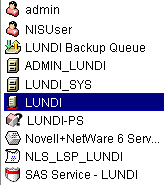
Every eDirectory server has an NCP Server object. In the following figure, server Lundi illustrates this object as displayed in iManager:
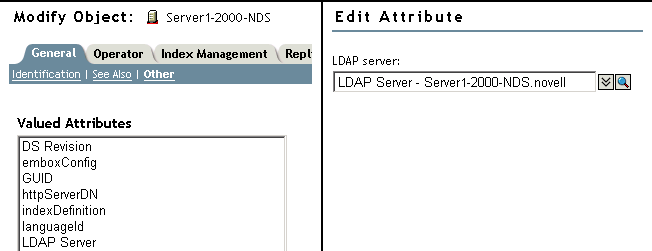
This object has an LDAP Server attribute, which points to the LDAP server object for a particular host eDirectory server. The following figure illustrates this attribute:
Typically, the LDAP server object, the LDAP Group object, and the NCP Server object are located in the same container. You name this container during the eDirectory installation, when you name the server and Admin context.
If you move the LDAP server object, you must place it in a writable replica.
The LDAP configuration utility is ldapconfig. You can use ldapconfig on Linux, Solaris, and AIX systems to modify, view, and refresh the attributes of LDAP server and LDAP Group objects.
Use the following syntax to view LDAP attribute values on Linux, Solaris, and AIX systems:
ldapconfig get [...] | set attribute-value-list [-t treename | -p hostname[:port]] [-w password] [-a user FDN] [-f]
ldapconfig [-t tree_name | -p host_name[:port]] [-w password] [-a user FDN] [-V] [-R] [-H] [-f] -v attribute,attribute2...
Use the following syntax to modify values of LDAP attributes on Linux, Solaris, and AIX systems:
ldapconfig [-t tree_name | -p host_name[:port]] [-w password] [-a admin_FDN] -s attribute=value,...
|
Parameter |
Description |
|---|---|
|
-t treename |
Name of the eDirectory tree where the component will be installed. |
|
-p hostname |
The name of the host. You could specify the DNS name or IP address also. |
|
-w |
The password of the user having administration rights. |
|
-a |
The fully distinguished name of the user having administration rights. For example: cn=user.o=org1 |
|
get | -V |
Lets you view all LDAP server/group attributes. |
|
get | -v attribute list |
Displays the current values of the attributes in the attribute list. |
|
set | -s attribute-value pairs |
Sets the attributes to the specified values. |
|
-v |
Lets you view the value of the LDAP attribute. |
|
-s |
Sets a value for an attribute of the installed components. |
|
-R |
Refreshes the LDAP server. |
|
-V |
Lets you view the current LDAP configuration settings. |
|
-H |
Lets you view the usage and help strings. |
|
-f |
Allows operations on a filtered replica. |
|
attribute |
A configurable LDAP server or group attribute name. For more information, see Attributes on the LDAP Server Object and Attributes on the LDAP Group Object. |
To view the value of the attribute in the attribute list, enter the following command:
ldapconfig [-t tree_name | -p host_name[:port]] [-w password] [-a user_FDN] -v “Require TLS for simple binds with password”,”searchTimeLimit”
To configure the LDAP TCP port number and search size limit to 1000, enter the following command:
ldapconfig [-t tree_name | -p host_name[:port]] [-w password] [-a admin_FDN] -s “LDAP TCP Port=389”,"searchSizeLimit=1000"
Use the LDAP server object to set up and manage the Novell LDAP server properties.
The following table provides a description of the LDAP server attributes:
|
Attribute |
Description |
|---|---|
|
LDAP Server |
The fully distinguished name of the LDAP server object in eDirectory. |
|
LDAP Host Server |
The fully distinguished name of the host eDirectory server that the LDAP server runs on. |
|
LDAP Group |
The LDAP Group object in eDirectory that this LDAP server is a member of. |
|
LDAP Server Bind Limit |
The number of clients that can simultaneously bind to the LDAP server. A value of 0 (zero) indicates no limit. |
|
LDAP Server Idle Timeout |
The period of inactivity from a client after which LDAP server terminates the connection with this client. A value of 0 (zero) indicates no limit. |
|
LDAP Enable TCP |
Indicates whether TCP (non-TLS) connections are enabled for this LDAP server. Value=1 (yes), 0 (no) |
|
LDAP Enable TLS |
Indicates whether TLS connections are enabled for this LDAP server. Value=1 (yes), 0 (no) |
|
LDAP TCP Port |
The port number that the LDAP server listens on for TCP (non-SSL) connections. Range=0 to 65535 |
|
LDAP TLS Port |
The port number that the LDAP server listens on for TLS connections. Range=0 to 65535, the maximum number of connections allowed on the LDAP server. |
|
keyMaterialName |
The name of the Certificate object in eDirectory that is associated with this LDAP server and will be used for SSL LDAP connections. |
|
searchSizeLimit |
The maximum number of entries that the LDAP server will return to an LDAP client in response to a search. A value of 0 (zero) indicates no limit. If the user has the administrator rights on the LDAP server object, the searchSizeLimit value is not considered. |
|
searchTimeLimit |
The maximum number of seconds after which an LDAP search will be timed out by the LDAP server. A value of 0 (zero) indicates no limit. If the user has the administrator rights on the LDAP server object, the searchTimeLimit value is not considered. |
|
filteredReplicaUsage |
Specifies whether the LDAP server should use a filtered replica for an LDAP search. Values=1 (use filtered replica), 0 (do not use filtered replica) |
|
sslEnableMutualAuthentication |
Specifies whether SSL-based mutual authentication (Certificate-based client authentication) is enabled on the LDAP server. |
|
ldapTLSVerifyClientCertificate |
Enables or disables verification of the client certificate for a TLS operation through LDAP. |
|
ldapNonStdAllUserAttrsMode |
Enables or disables the non standard, all user, and operational attributes. |
|
ldapBindRestrictions |
Enables the LDAP bind restrictions and cipher level on the LDAP client connections. This attribute can be used to control the client connections. Using iManager you can set any of the following four ldap bind restrictions:
In addition to the above options, you can set an additional cipher level also using the same attribute. Using iManager you can choose the following options:
The default is Export with a Cipher level including 40 and 56-bit encryption. For more information on the combination values of ldapbindrestrictions and cipher levels that can be used, refer to Table 15-1. |
|
ldapChainSecureRequired |
This is a boolean attribute. If enabled, chaining to other eDirectory will be over secure NCP. By default, the attribute is disabled. |
|
ldapInterfaces |
A multi-valued SYN_CI_STRING attribute used to store LDAP URLs on which LDAP server listens (on both cleartext and secure ports). This attribute is useful in configuring multiple instances, that requires each instance of the eDirectory server to listen on a specific interface. The attribute can be configured with the IP addresses and port numbers in the LDAP URL format. The LDAP server listens on these IP addresses and ports. Example: To configure an instance of LDAP server to listen on two IP addresses (on both clear text and secure port) of a machine, the attribute can be populated as follows: ldap://192.168.1.1:389 ldaps://192.168.2.1:636 ldap://192.168.100.101:389 ldaps://192.168.100.101:636 The default value of ldapInterfaces attribute is ldap://. This means LDAP server listens on all the IP addresses configured in the machine. The server continues to listen on all the interfaces in the machine if cleartext or TLS ports in the LDAP object are not unchecked. |
|
ldapStdCompliance |
eDirectory LDAP server by default does not return the sub-ordinate referrals for ONE level search. To enable this, you need to turn on ldapStdCompliance with a value 1. Setting this value will make the LDAP server return the sub-ordinate referrals for ONE level search. |
|
ldapChainSecureRequired |
This is a boolean attribute. If this is enabled, the chaining to other eDirectory will be over secure NCP. By default, the attribute will be disabled. |
|
ldapEnablePSearch |
Specifies whether or not the persistent search feature is enabled on the LDAP server. Values= true, false |
|
ldapMaximumPSearchOperations |
An integer value that limits the number of concurrent persistent search operations possible. A value of 0 specifies unlimited search operations. |
|
ldapIgnorePSearchLimitsForEvents |
Indicates whether size and time limits should be ignored after the persistent search request has sent the initial result set. Values= true, false If this attribute is set to false, the entire persistent search operation is subject to the search limits. If either limit is reached, the search fails with the appropriate error message. |
Table 15-1 Combination Values of ldapbindrestrictions and Cipher Levels
|
ldapbindrestriction |
Cipher Level |
Combination Value |
|---|---|---|
|
None |
None |
0 |
|
High |
48 |
|
|
Medium |
32 |
|
|
Low |
16 |
|
|
Disallows anonymous simple bind |
None |
1 |
|
High |
49 |
|
|
Medium |
33 |
|
|
Low |
17 |
|
|
Disallow local bind |
None |
2 |
|
High |
50 |
|
|
Medium |
34 |
|
|
Low |
18 |
|
|
Disallow anonymous simple bind and unbind |
None |
3 |
|
High |
51 |
|
|
Medium |
35 |
|
|
Low |
19 |
Use the LDAP Group object to set up and manage the way LDAP clients access and use the information on the Novell LDAP server.
To require TLS for simple binds, see Requiring TLS for Simple Binds with Passwords. This attribute specifies whether the LDAP server allows transmission of passwords in clear text from an LDAP client. Values=0 (no) or 1 (yes).
To specify a default referral, referralIncludeFilter, referralExluceFilter as well as how LDAP servers process LDAP referrals, see Using Referrals.