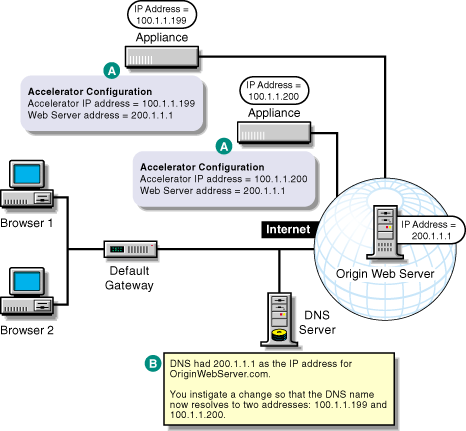
Figure 47 provides a visual map for the information in this section.
NOTE: The letters in Figure 47 are referenced in the table that follows. The addresses shown are for illustration purposes only. You will need to substitute actual addresses for your network.
Although Figure 47 shows the origin Web server on the Internet, it could be on the same network as the DNS server and the Web server accelerators, and the browsers could be on the Internet, as shown in Web Server Accelerator Setup.
Figure 47
| To | Do This | Notes |
|---|---|---|
Ensure your basic network configuration is complete |
|
|
Set up two or more appliances as Web server accelerators to the same origin Web server |
See A in Figure 47. If you want the appliances to share cached objects, configure them as ICP peers. See ICP Hierarchy Setup. |
|
Modify DNS |
|
See B in Figure 47. Round-Robin DNS is a standard DNS function. |